WELCOME VISIONEER
®
ROADWARRIOR 4D
S
CANNER USER’S GUIDE 9
2. Universal Serial Bus (USB) port—connects the scanner to the computer.
3. Paper feed—place an item face up in paper feed for scanning.
● Scanner lid—can be pulled away from the scanner body to open the scanner for cleaning.
● Paper sensor—the sensor in the paper feed slot. Detects when an item has been inserted in the scanner.
● Alignment strip—alignment marks for common paper sizes for the paper guide.
4. Power Button / Status light—turns the scanner on and indicates the current state of the scanner.
UNPACK THE SCANNER
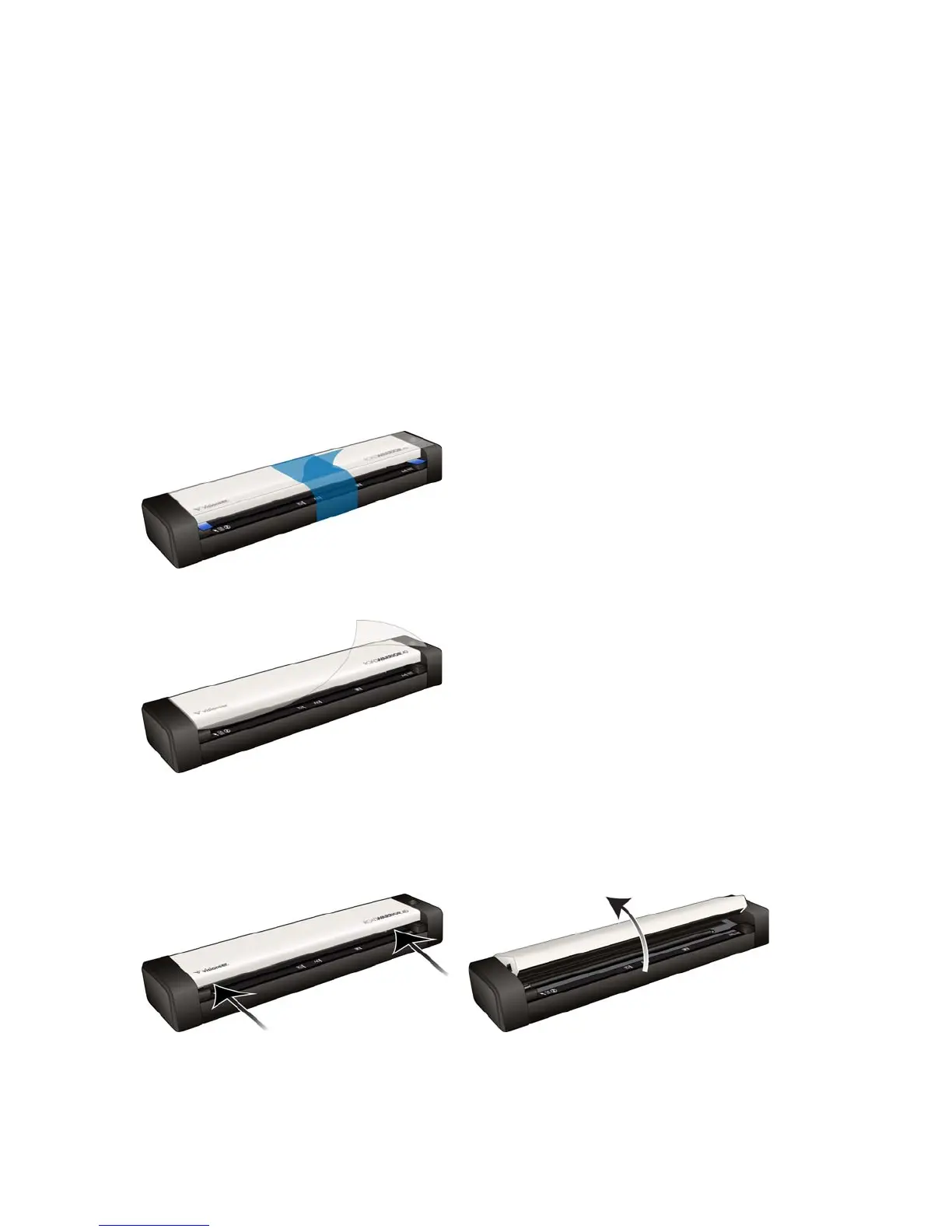
1. Remove the blue plastic strip from around the scanner.
2. Remove the clear plastic film from the top of the scanner.
3. Place your thumbs on either side of the paper feed slot, underneath the lid of the scanner. Hold the scanner
sides firmly and pull the scanner lid up to release it from the body of the scanner.
Use both hands to open the scanner, the lid is held down with locking arms on both sides of the paper feed
slot. If you open only one side, you may damage the scanner lid.











 To Next Page