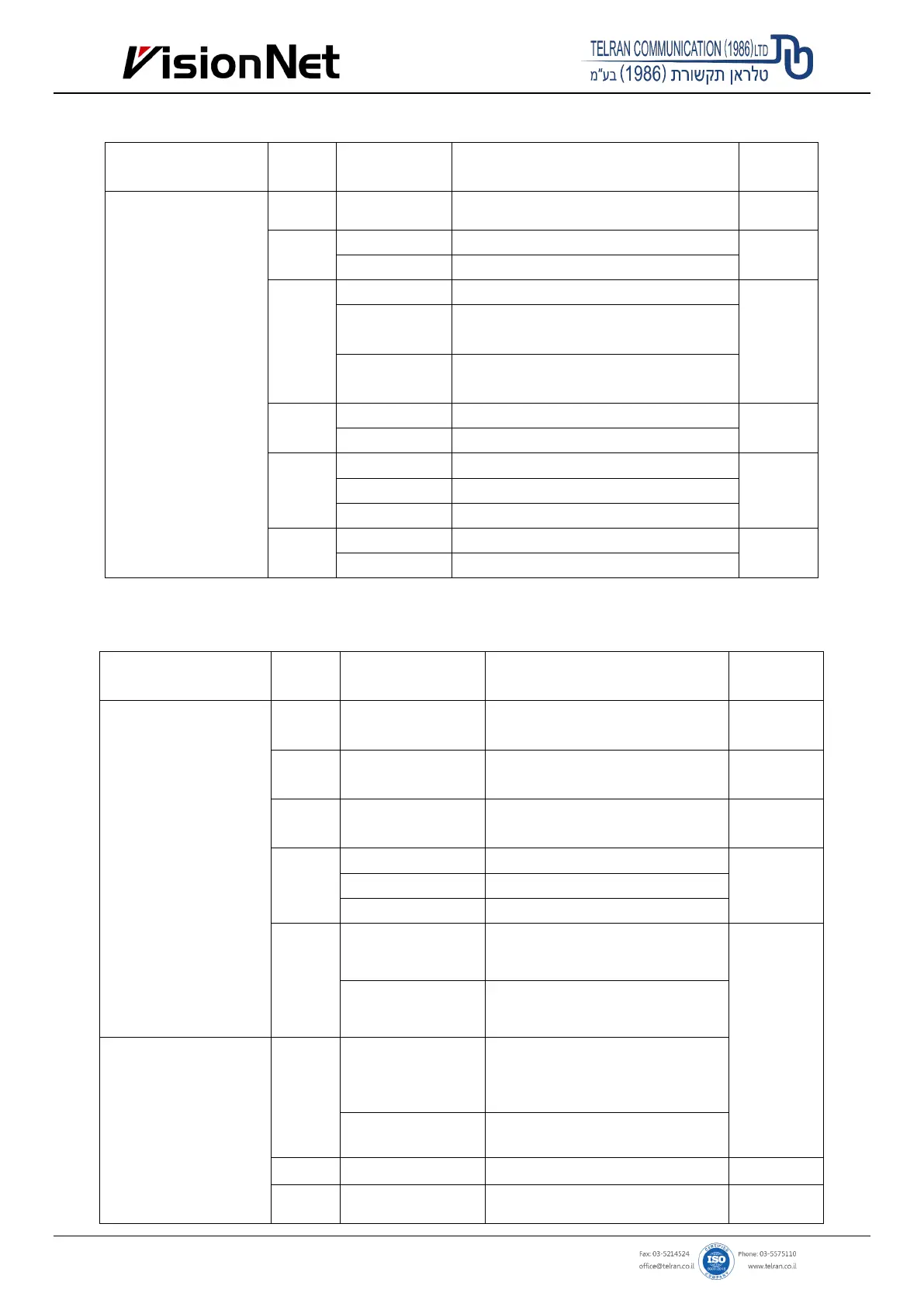
Advanced Settings
Enter programming Menu
steps
Description
value
Press * Admin code #
"999999")
41 (0-300) #
Door opening time range: 0-300S
5
42
0 # Alarming time sets 0S, means no alarm
0
(1-99) # Alarming time range: 1-99 min
61
0# Normal working mode
0
1#
The external alarm and built-in buzzer will work
if wrong operations are over 5 times.
2#
T
he device will be locked out for 10 min if
wrong operations are over 5 times.
62
0# Disable light indicator
1
1# Enable light indicator
63
0# Disable the keypad backlight
1 1# Enable the keypad backlight
(2-99) # Time of keypad backlight: 2-99 sec
64
0# Disable buzzer
1
1# Enable buzzer
8.2 Reader Mode Settings
Enter programming Menu Operation steps Description
value
Press * Admin code #
"999999")
00
New admin code #
new admin code #
Change admin code 999999
01
fingerprint twice *
Set admin add card or admin add
fingerprint
02
fingerprint twice *
Set admin delete card or admin delete
fingerprint
03
0# Reader mode
1
1# Standalone access control mode
2# Relay toggle mode
11
twice, ... *
Add fingerprint users continuously
repeating the
previous
operation,
Press * key to
exit.
Press ID number #
Input a fingerprint
twice … *
Add fingerprint users
number
Press * Admin code #
"999999")
21
once … *
Input the 2
nd
Delete fingerprint users continuously
Press ID number # … *
Delete users by the specific ID
number
20 0000# Delete ALL users
42 0#
Alarming time sets 0S, means no
0


 To Next Page