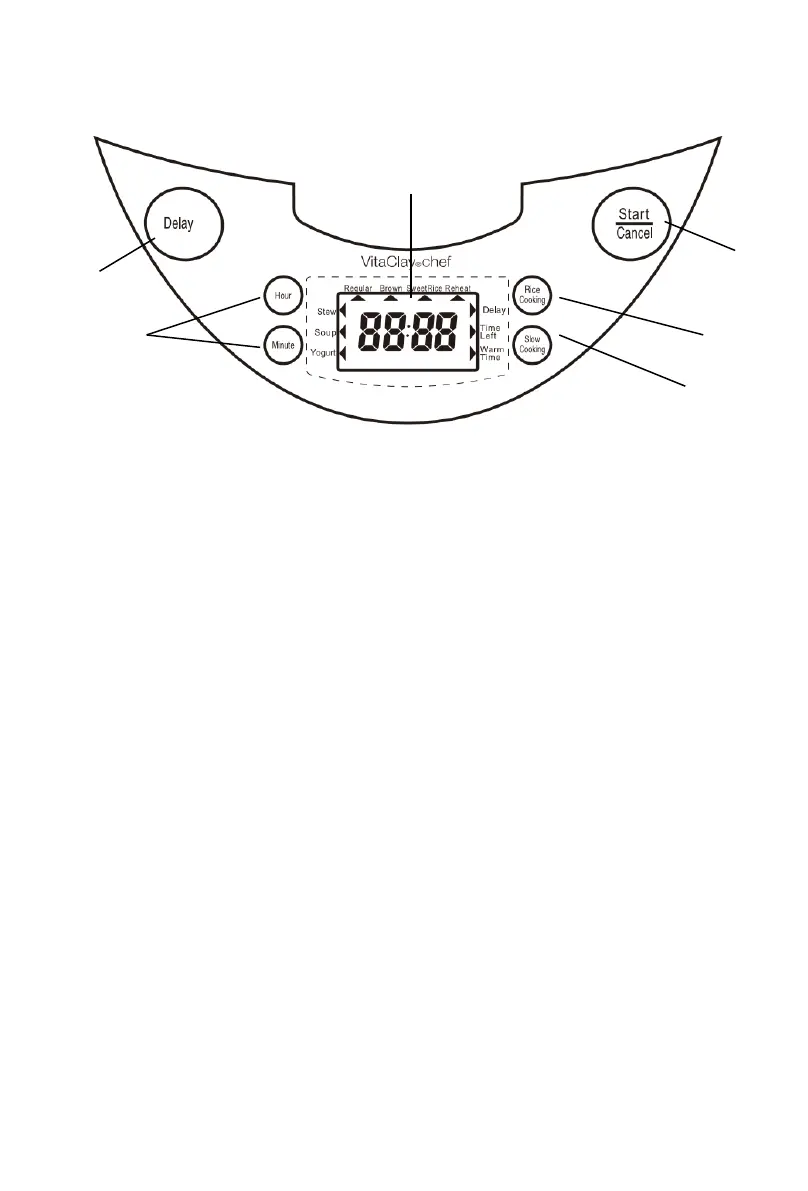
How to read your Control Panel Display
(1) “Delay” Start Key – Function key to turn on delay start
mode. Function is on when Indicator Light glows red.
(2) “Hour” & “Minute” Timer Keys – Use for setting
Soup, Stew and Yogurt mode cooking time, and Delay
Start time.
(3) LCD Display – Displays time at center and via the
“black arrows” around the parameter indicates rice
cooking modes along top edge, slow/stew/yogurt
cooking modes along left edge and delay/time
left/warm time along right edge.
(4) “Start/Cancel” Key – Function key to start or cancel
any mode. Cooker is on and cooking when Indicator
Light glows red.
(5) “Rice Cooking” Key – Function key to select Rice
Cooking modes (regular, brown, sweet rice, reheat).
(6) “Slow Cooking” Key – Function key to select Soup,
Stew or Yogurt cooking mode.


 To Next Page