11
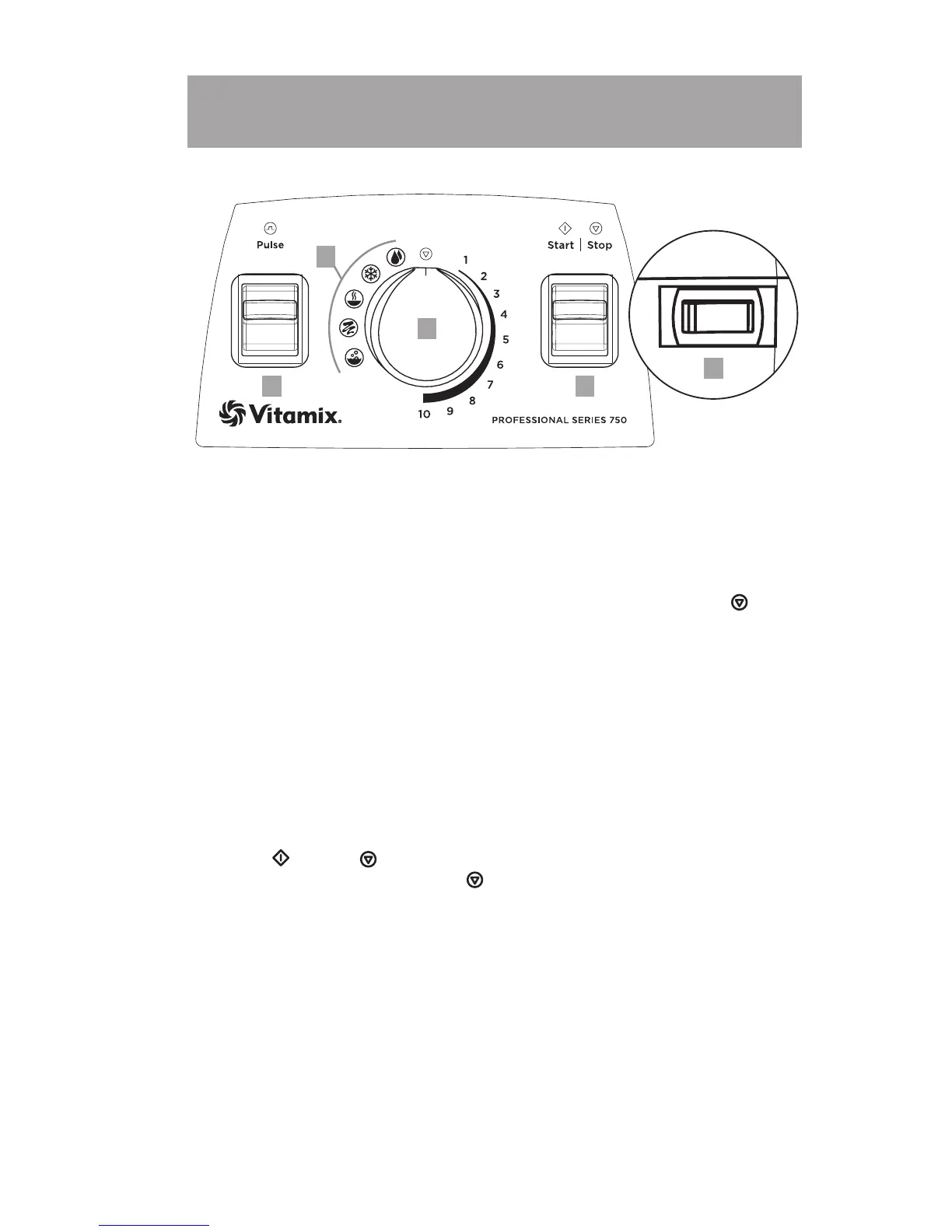
1. On / O Switch: The On / O (or Power) Switch is located on the lower
right-hand side of the machine. The On / O Switch controls the power to
the machine.
BEFORE moving the On / O Switch to the On (I) position, make sure the
marker on the Variable Speed Dial is pointed at the Stop Symbol ( ) at
the top of the dial.
After plugging in the unit, move the On / O Switch to the On position
to ready the machine for blending. Move the On / O Switch to the O
position at night and whenever the machine will be left unattended.
If the On / O switch is moved to the O position to stop a program mid-
cycle, wait 30 seconds for power to recycle and the timer to reset before
moving the On / O switch to the On position.
When the Pulse, Start / Stop, and Program Symbols brighten, the On / O
Switch is in the On position and power is flowing.
2. Start ( ) / Stop ( ) Switch: After the marker on the Variable Speed Dial is
rotated o of the Stop Symbol ( ) to either Variable Speed 1 or a Program
setting, press the Start / Stop Switch to start the machine and initiate
the blending process. Pressing the Start / Stop Switch again will stop the
blending process.
Programs can be interrupted by pushing down the Start / Stop switch
at any time. If reactivated by pushing down the Start / Stop switch, the
program will start at the beginning.
23
4
5









 To Next Page