13
food into the basket (10) and place it in the
bowl (9).
• Close the lid (3) until clicking.
• Insert the power cord connector into the
connector socket (8) and the power cord
plug into the mains socket.
MULTICOOKER MAIN FUNCTIONS
Switching the multicooker on
(standby mode)
– After connecting the multicooker to the
mains you will hear a short sound signal.
– Switch the multicooker on by pressing the
button (14), the «- - - -» symbols will appear
on the display (13).
– The unit is switched to the standby mode
and is ready for use.
Note: - every pressing of the buttons is accom-
panied by a short sound signal.
Selecting and starting the cooking program
– To select a cooking program, press the but-
ton (15) «MENU» in the standby mode.
– The cooking programs are selected in the fol-
lowing order: “Porridge”, “Pilaf”, “Steam cook-
ing”, “Roasting”, “Stewing”, “Baking”, “Soup”,
“Rice”, the cooking mode indicators will light
up sequentially on the control panel (2).
– The default cooking time digital indications
will appear flashing on the display (13).
– After you select the desired cooking pro-
gram and set the cooking time, the display
(13) will show flashing cooking time symbols
for 10 seconds.
– After 10 seconds the cooking program will
switch on, the digital cooking time indica-
tions will glow constantly, and the count-
down of the time remaining to the end of
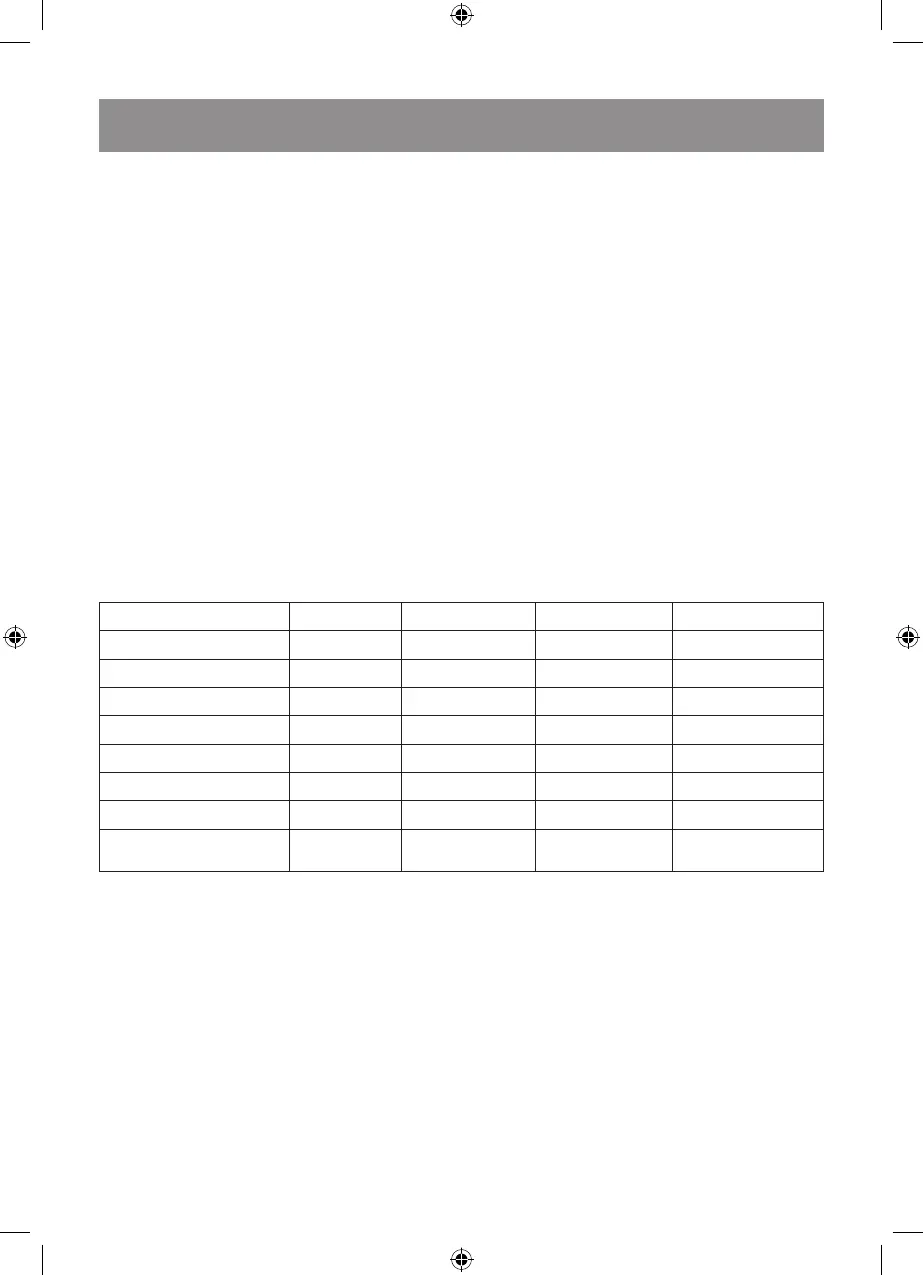
the cooking program will start (see the table
“Cooking programs and their duration”).
COOKING PROGRAMS AND THEIR DURATION
Cooking program Default time Cooking time Delayed start Keep warm mode
Porridge (milk porridge) 20 min. 15–70 min. + +
Pilaf 60 min. 0.5–6 hours + +
Steam Cooking 30 min. 5–120 min. + +
Roasting 30 min. 10–60 min. – –
Stewing 35 min. 5–240 min. + +
Baking 45 min. 25–120 min. – +
Soup 60 min. 1–4 hours + +
Rice 9 min.
Depends on the
amount of rice
+ +
Note:
– the cooking time information is for recommendation only.
– the result of cooking in auto-cooking mode depends on the amount of food and liquids and
the food temperature.
– temperature of the food before cooking should be about 20-25 °C.
– setting of the cooking time is not available for the “Rice” program.
– watch the rice readiness during cooking and, if necessary, stir it with the plastic ladle (12).
Changing the running time of the food
cooking program.
– After selecting the cooking program, the pro-
gram default operation time digital indica-
tions will appear flashing on the display (13).
– To change the time of the food cooking pro-
gram, press the buttons (16) «-», «+».
– 10 seconds after changing of the program
operation time, the multicooker will be
switched on, the time digital indications will
glow constantly, and the countdown of the
remaining operation time will start.
Note: - setting of the cooking time is not avail-
able for the “Rice” program.



 To Next Page