25
Personalization
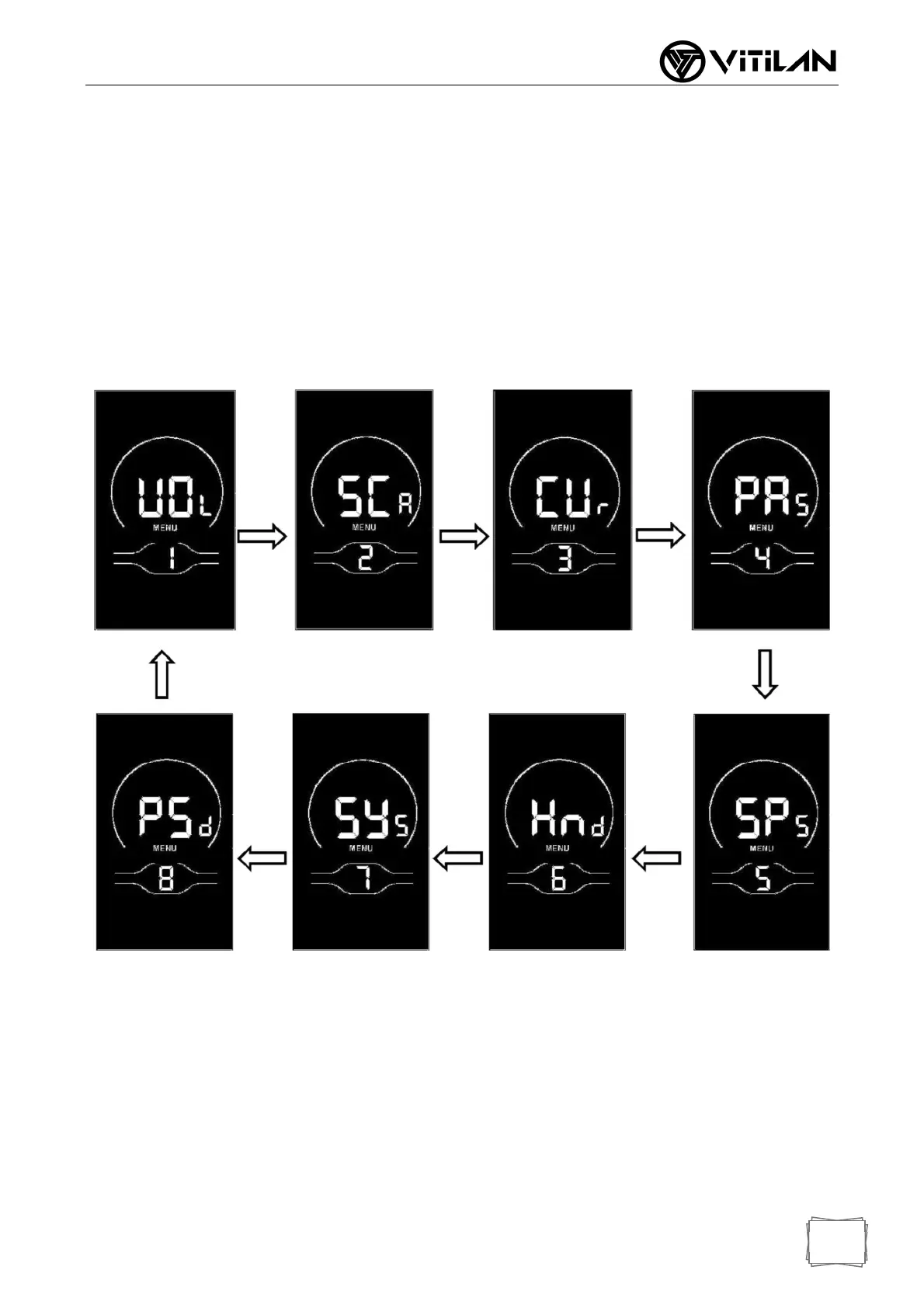
In order to meet the personalized use requirements of customers, personalized settings
are set up, including the battery power setting, power parameter setting, current limit value
setting, power sensor setting, speed sensor setting, handle function setting, system setting
and startup password setting of the instrument, with a total of eight settings. At the same
time, press and hold the UP + DOWN key for more than 2 seconds to lift it to enter the
normal setting state; Press and hold the UP + DOWN key again for more than 2 seconds
at the same time to enter the instrument personalization item selection interface;
Select the content to be set through UP/DOWN, and press "i" to enter the corresponding
setting interface.
◆ Battery Charge Setting
VOL represents voltage and requires 1 to 5 voltage values to be input one by one.
Take the first electric quantity value as an example: "1" in the screen represents the
first voltage and "34.5" is the first electric quantity value. Add/subtract settings are
made through UP/DOWN key, press "i" key briefly to confirm and enter the next
electric quantity setting interface; After the 5 electric quantity values are set, press the
"i" key for a long time to confirm and return to the instrument setting item selection
interface.



 To Next Page