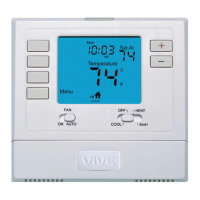
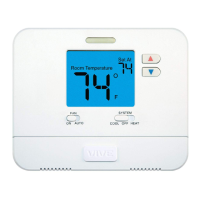
This document is an operation manual for the Vive Comfort TP-S-755(R) thermostat, providing instructions for its use, programming, and maintenance.
Function Description:
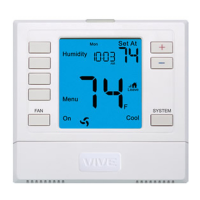
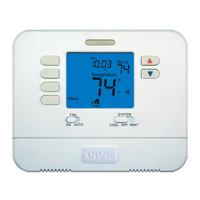
The Vive Comfort TP-S-755(R) is a programmable thermostat designed to control heating, cooling, and fan functions in an HVAC system. It allows users to set desired room temperatures and schedule different temperature settings throughout the day to optimize comfort and energy efficiency. The thermostat supports various system modes including HEAT, COOL, OFF, and AUTO, and can also manage emergency heat for heat pump systems. It features a clear LCD display that shows current room temperature, time, day of the week, system operation indicators, and setpoint temperature. The device is designed for ease of use with intuitive buttons for setting temperature, fan modes, and accessing programming options.
Usage Features:
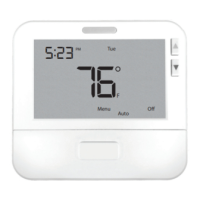
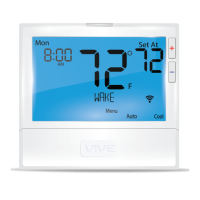
- LCD Display: The thermostat features an LCD display that provides comprehensive information at a glance. It shows the current room temperature, the time and day of the week, and various menu options. System operation indicators like COOL ON, HEAT ON, or FAN ON are displayed when the respective modes are active. If the compressor delay feature is active, these indicators will flash. The display also shows the setpoint temperature, program time periods, and system mode (e.g., AutoCool). A globe icon indicates if an energy-efficient temperature has been selected.
- Glow in the Dark Light Button: This button self-illuminates for several hours after exposure to ambient light, making the display visible in low-light conditions. Pressing the button also turns on the display light.
- Fan Button: The fan can be set to "Auto," which cycles the fan on only when the heating or cooling system is active, or "ON," which runs the fan continuously. In PTAC mode, "L," "M," and "H" options may be available to run the fan continuously at low, medium, or high speeds.
- System Button: This button allows selection of the HVAC system's operation mode. Options include HEAT (turns on heat mode), COOL (turns on cool mode), OFF (turns off both heating and cooling), and AUTO (automatically switches between heat and cool as needed). For heat pump systems, EM HEAT (emergency heat) is also an option.
- Temperature Setpoint Buttons: Plus (+) and minus (-) buttons are used to select the desired room temperature.
- User Program Buttons: These buttons are used for programming the thermostat's schedule.
- Programmable Schedule (5+1+1 or 7 Day): The thermostat supports 4 programmable time periods per day (WAKE, LEAVE, RETURN, SLEEP) for either a 5+1+1 day schedule (weekdays, Saturday, Sunday) or a 7-day schedule (each day individually). Users can set different temperatures for each period.
- Temporary & Permanent Hold Feature:
- Temporary Hold: Pressing the + or - buttons will display "HOLD" and "RUN SCHED" on the screen. If no further action is taken, the temperature will remain at this setpoint temporarily for 4 hours, after which the program setpoint will resume.
- Permanent Hold: If a temporary hold is active, pressing the "HOLD" key on the left of the screen will display "HOLD" below the setpoint temperature. The thermostat will then permanently maintain this setpoint, which can be adjusted using the + or - keys.
- To exit any hold and return to the program, press the "RUN SCHED" key.
- Auto Changeover: When in "Auto" mode, the system key can be pressed to switch between auto heat and auto cool, but only after the current mode's setpoint has been satisfied. To exit "Auto" mode, hold down the system key. To re-enter "Auto" mode, toggle the system key.
- Remote Information: The thermostat can integrate with remote sensors.
- When an R250S is used as an outdoor sensor with a dual fuel balance point enabled, the thermostat will only allow Y terminal(s) to energize above the balance point (cooling) and W2 to energize below the balance point (heating).
- If using R251S indoor sensors, the displayed temperature is the average of all remotes.
- When an R250S is used as a floor sensor, a High Limit feature may turn off the system even if the setpoint isn't fully satisfied, preventing overheating beyond the setpoint.
Maintenance Features:
- Battery Door Information: The thermostat requires 2 AA alkaline batteries (included). High-quality alkaline batteries are recommended. The battery compartment is located on the back of the thermostat.
- Low Battery Indicator: A "LOW" battery icon will appear on the display when the AA battery power is low.
- If batteries are not replaced within 21 days of the "LOW" indicator appearing, the screen will only show the low battery indicator, but all functionality will be maintained.
- If batteries are not replaced after an additional 21 days (days 22-42 since the first "LOW" display), the setpoints will automatically change to 55°F (Heating) and 85°F (Cooling). If the user adjusts the setpoint away from these values, it will hold for 4 hours before returning to 55°F or 85°F.
- After day 63, the batteries must be replaced immediately to prevent freezing or overheating, as the thermostat will shut off until new batteries are installed.
- Caution: Failure to replace batteries when the "LOW" icon appears may result in the heating and cooling system becoming inoperable, leading to freezing or overheating.
- Filter Change Reminder: If configured by an HVAC contractor, "FILT" will appear on the display when the air filter needs changing.
- Resetting The Filter Change Reminder: When "FILT" is displayed, change the air filter and then reset the reminder by holding down the second button from the top left of the thermostat for 3 seconds.
- Warranty Registration: The thermostat comes with a 5-year limited warranty. Registration is required within 60 days of installation. Without registration, the warranty period begins on the date of manufacture. Registration can be done online via the company website or by mailing a completed form provided in the manual.
- Installer Configuration (Tech Set): The "Tech Set" option, accessible after pressing the MENU key, is for installer configuration only. Users are advised not to change these settings without consulting a professional heating and air conditioning technician.
- Equipment Damage Hazard: A caution is provided against operating the cooling system if the outdoor temperature is below 50°F (10°C) to prevent possible compressor damage.

 Need help?
 General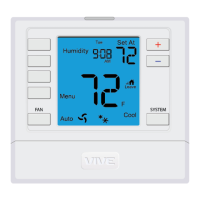

 To Next Page