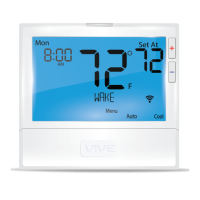
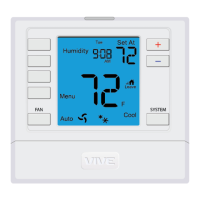
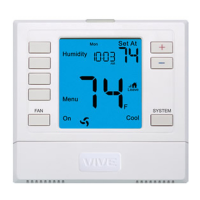
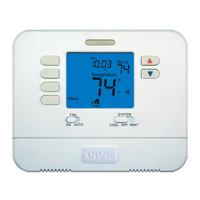
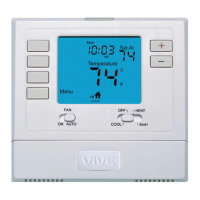
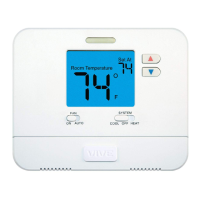
This document is an operation manual for the Vive Comfort TP-S-855C thermostat, providing instructions for its use, programming, and maintenance.
Function Description:
The Vive Comfort TP-S-855C is a programmable thermostat designed to control HVAC systems, offering both heating and cooling modes. It supports 5+1+1 day programming schedules, allowing users to customize temperature settings for weekdays, Saturday, and Sunday across multiple time periods (WAKE, LEAVE, RETURN, SLEEP, or OCCUPIED 1, UNOCCUPIED 1, OCCUPIED 2, UNOCCUPIED 2). The thermostat can operate in HEAT, COOL, OFF, or AUTO modes. In AUTO mode, it automatically switches between heating and cooling as needed. An EM HEAT option is available for heat pump systems, activating emergency heat. The fan can be set to ON (continuous operation), AUTO (cycles with the system), or IAQ (enables IAQ FAN MODE). The thermostat features a keypad lockout function to prevent unauthorized changes.
Important Technical Specifications:
- Model: TP-S-855C
- Power Source: 2 AA alkaline batteries.
- Low Battery Indication: A low battery icon flashes on the screen for 21 days when battery power is low. If not changed, the screen will only show the flashing icon until buttons are pressed (after 22 days). After 43 days, set points will offset to 85°F/29°C in cooling and 55°F/13°C in heating, reverting to default values after 4 hours. Eventually, all relays will open, and the thermostat will become inoperable until new batteries are installed.
- Cooling System Operation Precaution: Do not operate the cooling system if the outdoor temperature is below 50°F (10°C) to prevent possible compressor damage.
Usage Features:
- LCD Display: Shows current room temperature, setpoint temperature, time, day of the week, system mode (HEAT, COOL, OFF, AUTO, EM HEAT), fan status (ON, AUTO, IAQ), stage of heating/cooling (1, 2, or 3), low battery indicator, hold indicator, keypad lockout indicator, and energy-efficient leaf icon.
- Glow-in-the-Dark Light Button: Self-illuminates for several hours after exposure to ambient light and turns on the display light when pressed.
- Fan Button: Selects fan operation mode (ON, AUTO, IAQ).
- System Button: Selects HVAC system operation mode (HEAT, COOL, OFF, AUTO, EM HEAT).
- Temperature Setpoint Buttons (+/-): Adjusts the desired room temperature.
- Programming:
- Setting Time and Day: Use the MENU, SET TIME, NEXT STEP, and +/- buttons to set the current day of the week, hour, and minutes.
- Program Schedule (5+1+1 Day):
- Select HEAT or COOL mode.
- Press MENU (or RUN SCHED if menu doesn't appear).
- Press SET SCHED.
- For each time period (WAKE/OCC1, LEAVE/UNOCC1, RETURN/OCC2, SLEEP/UNOCC2), use +/- to set the time and setpoint temperature.
- Fan operation (ON or IAQ) can also be programmed for each time period.
- Repeat for weekdays, Saturday, and Sunday.
- Temporary Hold: Press +/- to temporarily hold the temperature for 4 hours. The display will show "HOLD" and "RUN SCHED."
- Permanent Hold: With a temporary hold active, press the HOLD key to permanently maintain the setpoint. "HOLD" will appear below the setpoint temperature.
- Return to Program: Press the RUN SCHED key to exit temporary or permanent holds and resume the programmed schedule.
- Auto Changeover: In AUTO mode, you can switch between auto heat and auto cool by pressing the system key once the current mode's setpoint is satisfied. To exit AUTO, hold down the system key. To re-enter AUTO, toggle the system key to AUTO.
- Keypad Lockout: If the padlock icon appears, the keypad is locked. Hold the + and - keys for 3 seconds to lock or unlock the display.
Maintenance Features:
- Battery Replacement: Replace 2 AA alkaline batteries when the "LOW" battery icon appears. Simple operating instructions are found on the back of the battery door.
- Filter Change Reminder: If configured by an HVAC contractor, a reminder will appear on the display when the air filter needs changing.
- Resetting Reminders: To reset the filter change reminder (and other maintenance reminders like Humidity Pad, UV lamp, and IAQ Cell), hold down the Set Time/Next Step button for 3 seconds.
- Warranty Information: The thermostat comes with a 5-year limited warranty. Registration within 60 days of installation is required. Registration can be done online or by mail using the provided form. Contact the HVAC professional for warranty issues.
- TECH SETUP: An installer configuration option accessible via the MENU key. This should not be changed without consulting a professional heating and air conditioning technician.

 Need help?
 General

 To Next Page