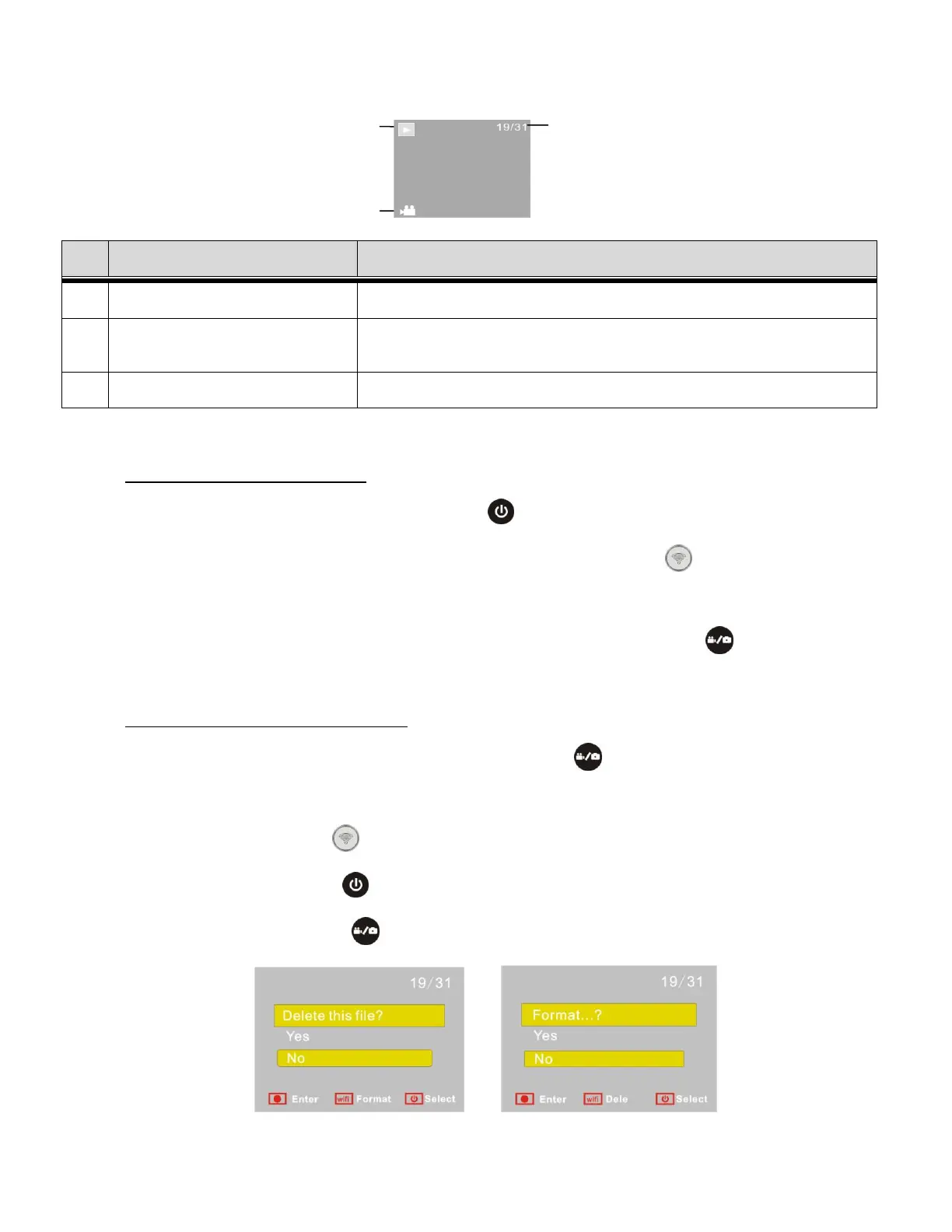
The LCD displays as below:
Indicates currently in Playback Mode.
Indicates the number file you are currently viewing / out of
the total number of files.
Indicates the current file is a video file.
1. View/Select a Video or Photo:
In Playback Mode, press the Power button to switch between photos and videos.
When there are several photos or videos, press the Wi-Fi button to select a specific
photo or video.
PLAY VIDEO: When a video file is selected, press the Shutter button to play it, and
press the Shutter button again to stop playing the video.
2. Delete File / Format Memory Card:
In Playback Mode, press and hold the Shutter button to open the prompt for deleting
the current file or formatting the memory card.
- Press the Wi-Fi button to switch between deleting or formatting.
- Press the Power button to select ‘Yes’ or ‘No’.
- Press the Shutter button to confirm and exit.


 To Next Page