EN - 3
English
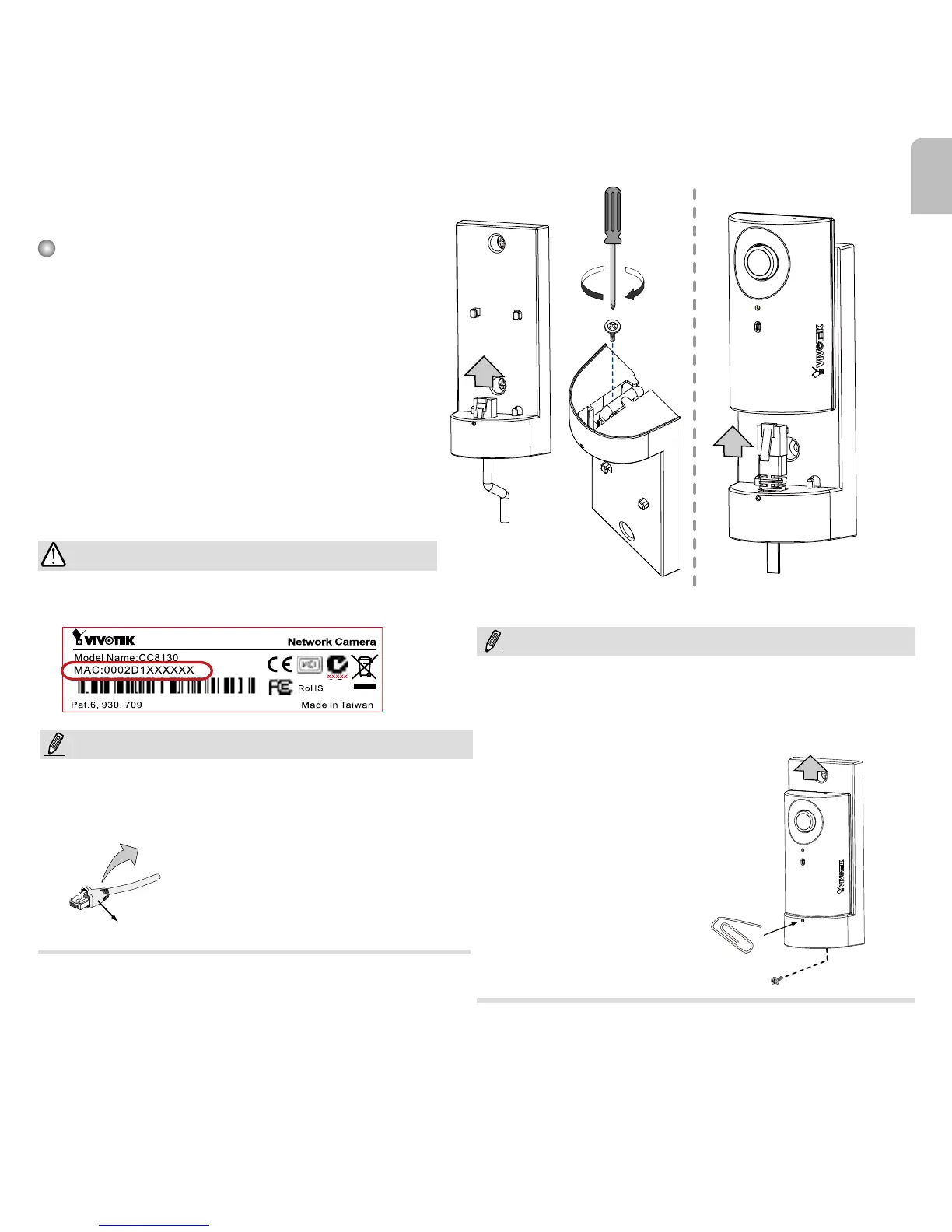
Round cable
Flat cable
4. Hardware Installation
Connecting Ethernet Cable
1. Insert your Ethernet cable through the
opening at the bottom of the camera
bracket.
2. If using a round cable: When the RJ-45
plug is fully inserted, use the round-
head screw with a washer to secure its
position from the bottom of the bracket.
If using a flat cable: Pass the cable
through the opening and attach to
camera.
Strain relief boot
Record the MAC address before installing the
camera.
It is recommended to use an Ethernet cable that
comes without the strain relief boot. You can remove
the boot if your cable comes with one.
To detach a camera, remove the retention screw
from the bottom, and insert a straightened paperclip
into the release button to press on the RJ-45 locking
tab.
IMPORTANT:
NOTE:
NOTE:














 To Next Page