Conguration Area
Client Settings: Click this button to access the client setting page� For more information, please refer to
Client Settings on page 25�
Conguration: Click this button to access the conguration page of the Network Camera. It is suggested
that a password be applied to the Network Camera so that only the administrator can configure the
Network Camera� For more information, please refer to Conguration on page 27�
Language: Click this button to choose a language for the user interface� Language options are available
in: English, Deutsch, Español, Français, Italiano,
日本語
, Português,
簡体中文
, and
繁體中文
�
Live Video Window
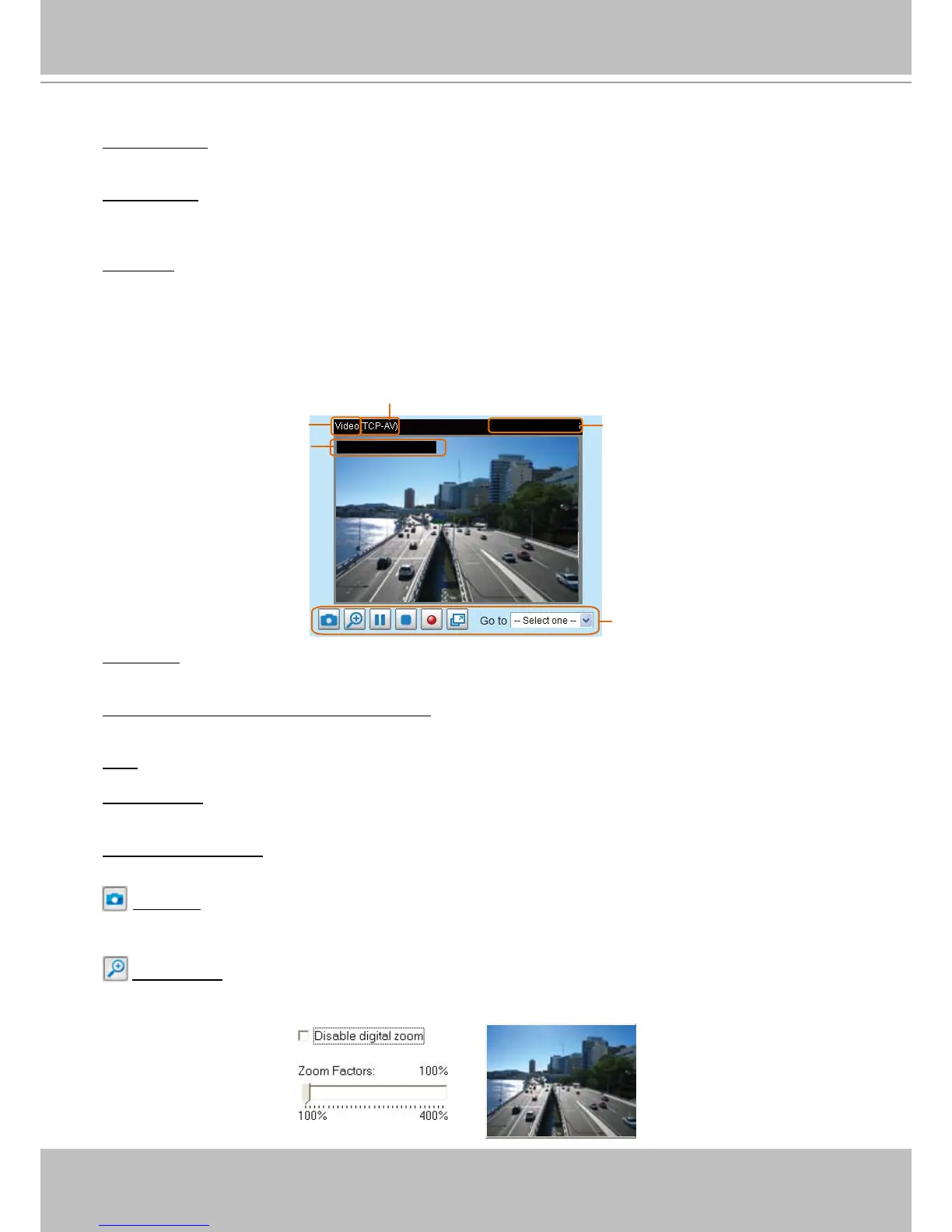
■ The following window is displayed when the video mode is set to H�264 / MPEG-4:
Video Title: The video title can be congured. For more information, please refer to Video Settings on
page 56�
H�264 / MPEG-4 Protocol and Media Options: The transmission protocol and media options for H�264 /
MPEG-4 video streaming. For further conguration, please refer to Client Settings on page 25�
Time: Display the current time. For further conguration, please refer to Video Settings on page 56�
Title and Time: The video title and time can be stamped on the streaming video. For further conguration,
please refer to Video Settings on page 56�
Video Control Buttons: Depending on the Network Camera model and Network Camera conguration,
some buttons may not be available�
Snapshot: Click this button to capture and save still images� The captured images will be displayed
in a pop-up window� Right-click the image and choose Save Picture As to save it in JPEG (*.jpg) or BMP
(*.bmp) format.
Digital Zoom: Click and uncheck “Disable digital zoom” to enable the zoom operation� The navigation
screen indicates the part of the image being magnied. To control the zoom level, drag the slider bar. To
move to a different area you want to magnify, drag the navigation screen�
Video Control Buttons
Time
Title and Time
Video 13:44:17 2010/10/30
MPEG-4 Protocol and Media Options
Video Title
2010/10/30 13:44:17












 To Next Page