EasyManua.ls Logo

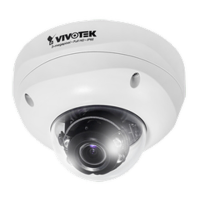
Vivotek FD8371V - User Manual

Vivotek FD8371V
211 pages
Print Icon
To Next Page IconTo Next Page
Loading...
Rev. 1.0
User’s Manual
Fixed Dome
Network Camera
FD8371V/71EV
3MP 1080P 60 fps Smart IR Smart Stream
Smart Focus SNV
Rev. 1.1

Other manuals for Vivotek FD8371V

Question and Answer IconNeed help?

Do you have a question about the Vivotek FD8371V and is the answer not in the manual?

Summary

Hardware Reset

Installation

Removing Dome Cover

Step-by-step instructions for safely removing the camera's dome cover.

Cabling Assembly

Guides on how to connect power and I/O cables to the camera.

Network Deployment

General Connection (without PoE)

Instructions for connecting the camera to a network without using PoE.

Power over Ethernet (PoE)

Explains how to connect the camera using a PoE-enabled switch for power and data.

Internet Connection Setup

Internet connection via a router

Guides on setting up internet connection through a router, including port forwarding.

Software Installation

Ready to Use

Adjusting Viewing Angle

Instructions on how to adjust the camera's viewing angle using its 3-axis mechanism.

Accessing the Network Camera

Client Settings

Main Page Overview

Video and Audio Control

Configuration Modes

System > General Settings

Security Settings

Root Password Configuration

Setting the administrator 'root' password for system access.

Manage User Accounts

Adding, modifying, or deleting user accounts with different privilege levels.

HTTPS Security Setup

Create Self-Signed Certificate

Steps to create a self-signed certificate for HTTPS connection.

Access List Control

PTZ Settings

Digital PTZ Operation (E-PTZ Operation)

Controlling Pan/Tilt/Zoom remotely via the e-PTZ function.

Event Management

Event settings

Configuring camera responses to events like motion detection or digital input.

Recording Settings

Local Storage Management

Content Management

Network Settings

IP Filtering Configuration

Video Input Settings

Video Input Settings Per Channel

Motion Detection Settings

Remote Focus Control

Summary

Hardware Reset

Installation

Removing Dome Cover

Step-by-step instructions for safely removing the camera's dome cover.

Cabling Assembly

Guides on how to connect power and I/O cables to the camera.

Network Deployment

General Connection (without PoE)

Instructions for connecting the camera to a network without using PoE.

Power over Ethernet (PoE)

Explains how to connect the camera using a PoE-enabled switch for power and data.

Internet Connection Setup

Internet connection via a router

Guides on setting up internet connection through a router, including port forwarding.

Software Installation

Ready to Use

Adjusting Viewing Angle

Instructions on how to adjust the camera's viewing angle using its 3-axis mechanism.

Accessing the Network Camera

Client Settings

Main Page Overview

Video and Audio Control

Configuration Modes

System > General Settings

Security Settings

Root Password Configuration

Setting the administrator 'root' password for system access.

Manage User Accounts

Adding, modifying, or deleting user accounts with different privilege levels.

HTTPS Security Setup

Create Self-Signed Certificate

Steps to create a self-signed certificate for HTTPS connection.

Access List Control

PTZ Settings

Digital PTZ Operation (E-PTZ Operation)

Controlling Pan/Tilt/Zoom remotely via the e-PTZ function.

Event Management

Event settings

Configuring camera responses to events like motion detection or digital input.

Recording Settings

Local Storage Management

Content Management

Network Settings

IP Filtering Configuration

Video Input Settings

Video Input Settings Per Channel

Motion Detection Settings

Remote Focus Control

Vivotek FD8371V Specifications

General IconGeneral
BrandVivotek
ModelFD8371V
CategorySecurity Camera
LanguageEnglish

Related product manuals