VIVOTEK
86 - User's Manual
Security > HTTPS
(Hypertext Transfer Protocol over SSL/TLS)
This section explains how to enable authentication and encrypted communication over
SSL (Secure Socket Layer) and TLS (Transport Layer Security). It helps protect streaming
data transmission over the Internet on higher security level.
Create and Install Certicate Method
Before using HTTPS for communication with the Network Camera, a Certicate must be created
rst. There are three ways to create and install a certicate:
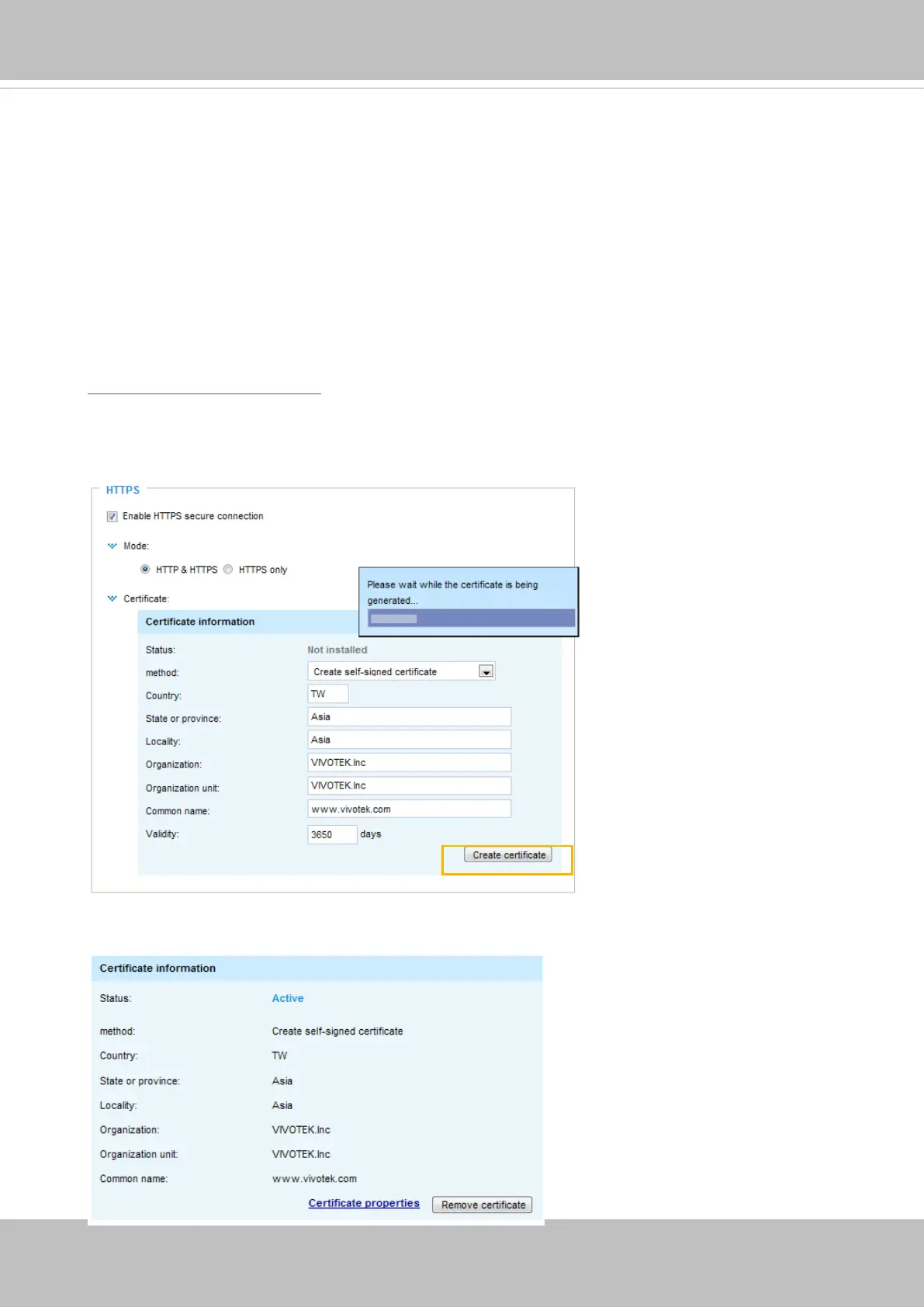
Create self-signed certificate
1. Select this option from a pull-down menu.
2. In the rst column, select Enable HTTPS secure connection, then select a connection option:
“HTTP & HTTPS” or “HTTPS only”.
3. Click Create certicate to generate a certicate.
4. The Certicate Information will automatically be displayed as shown below. You can click Certi-
cate properties to view detailed information about the certicate.



 To Next Page