VIVOTEK
User's Manual - 51
Exposure control:
■
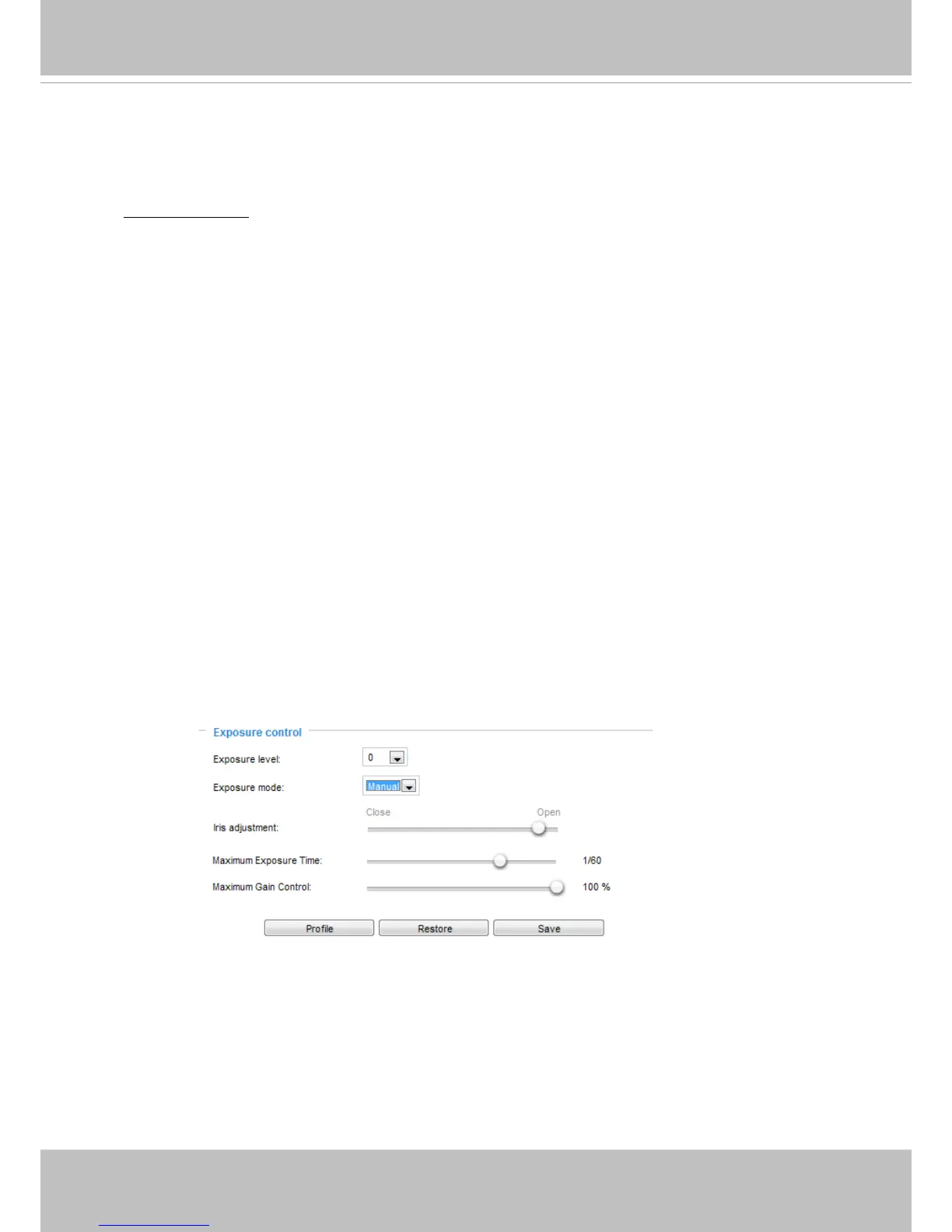
Exposure level: You can manually set the Exposure level, which ranges from -2.0 to +2.0 (dark
to bright). You can click and drag the circular pointers on the Exposure time and Gain control
slide bars to specify a range of shutter time and Gain control values around which the camera
can automatically tune to an optimal imaging result. You may prefer a shorter shutter time to
better capture moving objects, while a faster shutter reduces light and needs to be compensated
by electrical brightness gains.
■ BLC: When selected, a BLC window will appear on screen meaning that the center of the scene
will be taken as a weighed area. This option enables light compensation for images that are too
dark or too bright to recognize; for example, for the dark side of objects that is posed against
bright sunlight.
Auto: If you set Exposure mode as Auto, the Exposure time and Gain control will not be
congurable since the sensor library will automatically adjust the value according to the ambient
light.
■ Iris mode:
Select Indoor or Outdoor iris mode to adapt to the installation. The preset iris
aperture setting will apply.
Manual: Select Manual to set a xed exposure time, gain, and iris settings. Then, tune the slide
bar to set the Exposure time and Gain Control to the best image quality. A shorter exposure
time allows less amount of light to enter the sensor; while a higher gain control value generates
certain amount of noises.
■ Iris adjustment: Use the pointer to manually enlarge or reduce the aperture size.
■ Maximum Exposure Time: Use the pointer to manually place a limitation on the maximum
shutter speed.
■ Maximum Gain Control: Use the pointer to manually increase or decrease the strength exerted
as electronic gains.
■
Exposure mode: Select Auto or Manual mode according to your needs.


 To Next Page