Impulse Series
Instruction Manual.
Please read and retain these instructions for future reference.
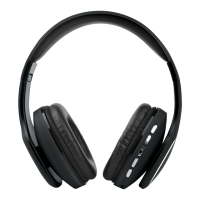
IDENTIFYING PARTS
1
5
6
7
2
3
4
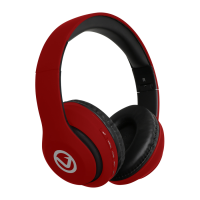
1. Headband
2. Speaker
3. Mini USB Input
4. Aux Input
5. Height Adjuster
6. Ear pads
7. Playback / Mode Controls
8. Micro SD Card Reader
3. The Device does not play music or answer calls when it is
connected to a Bluetooth mobile phone.
A. Ensure your mobile phone supports A2DP and HSF
(hands-free) profiles.
B. Ensure your mobile phone is within effective working range.
4. When paired with my computer, windows asks for a new driver.
Can you supply this?
We recommend you find compatible drivers for your computer
online.
5. Why can I not remotely control the pause, play, previous and
next functions when music is playing?
A. When you are using 3.5mm AUX connection, you can’t pause,
change volume or skip tracks.
B. This feature needs the Bluetooth device paired with the
speaker to support AVRCP (Audio/Video Remote Control
Profile). Please ensure your device supports this.
SAFETY PRECAUTIONS
• The product may only be used with the parts provided by the
manufacturer.
• Never use your appliance near water or in areas where it can
come into contact with water. Never handle the appliance if it
was dropped into water or any other liquid. If the appliance
comes into contact with water while switched off, but still
plugged in, it will cause a safety hazard.
• Always make sure your hands are dry before touching the plug
or power connections.
• Do not operate the product with a damaged cord or plug, or
after it malfunctions, has been dropped, or damaged in any
manner.
• The appliance is intended for household use only. Commercial
use invalidates the warranty and the supplier cannot be held
responsible for injury or damage caused when using the appli-
ance for any other purpose than that for which it is intended.
• This appliance is not intended for use by persons (including
children) with reduced physical, sensory or mental capabilities, or
lack of experience and knowledge, unless they have been given
supervision or instruction concerning use of the appliance by a
person responsible for their safety. Extreme caution must be
exercised.
• Children should be supervised to ensure that they do not play
with the appliance. Packaging must never be left within reach of
children, since it is potentially dangerous.
• Store in the original box in a cool, dry place out of the reach of
children.
ADDITIONAL WARNINGS
1. Take care to avoid liquid and objects from entering the
appliance through openings.
2. Never use your appliance while in the bath, shower or in areas
where it can come into contact with water.
3. Do not listen to loud music for extended periods of time, this
may damage your hearing.
CARE AND CLEANING
• Turn the Device off when not in use or before cleaning.
• The Casing may be cleaned by wiping with a soft, damp cloth
moistened with water only. Do not use harsh abrasives or
cleaners.
Dry thoroughly with a soft cloth.
ENVIRONMENTALLY FRIENDLY DISPOSAL
Do not dispose of electrical appliances as unsorted municipal
waste, use separate collection facilities.
Contact your local government for information regarding the
collection systems available. If electrical appliances are disposed
of in landfills or dumps, hazardous substances can leak into the
groundwater and get into the food chain, damaging your health
and wellbeing.
8

 Need help?
 General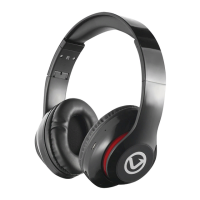


 To Next Page