C
o
n
t
r
o
l
l
e
v
e
r
w
i
t
h
o
n
e
b
u
t
t
o
n
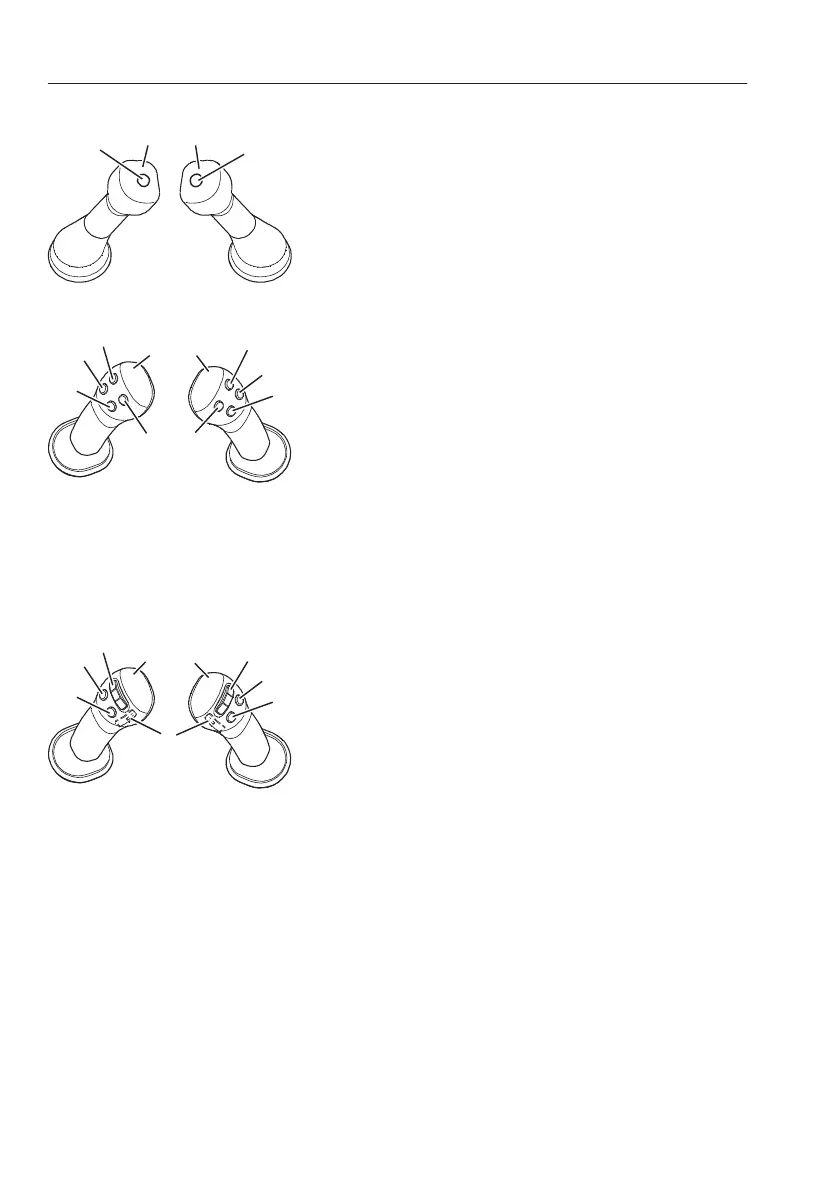
A Left operating lever
B Right operating lever
1 Horn button
2 Boost/hammer button
N
O
T
E
!
When the hammer select switch is activated, the
boost function does not work.
C
o
n
t
r
o
l
l
e
v
e
r
w
i
t
h
f
o
u
r
b
u
t
t
o
n
s
A Left operating lever
B Right operating lever
1 Rotator button
2 Rotator button
3 Horn button
4 Joystick shortkey button
5 Hammer/shear button
6 Shear/unassigned
7 Float button
8 Boost button
C
o
n
t
r
o
l
l
e
v
e
r
w
i
t
h
t
h
r
e
e
b
u
t
t
o
n
s
a
n
d
p
r
o
p
o
r
t
i
o
n
a
l
s
w
i
t
c
h
A Left operating lever
B Right operating lever
1 Proportional switch (rotator)
2 Proportional switch (hammer/shear)
3 Horn button
4 Joystick shortkey button
5 Boost button
6 Float button
7 Unassigned
N
O
T
E
!
Before operating the control levers for X1 or X3
operation, make sure to read and understand the
different control types for the different buttons and
switches, refer to page
79
for details.
9
8
O
t
h
e
r
c
o
n
t
r
o
l
s
C
o
n
t
r
o
l
s


 To Next Page