07 Driver support
07
}}
* Option/accessory, for more information, see Introduction.
199
Cruise control*
The cruise control (CC – Cruise Control) helps
the driver maintain an even speed, resulting in
a more relaxed driving on motorways and
long, straight roads in regular traffic flows.
Overview
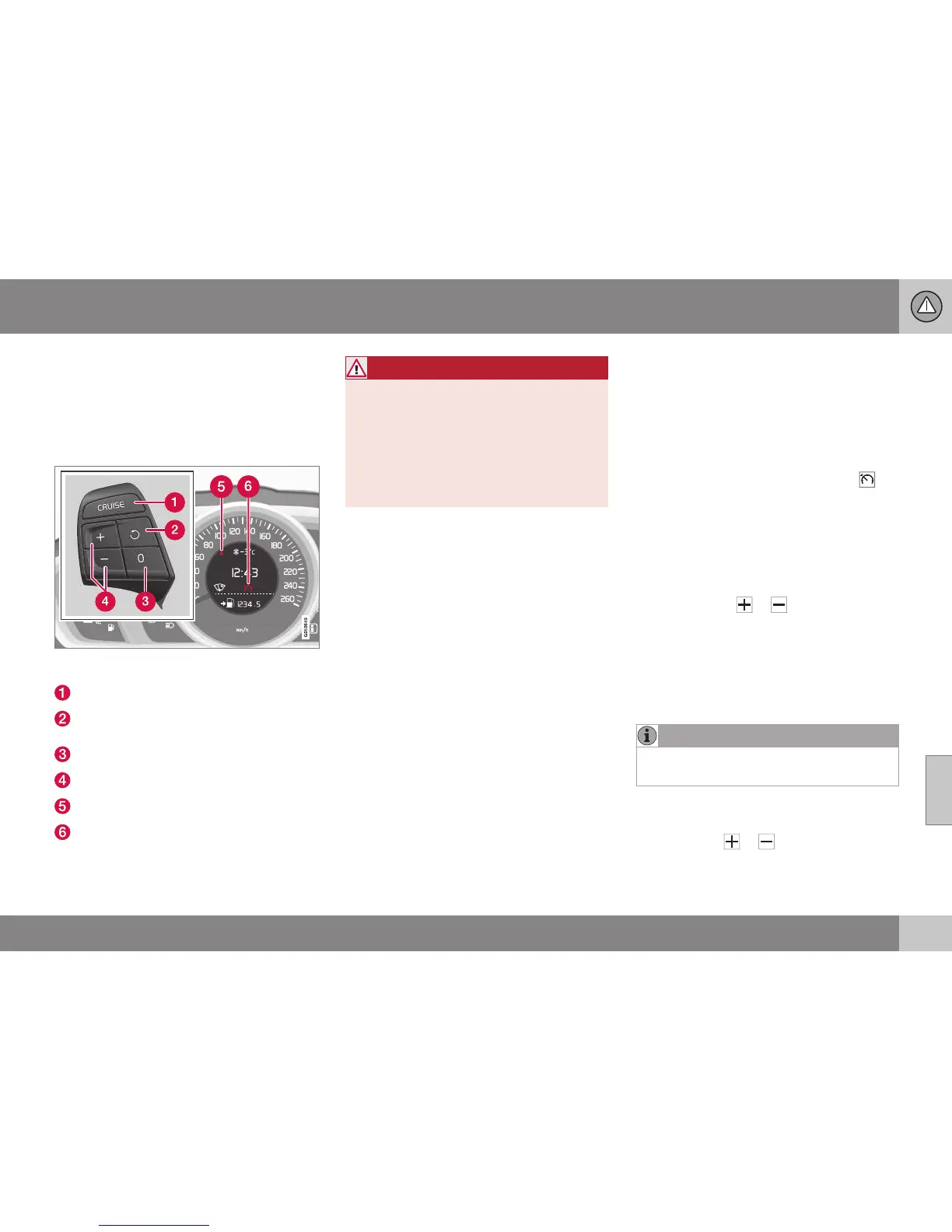
Steering wheel keypad and combined instrument
panel.
Cruise control - On/Off.
Standby mode ceases and the stored
speed is resumed.
Standby mode
Activate and adjust the speed.
Selected speed (GREY = Standby mode).
Cruise control active - WHITE symbol
(GREY = Standby mode).
WARNING
The driver must always be observant with
regard to the traffic conditions and inter-
vene when the cruise control is not main-
taining a suitable speed and/or suitable
distance.
The driver always bears ultimate responsi-
bility for ensuring that the vehicle is driven
safely.
Related information
•
Cruise control* - managing speed
(p. 199)
•
Cruise control* temporary deactivation
and standby mode (p. 200)
•
Cruise control* - resume set speed
(p. 201)
•
Cruise control* - deactivate (p. 201)
•
Adaptive cruise control - ACC* (p. 201)
Cruise control* - managing speed
It is possible to activate, set and change the
stored speed.
Activating and setting the speed
To enable cruise control:
•
Press the steering wheel button for
CRUISE (without speed limiter) or
(with speed limiter).
> The cruise control symbol (6) in the com-
bined instrument panel illuminates -
cruise control is in standby mode.
To activate cruise control:
•
At the required speed - press the steering
wheel button
or .
> The current speed is stored in memory
and the combined instrument panel's
marking (5) illuminates at the selected
speed and the symbol (6) changes from
GREY to WHITE - the car then follows the
stored speed.
NOTE
Cruise Control cannot be enabled at
speeds below 30 km/h.
Changing the stored speed
Stored speed is changed with short or long
presses on the or button.
To adjust +/- 5 km/h:



 To Next Page