07 Driver support
07
}}
* Option/accessory, for more information, see Introduction.
191
2.
Scroll with the
button until the com-
bined instrument panel shows a mark (5)
by the desired maximum speed.
> The speed limiter is then active and the
selected max. speed is stored in the
memory.
Related information
•
Speed limiter* (p. 189)
Speed limiter* - changing speed
Changing the stored speed
Stored maximum speed is changed with
short or long presses on the
or button.
To adjust +/- 5 km/h:
•
Use short presses - each press gives
+/- 5 km/h.
To adjust +/- 1 km/h:
•
Hold the button depressed and release
when the combined instrument panel's
mark is by the desired maximum speed.
Last press made is stored in the memory.
Related information
•
Speed limiter* (p. 189)
Speed limiter - temporary
deactivation and standby mode*
A (Speed Limiter) can be regarded as a
reverse cruise control - the driver regulates
the speed using the accelerator pedal but is
prevented from accidentally exceeding a pre-
selected/set speed by the speed limiter.
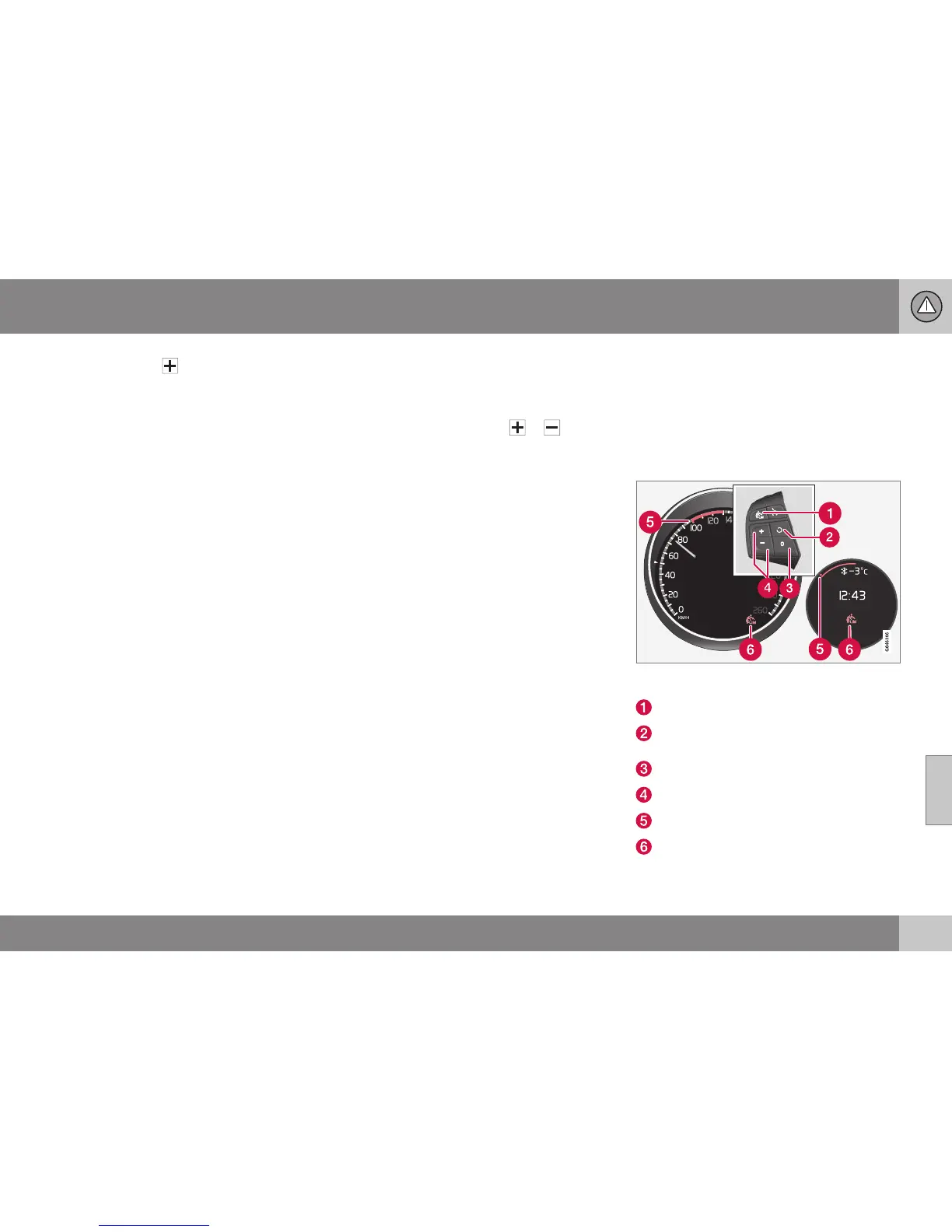
Steering wheel keypad and instrument panel Dig-
ital and Analogue.
Speed limiter - On/Off.
Standby mode ceases and the stored
speed is resumed.
Standby mode
Activate and adjust the max. speed.
Selected speed
Speed limiter active



 To Next Page