EasyManua.ls Logo

Vornado OSC73 - User Manual

Vornado OSC73
15 pages
Print Icon
To Next Page IconTo Next Page
Loading...
model
OSC73
vornado.com
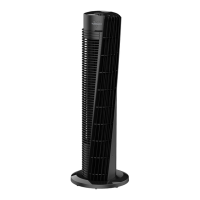
OSCILLATING TOWER
CIRCULATOR OWNER’S GUIDE
READ AND SAVE
THESE INSTRUCTIONS
Question and Answer IconNeed help?

Do you have a question about the Vornado OSC73 and is the answer not in the manual?

Summary

Important Safety Instructions

Intended Use

Specifies the product's intended use and limitations, including floor use and indoor living spaces.

Child and Battery Safety

Covers supervision for children and hazards associated with batteries, including chemical burns and ingestion.

Installation and Cord Safety

Advises on safe placement, avoiding heat/water, and proper cord management to prevent fire and shock.

Safe Use and Servicing

Safe Operation Precautions

Instructions on avoiding electrical hazards, using approved parts, and safe plug/cord handling during use.

Servicing and Fuse Replacement

Guidelines for safe cleaning, unauthorized repairs, and fuse replacement procedures.

FCC Compliance Information

FCC Compliance Statement

States the equipment complies with FCC rules for digital devices and may cause interference if not used correctly.

Suppliers Declaration of Conformity

Identifies the manufacturer and model, providing contact details for compliance.

Battery Disposal

Disposal Guidelines

Instructs to dispose of batteries according to local laws, not in fire, and keep away from children.

Features Overview

Remote Storage and Carry Handle

Highlights the remote storage compartment and the integrated carry handle for portability.

Electronic Controls and Timer

Details the push-button controls, multiple speed settings, and energy-saving timer functions.

Design for Stability

Describes the finger-friendly design, sturdy base, and silicone feet for stability.

Getting Started: Base Assembly

Base Assembly Instructions

Step-by-step guide for assembling the base, including connecting halves and attaching to the tower.

Power Cord Routing

Instructions on feeding and routing the power cord through the base during assembly.

How to Use

Powering On and Speed Selection

How to power on the unit and cycle through fan speed settings using the controls.

Using the Timer Function

Steps to set the automatic shut-off timer and cancel it.

Activating Oscillation

How to turn the oscillation feature on and off, indicated by an LED.

Remote Control Operation

Remote Control Functions

Details how to use the remote for power, fan speed, timer, and oscillation.

Remote Battery Replacement

Instructions for replacing the remote's battery, including type and procedure.

Cleaning and Maintenance

Regular Cleaning Procedure

Steps for cleaning the tower using a vacuum brush attachment and a soft cloth.

Troubleshooting Guide

Unit Fails to Power On

Addresses common causes like unplugged cord or blown fuse, and suggests solutions.

Insufficient Air Circulation

Explains issues with air flow, including settings, obstructions, and air circulation time.

Remote Control Not Working

Troubleshoots remote issues, such as dead batteries or line-of-sight problems.

Warranty Information

Five-Year Limited Warranty

Details Vornado's warranty coverage, duration, and procedures for service claims.

Warranty Exclusions

Lists conditions that void the warranty, such as abuse, modification, or improper use.

Summary

Important Safety Instructions

Intended Use

Specifies the product's intended use and limitations, including floor use and indoor living spaces.

Child and Battery Safety

Covers supervision for children and hazards associated with batteries, including chemical burns and ingestion.

Installation and Cord Safety

Advises on safe placement, avoiding heat/water, and proper cord management to prevent fire and shock.

Safe Use and Servicing

Safe Operation Precautions

Instructions on avoiding electrical hazards, using approved parts, and safe plug/cord handling during use.

Servicing and Fuse Replacement

Guidelines for safe cleaning, unauthorized repairs, and fuse replacement procedures.

FCC Compliance Information

FCC Compliance Statement

States the equipment complies with FCC rules for digital devices and may cause interference if not used correctly.

Suppliers Declaration of Conformity

Identifies the manufacturer and model, providing contact details for compliance.

Battery Disposal

Disposal Guidelines

Instructs to dispose of batteries according to local laws, not in fire, and keep away from children.

Features Overview

Remote Storage and Carry Handle

Highlights the remote storage compartment and the integrated carry handle for portability.

Electronic Controls and Timer

Details the push-button controls, multiple speed settings, and energy-saving timer functions.

Design for Stability

Describes the finger-friendly design, sturdy base, and silicone feet for stability.

Getting Started: Base Assembly

Base Assembly Instructions

Step-by-step guide for assembling the base, including connecting halves and attaching to the tower.

Power Cord Routing

Instructions on feeding and routing the power cord through the base during assembly.

How to Use

Powering On and Speed Selection

How to power on the unit and cycle through fan speed settings using the controls.

Using the Timer Function

Steps to set the automatic shut-off timer and cancel it.

Activating Oscillation

How to turn the oscillation feature on and off, indicated by an LED.

Remote Control Operation

Remote Control Functions

Details how to use the remote for power, fan speed, timer, and oscillation.

Remote Battery Replacement

Instructions for replacing the remote's battery, including type and procedure.

Cleaning and Maintenance

Regular Cleaning Procedure

Steps for cleaning the tower using a vacuum brush attachment and a soft cloth.

Troubleshooting Guide

Unit Fails to Power On

Addresses common causes like unplugged cord or blown fuse, and suggests solutions.

Insufficient Air Circulation

Explains issues with air flow, including settings, obstructions, and air circulation time.

Remote Control Not Working

Troubleshoots remote issues, such as dead batteries or line-of-sight problems.

Warranty Information

Five-Year Limited Warranty

Details Vornado's warranty coverage, duration, and procedures for service claims.

Warranty Exclusions

Lists conditions that void the warranty, such as abuse, modification, or improper use.

Overview

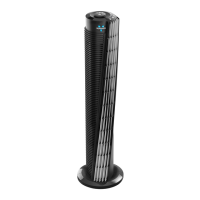
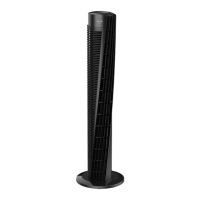
The Vornado OSC73 is an oscillating tower circulator designed for indoor air circulation in living spaces within the United States. It is intended for floor use only and is not suitable for commercial or industrial applications. Vornado offers a 5-year satisfaction guarantee, indicating a commitment to product quality and customer support.

Function Description:

The Vornado OSC73 is an oscillating tower circulator that moves a substantial amount of air to create a comfortable indoor environment. It features multiple speed settings and an energy-saving timer to customize airflow and operation. The oscillation function ensures wider air distribution throughout the room.
Important Technical Specifications:

  • Model: OSC73
  • Warranty: 5-year satisfaction guarantee
  • Power: Operates with a polarized plug. Overload protection is provided by a 2.5 Amp, 125 Volt fuse.
  • Battery (Remote Control): Requires one coin-style 3V CR2032 battery.
  • FCC Compliance: Class B digital device, compliant with Part 15 of FCC Rules.
  • Intended Use: Indoor living spaces only, for floor use.

Usage Features:

  • Push Button Electronic Controls: Located on the top of the tower for easy access.
  • Multiple Speeds: Offers 3 speed settings (LOW, MEDIUM, HIGH) to suit different comfort levels. Speed is indicated by illuminated LEDs.
  • Energy-Saving Timer: Allows users to set the unit to turn OFF automatically after 1, 2, 4, or 8 hours. The desired run time is indicated by an illuminated LED. The timer can be canceled by cycling through settings until no LEDs are illuminated.
  • Oscillation Function: The tower oscillates to distribute air more broadly. An LED indicates when oscillation is active.
  • Remote Control: Provides convenience, allowing users to power on/off, select fan speed, activate/adjust the timer, and turn oscillation on/off from a distance. The remote requires a line-of-sight path to the receiver lens on the tower.
  • Remote Storage: A dedicated slot on the tower for storing the remote control.
  • Carry Handle: Integrated into the design for easy portability.
  • Finger-Friendly Design: The grille is designed to resist curious fingers.
  • Sturdy Base: Ensures wobble-free airflow and stability.
  • Silicone Feet: Non-marking feet are added for enhanced stability and to protect floor surfaces.

Maintenance Features:

  • Regular Cleaning: The tower circulator requires regular cleaning due to the substantial amount of air it moves.
    • Procedure: Unplug the unit before cleaning. Use a brush attachment on a household vacuum cleaner to remove accumulated dust from the tower. Wipe down the entire tower with a soft cloth.
    • Caution: Do not use gasoline, thinners, solvents, ammonias, or other chemicals for cleaning.
  • Fuse Replacement: The product employs overload protection with a fuse. If the fuse blows, it indicates an overload or short-circuit. Users can replace the fuse by following specific instructions:
    1. Turn off the appliance using controls.
    2. Grasp the plug and disconnect from the outlet.
    3. Replace the fuse only with a 2.5 Amp, 125 Volt fuse approved by Vornado Consumer Service.
    4. Use a small flat-head screwdriver to slide open the fuse cover on the plug.
    5. Gently lift each end of the old fuse with the screwdriver to remove it.
    6. Install the new fuse by gently pushing each metal end into the receptacle. Avoid pushing on the center of the fuse.
    7. Slide the fuse cover closed, ensuring it fits completely and no part sticks out.
    8. Plug the appliance into the outlet and turn the power on.
    9. If the replacement fuse blows, a short-circuit may be present, and the product should be discarded or returned to an authorized service facility.
  • Battery Replacement (Remote Control):
    1. The remote requires one coin-style 3V CR2032 battery.
    2. To replace, open the battery door on the back of the remote control (a #1 Phillips screwdriver may be needed to loosen a small screw).
    3. Clean battery contacts if necessary.
    4. Remove any plastic protection from the new battery and place it in the remote with the + side facing out, ensuring correct polarity.
    5. Replace the battery door and screw.
    6. Important: Remove the battery from the remote when not in use for an extended period. Always remove dead batteries immediately and replace with fresh ones. Do not store dead batteries in the remote.
  • Service and Repair: Do not attempt to repair or replace parts yourself. All service and/or repairs must be done by a Vornado Authorized Service Center. If the power cord is damaged, it must be replaced by the manufacturer, its service agent, or similarly qualified persons to avoid a hazard. Contact Vornado Consumer Service for instructions.

Safety Instructions:

  • Always read and save the instructions provided in the owner's guide.
  • Keep the product away from curtains, draperies, tablecloths, and other fabrics.
  • Do not place the product near furnaces, fireplaces, stoves, or other high-temperature heat sources.
  • Avoid using the product in a window, on an uneven or unstable surface, or near water.
  • Do not use the product on wet surfaces or where it may fall into a bathtub, laundry, swimming pool, or other water container.
  • Do not use the product outdoors or expose it to weather.
  • Do not run the cord under carpeting, throw rugs, runners, or similar coverings, or under furniture or appliances. Arrange the cord away from traffic areas to prevent tripping hazards.
  • Ensure the cord does not hang over counter edges or get crimped/closed in doors.
  • Place the appliance near an easily accessible outlet for quick unplugging in an emergency.
  • Do not operate with a solid-state speed device (e.g., dimmer switch).
  • Do not operate any fan with a damaged cord or plug. Discard or return to an authorized service facility.
  • Do not operate if the unit has been dropped or damaged.
  • If the power cord is damaged, it must be replaced by the manufacturer, its service agent, or similarly qualified persons.
  • Before plugging in, ensure electrical information on the rating label is compatible with the outlet's power supply.
  • Do not sit or stand on the product.
  • Never use the cord as a handle or yank, strain, or stretch it.
  • Do not insert foreign objects into any input or output opening while plugged in.
  • Discontinue use if there is a loose fit between the wall outlet and plug, as this can cause overheating. Contact a qualified electrician to replace worn outlets.
  • The polarized plug is a safety feature; do not attempt to defeat it.
  • Always turn off the power and unplug the product before moving, repositioning, servicing, cleaning, or when not in use for extended periods or during electrical storms.
  • Children and Impaired Persons: Supervision is required for children 12 years and younger and anyone with reduced physical, sensory, or mental capabilities. Children should not play with the appliance.
  • Battery Safety (Remote Control):
    • Chemical Burn Hazard: Keep batteries away from children.
    • WARNING: KEEP NEW AND USED BATTERIES AWAY FROM CHILDREN. This product contains a lithium button/coin cell battery. If swallowed, it can cause severe internal burns and potentially death in as little as 2 hours. Secure the battery compartment. If it does not close securely, stop using the product, remove batteries, and keep it away from children. Seek immediate medical attention if batteries might have been swallowed or placed inside the body (call National Poison Control Center at 1-800-222-1222 or 202-625-3333 in the US).
    • Battery Disposal: Dispose of batteries according to local laws and regulations, keeping them away from children. Do not dispose of batteries in fire, as they may explode or leak.

Vornado OSC73 Specifications

General IconGeneral
BrandVornado
ModelOSC73
CategoryFan
LanguageEnglish

Related product manuals