10 English
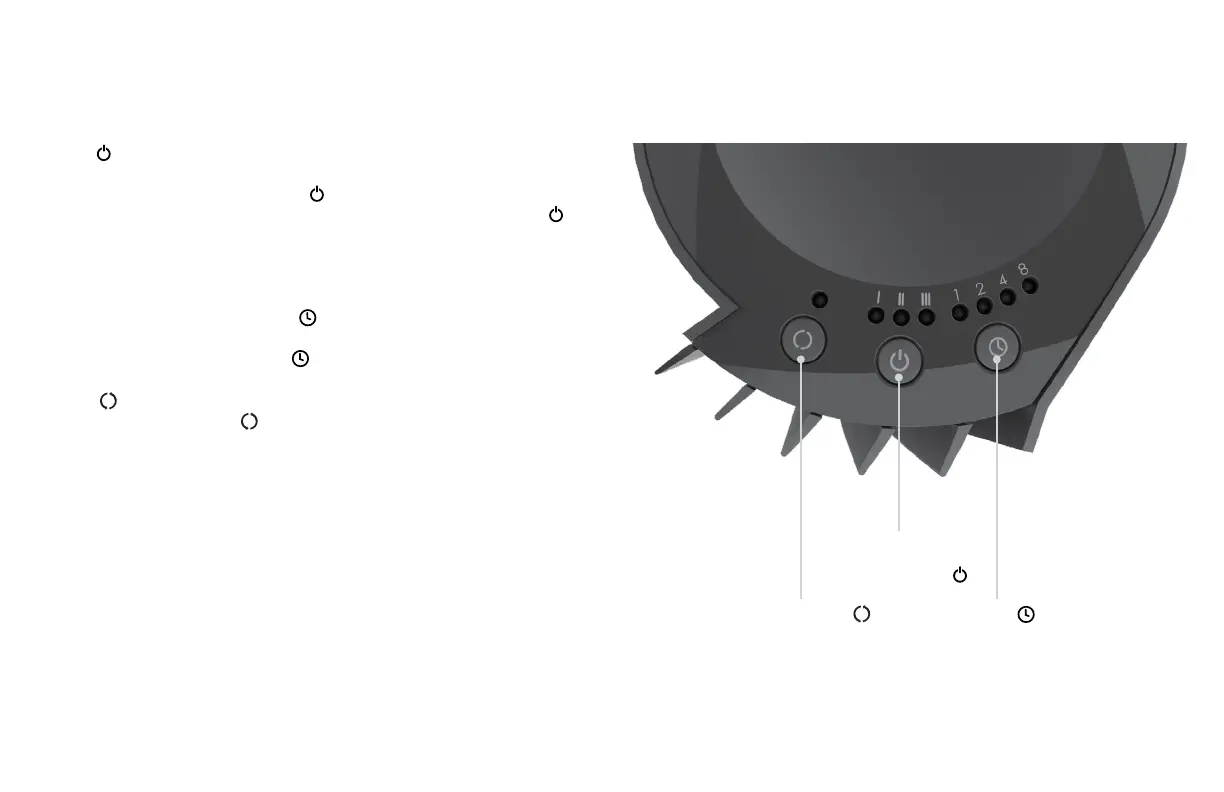
1. Push to power on.
2. Select desired speed by pressing . Speed will cycle HIGH - MEDIUM
- LOW - OFF and is indicated by the illuminated LEDs above the .
LOW (I) - MEDIUM (II) - HIGH (III)
3. The fan has an automatic timer to turn the unit OFF at intervals of 1
,
2
,
4 or 8 hours. To set timer, press
until the desired run time LED is
illuminated. The unit will continue to run until that amount of time has
expired. To cancel timer, press until there are no LEDs illuminated.
4. Press
to turn oscillation on and off. When oscillation is turned
ON, the LED above the will be illuminated and tower will begin
oscillating.
HOW TO USE
POWER and
FAN SPEED
OSCILLATION TIMER


 To Next Page