Programming Multiple Pumps
NOTE: When using a single VorTech pump, no wireless configuration is necessary
A pump group consists of one master pump and at least one slave pump. There can only be one master pump
per group which can include an unlimited number of slave pumps. In order to set a pump as a master or a slave,
the aquarist must first enter the VorTech Pump’s configuration mode. Within configuration mode one can do
one of three different things:
•Resetthepump’smemorybacktoindependentmode
•Setthepumpasamaster
•Setthepumpasaslave
Masters and slaves must be set as groups and each group must be programmed separately. You must perform
the following steps in the order listed to correctly program your EcoSMART driver. You may setup a maximum of
seven separate groups, each having a unique master pump.
5
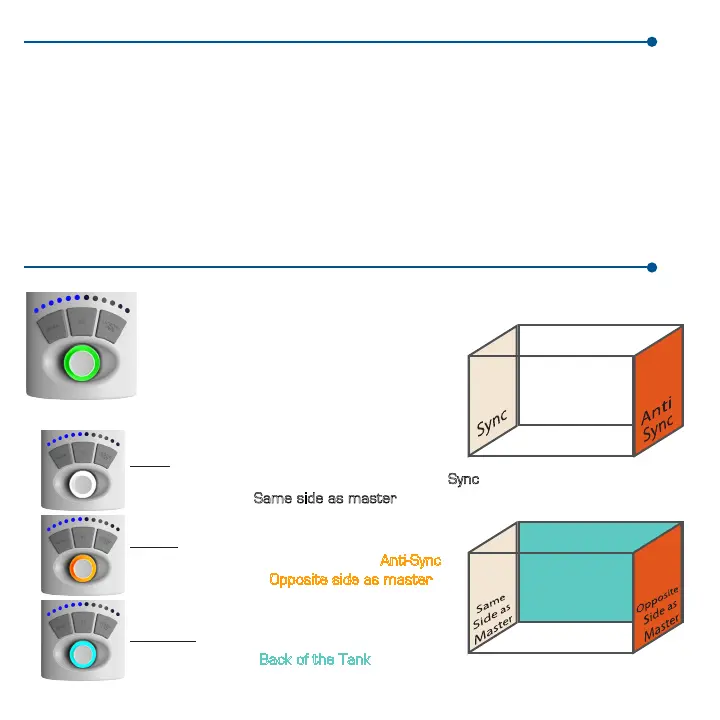
EcoSMART Pump Positioning
Master Pump
*Shown here in Constant Speed mode.
Can Operate in Constant Speed, Random,
EcoSMART, Short Pulse and Long Pulse Modes.
Turquoise (EcoSMART Only)
EcoSMART Mode: Back of the Tank
EcoSMART Setup
Sync/Anti-Sync Pump Setup
Slave Pumps (Orange, White, Turquoise)
Orange
Random, Short & Long Pulse modes: Anti-Sync
In EcoSMART mode: Opposite side as master
White
Constant, Random, Short & Long Pulse modes: Sync
EcoSMART mode: Same side as master
Back of Tank



 To Next Page