Error Codes
Over Temperature Condition - In the event of a motor overheating, the pump will automatically shut down for
a period to allow for cooling. Once the motor has cooled, the driver will automatically restart and resume
normal operation. You may experience an overheating error from a misalignment.
Stall Condition - In the event of a motor stall, the pump may have stopped for a few possible reasons. You
should first check that there is not something blocking the propeller from spinning.
Wave Motion Warning
The generation of waves within your aquarium places additional stress on the aquarium glass and joints. Not all aquarium tanks are
designed to withstand this stress, and failure of the glass and/or joints could result. You are encouraged, before generating waves,
to consult with your aquarium tank manufacturer to determine if the tank construction is adequate to withstand the additional stress
generated by the wave motion. You are also encouraged to assure that your aquarium stand or furniture is adequately stable to
withstand the additional stress resulting from wave generation.
EcoTech Marine DISCLAIMS AND WILL NOT BE LIABLE FOR, damage to aquarium tanks or their surroundings, water damage, or any
other consequential damages resulting from wave generation. MAKE WAVES AT YOUR OWN RISK.
Feed Mode
Battery Backup Mode
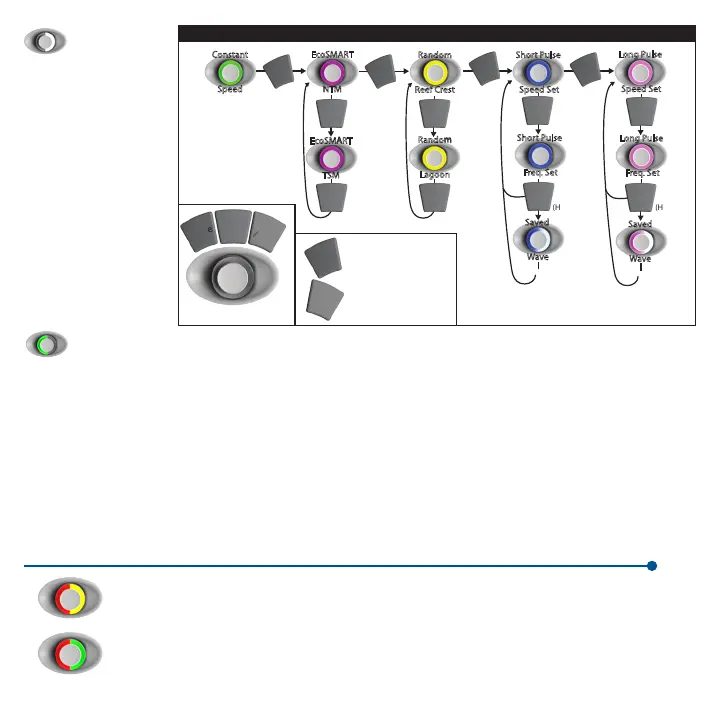
To enter Feed Mode,
press and hold the mode
button for three seconds.
The LED will now blink
white indicating that
the pumps are in feed
mode. Regardless of your
system’s master/slave
pump configuration, all
pumps will enter feed
mode when that mode
is selected on any one
pump. The pumps will
spin very slowly for ten
minutes and then resume
their prior operating
conditions.
When a battery backup accessory is added to the VorTech pump, the pump will automatically switch to Battery Backup mode
during a power outage. The pumps will run at the minimum speed to maximize their run time during this critical period.
8
For more description about pump modes, read the full manual at www.ecotechmarine.com
For other error codes and troubleshooting, read the full manual at www.ecotechmarine.com
Control Dial
(Hold)
(Hold)
EcoSMART
NTM
Random
Reef Crest
Short Pulse
Speed Set
Long Pulse
Speed Set
Random
Lagoon
Short Pulse
Freq. Set
Long Pulse
Freq. Set
Saved
Wave
Saved
Wave
EcoSMART
TSM
Mode
Option
/Pwr
Set
Mode
Mode
Mode
Mode
Set
Option
/Pwr
(Hold) - Powers O
Mode
(Hold) - Feed mode
EcoSMART Driver General Operational Modes
Constant
Speed
*
*
*
*
*Note: LED bar will indicate change between modes
Set
Set
Set
Set
Set
Set
Set


 To Next Page
 Loading...