NOTE: The subsequent pump groups must be programmed near the original group. For example, if running two
different groups in separate areas of your house, the second group must be programmed within 5 feet the first
group to ensure proper communication.
Mo
d
e
Set
Mo
d
e
Mo
d
e
6
Step 3: Assign the Master
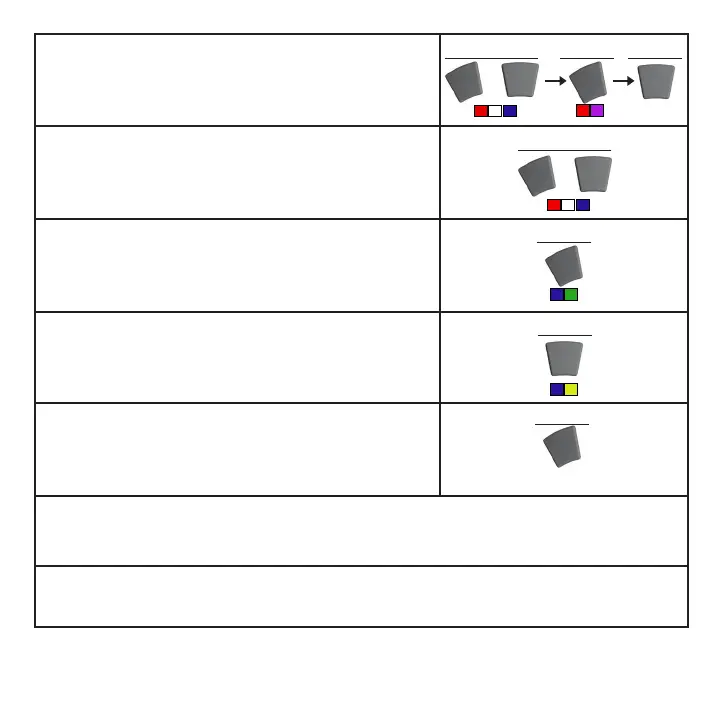
Set the master pump by pressing the mode button. The LED will
then blink blue and green.
Step 5: Reset the Master
Hold the mode button on the master pump after completing ALL the
master/slave assignments.
Step 1: Clear Driver Memory
The internal memory of each unit must be cleared before setting up
a group.
Step 2: Enter Configuration Mode
All pumps in a group must then be set into configuration mode
before the assignment of slave or master status. This configuration
must be performed with the drivers in close proximity to ensure
proper assignment. The drivers will blink red, white and blue in this
mode.
Step 4: Assign the Slaves
Set all the slave pumps by pressing the set button on each driver.
The LED will then blink blue and yellow.
NOTE: If any slave blinks blue and red, it was too far away from the
master driver and could not communicate properly
Step 6: Begin Normal Operation
Use the controls on the Master Pump to operate all pumps in the group. Slave pumps can only be set to sync or
anti-sync modes, or the three options in EcoSMART modes.
Step 7: Program Subsequent Groups
Now that the first group is programmed, repeat steps 1-5 on the next group of pumps, if so desired.
Mo
d
e
Set
+
hold hold hold
Set
Pump
Resets
Mo
d
e
Set
+
hold
tap
tap
hold
Pump
Resets



 To Next Page