ENGLISH
4
SETTING THE APP
The VOSKER app let you configure all the camera’s settings. These new
settings will take effect the next time the V150 camera connects to
update its status. Here are the most important settings, there are more
available in the app.
BASIC SETTINGS
Mode - PHOTO
Delay: Sets the time interval between each detection before the camera
records the next photo.
Multi-shot: Takes up to 2 consecutive shots at each detection, with
a 5 second delay between each photo.
START THE CAMERA
1. Turn On the camera (OFF/ON switch).
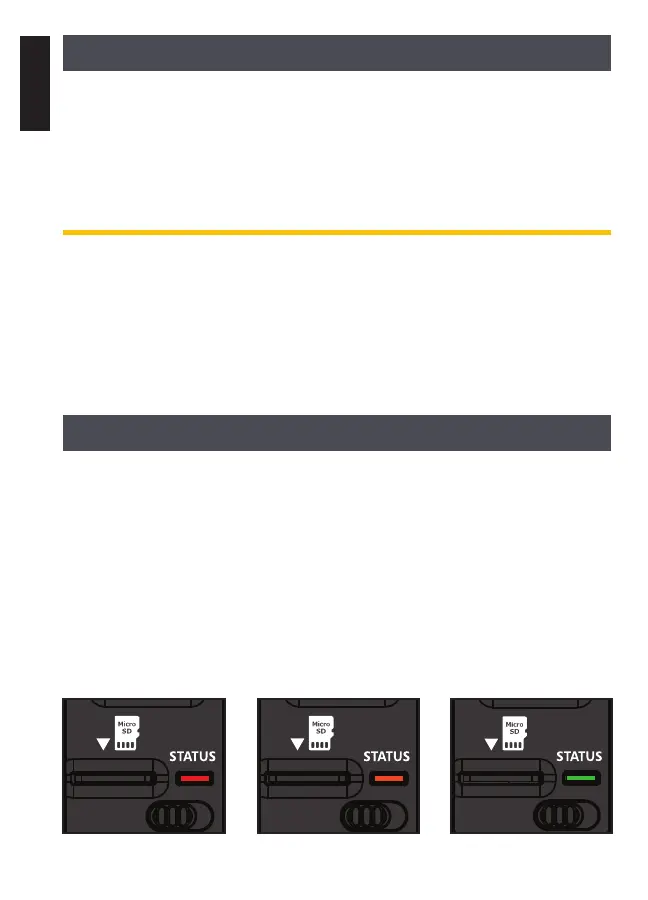
2. The camera will search for a signal and the “status light”
will flash green.
3. The “status light” will continuously be lit and will appear in one
of the following three colors:
• Red: no signal.
• Orange: fair signal.
• Green: good signal.
OFF/ON OFF/ON
OFF/ON


 To Next Page