
 Need help?
Do you have a question about the Voxx Electronics Prestige APS997Z and is the answer not in the manual?
How to arm the security system, including parking light flashes and LED status.
How to disarm the security system, including parking light flashes and LED status.
Unlocking the driver's door first, then the remaining doors.
How to activate the trunk release feature using the remote.
Information on activating auxiliary channel outputs, requires dealer programming.
How to activate and deactivate the panic alarm using the remote.
Steps to arm the system and bypass shock sensor detection stages.
How to change the alarm system sound for easier identification.
Toggling ARM/DISARM chirps ON or OFF without entering programming.
Controlling the LED status light when the system is armed/locked.
How the system indicates the number of programmed transmitters.
How to activate and exit valet mode, disabling security and remote start functions.
Procedure to disarm the system without a transmitter if lost or battery fails.
Alternative override procedure without transmitter or valet button.
User-personalized code for enhanced security override.
Steps to disarm the alarm using a custom 2-number code.
Procedure to program a user-selected 2-digit custom code.
Procedure to activate the remote start function for the vehicle.
How to turn off the vehicle when it is running via remote start.
Steps to enter vehicle and take manual control while running.
Setting temperature controls for automatic climate activation.
Conditions that will prevent or shut down the remote starter for safety.
Enabling ready mode for remote start on manual transmission vehicles.
Entering/exiting vehicle while keeping manual transmission ready mode active.
Conditions that will cause the system to exit remote start ready mode.
Keeping vehicle running for short stops while retaining keys.
Disabling remote start feature for vehicle servicing.
Setting the timer for automatic starting every 2 or 4 hours.
Procedure to activate the configured 2/4 hour timer mode.
Methods to deactivate the 2/4 hour start up timer mode.
Procedure to engage and disengage the turbo timer feature.
Activates the 24-hour countdown timer by pressing buttons on the remote.
Activates the temperature start mode by pressing buttons on the remote.
Table detailing LED flashes and their corresponding functions.
Table detailing chirps and their corresponding functions.
Table detailing parking light flashes and their functions.
Table detailing parking light flashes for shutdown diagnostics.
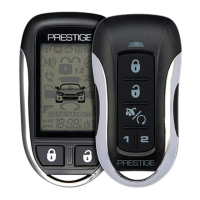
How to illuminate the 2-way LCD remote display.
Setting the remote to vibrate or play a melody tone.
Enabling power save mode on the 2-way LCD transmitter.
Silencing the alarm trigger melody with a lock command.
Using the parking meter countdown timer with preset times.
Controlling a second security system with the remote.
Accessing and adjusting clock, alarm clock, and countdown timer settings.
Explanation of various icons displayed on the 2-way LCD remote.
Procedure to replace the CR2032 battery in the 5-button remote.
Procedure to replace the CR2450 battery in the 2-way LCD remote.
Steps to program transmitters to the security system.
 General
| Remote Start | Yes |
|---|---|
| Two-Way Communication | Yes |
| Panic Mode | Yes |
| Keyless Entry | Yes |
| Trunk Release | Yes |
| LED Status Indicator | Yes |
| Number of Buttons on Remotes | 5 |
| Number of Remotes | 2 |
| Confirmation | Audible and Visual |
| Starter Kill | Yes |
| Anti-Car Jacking | Yes |
| Door Lock Output | Yes |
| Trunk Release Output | Yes |
| Parking Light Flash | Yes |
| Horn Output | Yes |
| Valet Switch | Yes |
| Type | Car Alarm |
| Shock Sensor | Yes |

 To Next Page

