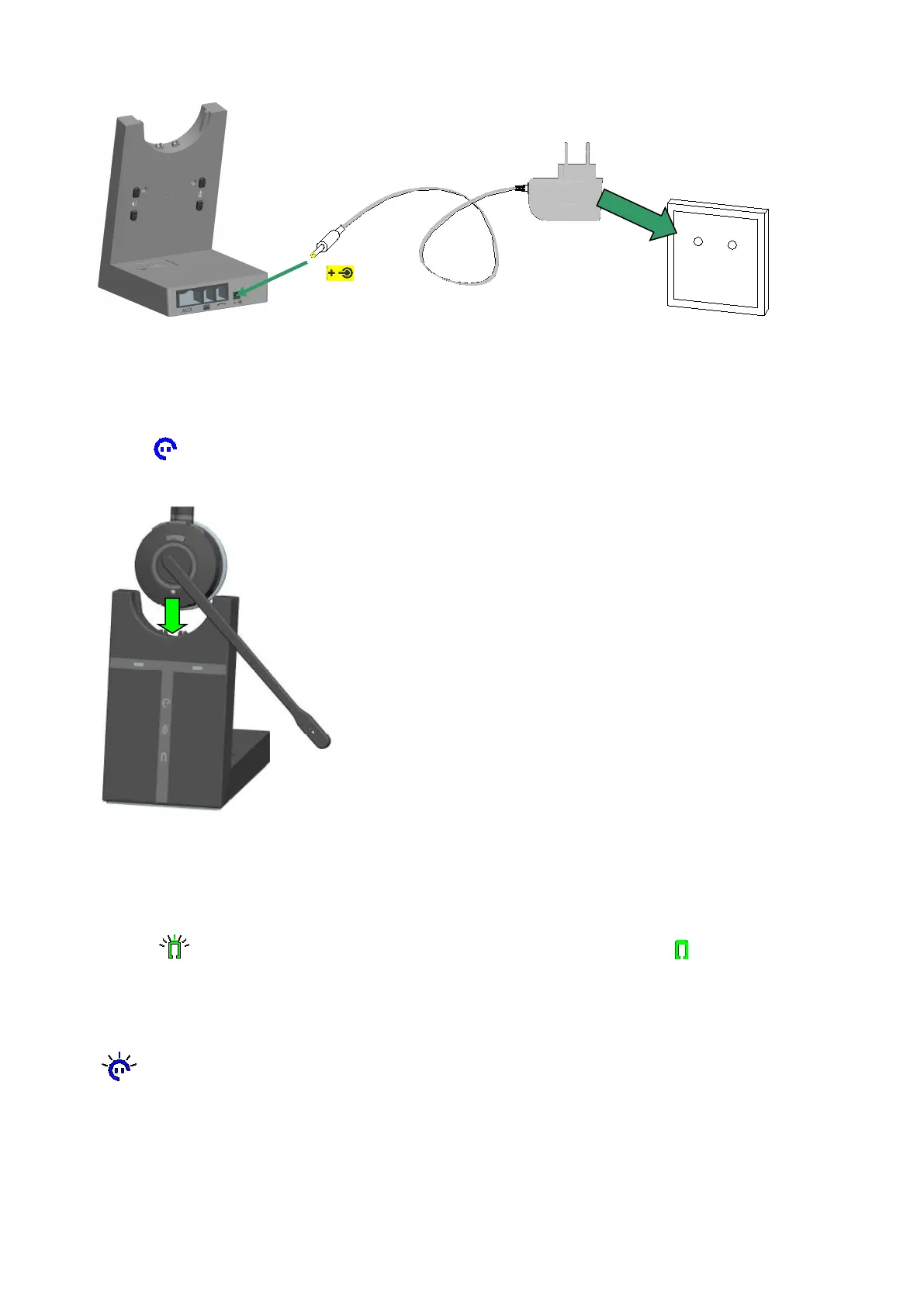
3.5 DOCK THE HEADSET
1. Press the Multiple function button, it will be powered on after the LED lights for 2S. Press the
Multiple function button again or dock the headset with the base, then lifting the headset, the headset with
paired light will lit up when the headset and base are in the connection.
2. When docked correctly the headset battery will begin charging, if needed(LED will flash when
charging ). Charge for 20 minutes or until the battery indicator on the base is steady green.
3. Clear the paired base: Press the marked R+ at the back of the base, the battery charging status light
will flash 3 times.
4. Renew to pair the headset: consistently press the PAGE switch for 5S, the headset with paired
light will flash to search the headset, consistently press the headset mute button until the headset
status LED flash, then the headset are in the paired status. Connection will be successful when the LED
power off in the same time.
4. CONFIGURING THE DESK PHONE AND PC AUDIO
Due to the large range of desk phone brands/models available, a clear dial tone must be set before


 To Next Page