EasyManua.ls Logo

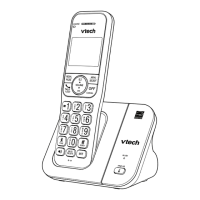
VTech CS5121 - User Manual

VTech CS5121
69 pages
Print Icon
To Next Page IconTo Next Page
Loading...
i
Congratulations
on purchasing your new VTech product.
Before using this telephone, please read the
Important safety instructions
on page 46 of this manual.
This manual has all the feature operations and troubleshooting necessary to install and operate
your new VTech telephone. Please review this manual thoroughly to ensure proper installation
and operation of this innovative and feature rich VTech product. For support, shopping, and
everything new at VTech, visit our website at www.vtechphones.com.
In Canada, please visit www.vtechcanada.com.
The ENERGY STAR
®
program (www.energystar.gov) recognizes and encourages
the use of products that save energy and help protect our environment. We are
proud to mark this product with the ENERGY STAR
®
label indicating it meets the
latest energy efficiency guidelines.
T
Compatible with
Hearing Aid T-Coil
TIA-1083
Telephones identified with this logo have reduced noise and interference when
used with T-coil equipped hearing aids and cochlear implants. The TIA-1083
Compliant Logo is a trademark of the Telecommunications Industry Association.
Used under license.

Table of Contents

Questions and Answers

  • J
    Jenna GloverSep 9, 2025
    Why VTech CS5121 Cordless Telephone does not display caller ID during call waiting?
    • J
      Justin FowlerSep 9, 2025
      If your VTech Cordless Telephone system doesn't receive caller ID or display it during call waiting, ensure you subscribe to caller ID with call waiting features from your local telephone company. The caller may be calling from an area that doesn't support caller ID. Both you and the caller's telephone companies must use compatible equipment. If you have high-speed internet (DSL), install a DSL filter between the telephone base and the wall jack.
  • L
    Larry AllisonAug 22, 2025
    What to do if VTech CS5121 does not ring?
    • W
      Wayne WebsterAug 23, 2025
      If your VTech Cordless Telephone doesn't ring when you receive a call, first check that the handset and base ringer are turned on. Ensure the telephone line cord and power adapter are properly connected. If the handset is too far from the base, move it closer. Too many extension phones on the line can also prevent ringing, so try unplugging some. Interference from other electronics can be a factor; keep the telephone away from devices like routers, TVs, and computers. Try testing with another phone at the same jack and replacing the telephone line cord.
  • M
    mcdonaldroseAug 25, 2025
    What to do if there is no dial tone on VTech Cordless Telephone?
    • R
      Roberta BryantAug 25, 2025
      If there is no dial tone on your VTech Cordless Telephone, first try all the general troubleshooting suggestions. Ensure the handset is close enough to the telephone base, as it might be out of range. A malfunctioning telephone line cord could also be the issue; try replacing it with a new one. To determine if the problem lies within your wiring or local service, disconnect the base and connect a different telephone. If the other telephone also lacks a dial tone, contact your local telephone company.
  • G
    Glenn HardyAug 26, 2025
    Why is there noise during conversation on VTech Cordless Telephone?
    • A
      Anne SalinasAug 26, 2025
      If you experience noise or interference during calls on your VTech Cordless Telephone, try moving the handset closer to the base. Appliances plugged into the same circuit can cause interference, so try a different outlet. Keep the telephone away from other electronic devices like routers and computers. If using a modem or surge protector, try plugging the telephone into a different location or using a different surge protector. For DSL service, ensure a DSL filter is installed between the base and wall jack. If the problem persists, the issue might be with your wiring or local service.
  • J
    Joseph RiveraAug 27, 2025
    Why I cannot dial out on my VTech CS5121 Cordless Telephone?
    • B
      Benjamin WilliamsAug 27, 2025
      If you cannot dial out on your VTech Cordless Telephone, first try all the general troubleshooting suggestions. Ensure there is a dial tone before dialing and allow a second or two for the handset to synchronize with the base. Verify that the telephone is set to the correct dial type (pulse or tone) for your area. Background noise from devices like televisions or radios can interfere with dialing, so eliminate any such noise. If other phones in your home have the same issue, the problem may be with your wiring or local service.
  • E
    Eric RobertsAug 29, 2025
    What to do if VTech Cordless Telephone displays 'LOW BATTERY'?
    • J
      Jason WalshAug 29, 2025
      If 'LOW BATTERY' appears on your VTech Cordless Telephone, place the handset in the telephone base or charger to recharge it. Alternatively, remove and reinstall the battery, use the handset until the battery is fully depleted, then recharge it on the base for 16 hours. If the problem continues, the battery may need replacement.
  • S
    Sean NelsonSep 18, 2025
    Why VTech CS5121 answering system messages are incomplete?
    • M
      Miguel ThompsonSep 18, 2025
      Messages on your VTech Cordless Telephone answering system may be incomplete if a caller leaves a very long message (the system disconnects after four minutes), if the caller pauses for more than five seconds, if the memory becomes full, or if the caller’s voice is very soft.
  • A
    Aaron MartinezSep 18, 2025
    What to do if VTech CS5121 Cordless Telephone answering system does not respond to remote commands?
    • M
      Mark HeathSep 19, 2025
      If the answering system on your VTech Cordless Telephone does not respond to remote commands, ensure your remote access code is correct and that you are calling from a touch-tone telephone. Wait until the announcement is over before entering the code, as the system may not detect it during playback. Also, ensure there is no interference on the telephone line and press the keypad keys firmly when dialing.
  • P
    Philip MitchellSep 7, 2025
    Why VTech CS5121 answering system does not answer correctly?
    • O
      Olivia LongSep 8, 2025
      If the answering system on your VTech Cordless Telephone doesn't answer after the programmed number of rings, ensure the answering system is turned on (the red light on the ANS ON/OFF key should be lit). If toll saver is activated, the number of rings changes to two when there are new messages. If the memory is full or the system is off, it will answer after ten rings. The ringing system used by your local telephone company can also affect the answering system.
  • K
    kschmidtSep 4, 2025
    What does 'CONNECTING...' mean on VTech CS5121 Cordless Telephone?
    • T
      Terry GonzalezSep 4, 2025
      If your VTech Cordless Telephone handset displays 'CONNECTING...', move the handset closer to the telephone base, as you may have moved out of range.

Summary

Getting Started

Parts Checklist

Lists all items included in the telephone package.

Battery Installation and Charging

Guide on installing and charging the handset battery for optimal performance.

Handset Layout

Explains the functions of handset buttons and indicators.

Telephone Base Layout

Identifies and explains the function of each button and display on the telephone base.

Telephone Settings

Date and Time

Procedures for setting the date and time on the telephone.

Dial Mode

Configures tone or pulse dialing based on service provider.

Language

Sets the display language for the telephone.

Telephone Operation

Make Calls

Initiates phone calls using the handset.

Directory

Manages phone numbers and names for easy access.

Speed Dial

Stores and manages frequently used numbers for quick dialing.

Call Log

View history of incoming and outgoing calls.

Answering System

Activate the Answering System

Turns the answering system on or off to answer calls.

Message Playback

Listens to recorded messages on the answering system.

Remote Access

Accesses and controls the answering system remotely.

Appendix

Handset Display Screen Messages

Explains various messages displayed on the handset screen.

Battery

Details battery performance, charging, and care.

Important Safety Instructions

Troubleshooting

Common Cure for Electronic Equipment

Troubleshooting steps for electronic interference and unit responsiveness.

Operating Range

Maintenance

Taking Care of Your Telephone

Advice on handling and preserving the telephone's condition.

Cleaning Your Telephone

Instructions for cleaning the telephone casing.

About Cordless Telephones

Privacy

Discusses privacy of cordless phone conversations.

Rechargeable Batteries

Information on battery types and handling.

Warranty

What Does This Limited Warranty Cover?

Details the scope of the product's limited warranty.

How Do You Get Warranty Service?

Provides instructions and contact for warranty service.

FCC, ACTA and IC Regulations

FCC Part 15

Compliance with FCC Part 15 regulations for digital devices.

FCC Part 68 and ACTA

Compliance with FCC Part 68 and ACTA technical requirements.

Technical Specifications

VTech CS5121 Specifications

General IconGeneral
BrandVTech
ModelCS5121
CategoryCordless Telephone
LanguageEnglish

Related product manuals