The VTech First Responder Smart Rescue Set™ is an interactive playset designed to engage children in imaginative first responder play. The set includes a healthcare tablet and 15 play pieces, encouraging children to dress up as first responders and learn about healthcare.
Function Description:
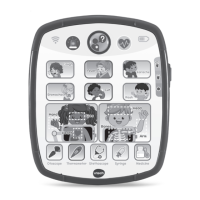
The core of the playset is the interactive healthcare tablet, which features various buttons and modes to simulate medical scenarios. Children can use the tablet to identify symptoms, learn about human body parts, explore medical tools, and answer quiz questions to diagnose illnesses. The playset promotes understanding of common illnesses, the function of different body parts, and the use of medical instruments. It also includes a "First Responder Mode" with rescue voices and themed songs to enhance the role-playing experience.
Important Technical Specifications:
The device requires 2 AA batteries for operation. It is crucial to follow the battery installation instructions carefully, ensuring correct polarity and avoiding mixing old and new batteries or different types of batteries (alkaline, carbon-zinc, rechargeable). Rechargeable batteries should only be charged under adult supervision and removed from the toy before charging. The device has an automatic shut-off feature to preserve battery life, powering down after several seconds of inactivity. If the unit powers down or lights fade, new batteries are needed.
Usage Features:
The healthcare tablet is equipped with several interactive elements:
- On/Off/Volume Selector: A slider switch to turn the unit on or off and adjust the volume (low or high).
- Emergency Button: Activates the First Responder Mode, playing rescue voices and songs.
- Check-Up Button: Used to enter Quiz mode, where children answer questions to diagnose patients.
- ECG Button: (Function not explicitly detailed, but likely related to heart monitoring simulation).
- On/Off/Volume Selector: (Redundant with the first point, but listed as a separate feature on the diagram).
- 6 Symptom Buttons: These buttons represent common symptoms like Cough, Fever, Earache, Stomachache, Cut, and Rash. Pressing them helps children understand various illnesses.
- 6 Human Body Buttons: These buttons represent different body parts: Hand, Heart, Eyes, Head, Bones, and Arm. Pressing them allows children to learn about each part and how to help a patient.
- 5 Medical Tool Buttons: These buttons represent medical instruments: Otoscope, Thermometer, Stethoscope, Syringe, and Medicine. Pressing them helps children explore how these tools are used by doctors.
The playset offers several activity modes:
- Symptom Checker Mode: Children press the Symptom Buttons to learn about common illnesses.
- Human Body Mode: Children press the Human Body Buttons to learn about different body parts and how to assist patients.
- Learning Mode: Children press the Medical Tool Buttons to explore instruments and their uses.
- Quiz Mode: Activated by the Check-Up Button, this mode involves answering questions to diagnose a patient's illness.
- First Responder Mode: Activated by the Emergency Button, this mode plays rescue voices and songs, enhancing the role-play experience.
The playset includes additional physical accessories for immersive play:
- First Responder Costume
- Medical Bag
- Stethoscope
- Otoscope
- Syringe
- Thermometer
- Tweezers
- Mirror
- Scissors
- Flashlight
- Walkie-Talkie
- Medicine Bottle
- Glasses
- Bandage
- Healthcare Tablet
Optional labels are provided to decorate some of the play pieces, such as the otoscope, thermometer, stethoscope, medicine bottle, and syringe, adding a personalized touch.
Maintenance Features:
- Cleaning: The unit can be cleaned by wiping it with a slightly damp cloth.
- Storage: Keep the unit out of direct sunlight and away from any direct heat sources.
- Battery Removal: Remove batteries if the unit will not be used for an extended period.
- Disposal: Dispose of exhausted batteries safely and do not dispose of them in fire.
- Costume and Medical Bag: The first responder costume and medical bag can be hand washed or gently machine washed, then hung to air dry.
- Troubleshooting: If the unit stops working or malfunctions, users are advised to turn the unit off, interrupt the power supply by removing batteries, let it stand for a few minutes, then replace the batteries. If the unit still does not work, new batteries should be installed. For persistent issues, customer support is available.

 Need help?



 To Next Page
 General