EasyManua.ls Logo

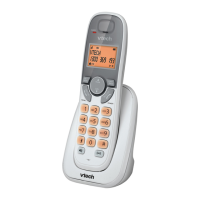
VTech FS6414-2A - User Manual

VTech FS6414-2A
40 pages
Print Icon
To Next Page IconTo Next Page
Loading...
Models: FS6414-A/
FS6414-2A/
FS6414-3A
User’s manual
http://hkphones.vtech.com

Table of Contents

Questions and Answers

  • N
    nlongAug 8, 2025
    What to do if my VTech FS6414-2A Cordless Telephone does not work at all?
    • C
      Christina BryanAug 8, 2025
      If your VTech Cordless Telephone isn't working, try these steps: * Ensure the batteries are correctly installed and charged. For best performance, return the handset to the base after each use. * Check that the power adapter is securely plugged into a working outlet (not controlled by a wall switch). * Unplug the base's power, wait 15 seconds, then plug it back in. Allow a minute for synchronization. * Remove and re-insert the batteries, or replace them if necessary. * Test the wall jack with another phone. If that phone also doesn't work, the issue is with your wiring or telephone service. Contact your service provider.
  • C
    Caitlyn MorrisonAug 15, 2025
    How to fix a VTech FS6414-2A Cordless Telephone that is not responding?
    • E
      Erin WilsonAug 15, 2025
      If your VTech Cordless Telephone isn't responding, place the handset in the base. If it still doesn't respond, try these steps in order: 1. Disconnect the power to the telephone base. 2. Disconnect the batteries on the handset. 3. Wait a few minutes, then reconnect power to the base. 4. Re-install the batteries and place the handset in the base. 5. Wait for the handset to synchronize with the base (up to one minute).
  • C
    charles23Aug 20, 2025
    What to do if the VTech FS6414-2A batteries do not charge?
    • S
      Sara WhiteAug 20, 2025
      If the batteries in your VTech Cordless Telephone aren't charging, try these steps: * Ensure the handset is correctly placed in the telephone base. * Remove and reinstall the batteries, then charge for up to 16 hours. * If the issue continues, consider purchasing new batteries.
  • B
    Brittney MorganAug 27, 2025
    What to do if my VTech Cordless Telephone shows low battery?
    • J
      jeffreyvaughnAug 27, 2025
      If your VTech Cordless Telephone displays a low battery warning, try these steps: * Place the handset in the telephone base to recharge. * Remove and reinstall the batteries, use the handset until the battery is fully depleted, then recharge it in the base. * If the problem persists, replace the batteries.
  • S
    Steven YangSep 1, 2025
    Why is there interference during a VTech FS6414-2A Cordless Telephone conversation?
    • D
      davidraySep 1, 2025
      Interference during a call on your VTech Cordless Telephone can occur for several reasons. Here's what to check: * Make sure the handset is within range of the telephone base. * If you have DSL internet, ensure a DSL filter is installed between the base and the wall jack. * Other appliances or cordless phones on the same circuit can cause interference. Try moving them to a different outlet. * Keep the phone away from electronic devices like wireless routers, radios, computers, and other cordless phones. * Try plugging the phone (or modem/surge protector) into a different outlet. * Position the base in a central, elevated location away from obstructions. * Test the wall jack with a corded phone. If the problem persists, contact your telephone service provider.

Summary

IMPORTANT SAFETY INSTRUCTIONS

SET UP THE TELEPHONE

USE YOUR PHONE

Switch ON;OFF the Handset

Instructions on how to turn the handset on and off.

Make a Call

Explains how to initiate a phone call using different dialing methods.

Answer a Call

Details how to receive an incoming call on the handset.

Mute and End Call

How to mute the microphone and terminate an active phone call.

Power Fail Back-Up

How the phone operates during a power outage using handset battery.

Make Call During Power Fail Back-Up

Steps to make calls when the phone is in Power Fail Back-Up mode.

Answer Call During Power Fail Back-Up

How to receive calls during a power failure backup operation.

Make an Internal Call

How to make calls between registered handsets.

PRIVATE PHONEBOOK

Store a Number Entry in the Phonebook

Steps to add new contacts with names and numbers to the phonebook.

PHONE SETTINGS

Handset Settings Overview

General settings and configurations applicable to the handset.

Reset Your Phone

Returning the phone to its default factory settings.

Handset Registration and Deregistration

Processes for registering and removing handsets from the base station.

TROUBLESHOOTING

Common Cure for Electronic Equipment

General troubleshooting steps for non-responsive phone issues.

CARE AND MAINTENANCE INSTRUCTIONS

VTech FS6414-2A Specifications

General IconGeneral
BrandVTech
ModelFS6414-2A
TypeCordless Telephone
Number of Handsets2
Answering SystemYes
Caller IDYes
SpeakerphoneYes
FrequencyDECT 6.0
Call WaitingYes
Handset SpeakerphoneYes
IntercomYes
ExpandableYes, up to 5 handsets
Answering System TypeDigital
Backlit DisplayYes
Phonebook Capacity50 entries
RangeUp to 1000 feet
Battery LifeUp to 5 days standby
Battery TypeNiMH

Related product manuals