EasyManua.ls Logo

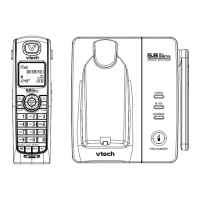
VTech i6727 - User Manual

VTech i6727
48 pages
Print Icon
To Next Page IconTo Next Page
Loading...
NEED HELP?
This manual has all the feature operations and troubleshooting necessary to install
and operate your new VTech telephone. Please take the time to review thoroughly
to ensure proper installation of this VTech innovative and feature rich product.
You can also visit our website at www.vtechphones.com for support,
shopping, and everything new at VTech. In Canada, go to www.vtechcanada.com.
Important! Before using this telephone,
please read the Important safety
instructions on page 36 of this manual.

Other manuals for VTech i6727

Questions and Answers

  • A
    Amanda FigueroaAug 20, 2025
    Why doesn't my VTech i6727 ring when I get a call?
    • Z
      Zachary HallAug 20, 2025
      If your VTech telephone does not ring when you receive a call, ensure the ringer is activated. Also, confirm that the telephone line cord and power adapter are correctly connected. If the handset is too far from the base, move it closer. Too many extension phones on the line might prevent ringing, so try unplugging some. Interference from other electronics can also be a factor; keep the telephone away from devices like routers, radios, and appliances. If other phones in your home have the same issue, the problem may be with your wiring or local service, so contact your telephone company.
  • A
    Amber MurphyAug 22, 2025
    How to fix VTech i6727 Telephone that is not working?
    • J
      Jamie GonzalezAug 22, 2025
      If your VTech telephone is not working, ensure the battery is correctly installed and charged. Return the handset to the base after use for optimal performance. Check that the power adapter is securely plugged into an outlet not controlled by a wall switch and that the telephone line cord is firmly connected to both the base and the wall jack. Try unplugging the unit, waiting 15 seconds, and plugging it back in, allowing a minute for synchronization. Charge the handset for at least 16 hours. If issues persist, remove and re-insert the battery, or consider purchasing a new one. To check the local service, plug a working telephone into the same jack. If that phone doesn't work, contact your local telephone company.
  • M
    Michael BenderAug 25, 2025
    Why is my VTech i6727 Telephone battery not charging?
    • A
      angelanelsonAug 25, 2025
      If the battery of your VTech telephone is not charging, ensure the handset is correctly placed in the charger and that the CHARGE light is on. Remove and reinstall the battery, then let it charge for 16 hours. If the CHARGE light is off, check that the power adapter and telephone line cords are correctly plugged in. Unplug the power adapter, wait 15 seconds, and plug it back in. Clean the charging contacts on the handset and base each month. If problems persist, consider replacing the battery or refer to the Warranty section of the manual.
  • S
    Stephen WalkerAug 26, 2025
    Why can't I dial out on my VTech i6727 Telephone?
    • J
      jacksonkristinAug 26, 2025
      If you can't dial out on your VTech telephone, try all the general troubleshooting steps first. Ensure there's a dial tone before dialing, waiting a second or two for synchronization. Verify the telephone is set to the correct dial mode (pulse or tone) for your area. If other phones in your home have the same issue, the problem may be with your wiring or local service. Eliminate background noise from TVs or radios, or try muting the handset before dialing, or dial from a quieter room.
  • S
    smithbillyAug 28, 2025
    What to do if there is no dial tone on VTech i6727 Telephone?
    • L
      Logan GreenAug 28, 2025
      If there is no dial tone on your VTech telephone, first try all the general troubleshooting suggestions. Move the handset closer to the base, as it may be out of range. Try installing a new telephone line cord, as the existing one may be faulty. Disconnect the base and connect a different telephone; if there's still no dial tone, the issue is likely with your wiring or local service, so contact your telephone company.
  • A
    aowensAug 29, 2025
    What to do if VTech i6727 shows low battery?
    • R
      Robert HamiltonAug 29, 2025
      If your VTech telephone displays 'Low Battery', place the handset in the telephone base or charger to recharge it. Alternatively, remove and reinstall the battery, use the handset until fully discharged, then recharge it for 16 hours. If the problem continues, the battery may need replacement.
  • H
    Haley WebsterAug 31, 2025
    Why is caller ID not working on my VTech i6727 Telephone?
    • J
      Jaime HunterAug 31, 2025
      If your caller ID features are not working properly on your VTech telephone, ensure you have subscribed to Caller ID service with your local telephone company. The caller may not be calling from an area that supports caller ID, or the telephone companies of both you and the caller must use compatible equipment. If you have DSL service, install a DSL filter between the telephone base and the telephone line jack.
  • E
    ericjohnstonSep 2, 2025
    Why is there noise during VTech telephone conversations?
    • J
      Jennifer ArmstrongSep 2, 2025
      If you're experiencing noise or interference during calls on your VTech telephone, or if calls fade or cut out, try moving the handset closer to the base. Appliances plugged into the same circuit can cause interference, so try a different outlet. Keep the phone away from other electronic devices like routers and microwaves. If you're using a modem or surge protector, try plugging the telephone directly into a different outlet. The location of the base can also affect range, so try placing it in a higher spot. If the problem persists with a corded phone, it may be a wiring or local service issue. If you have DSL, ensure you have a DSL filter installed at each telephone jack.
  • J
    Joshua EvansSep 4, 2025
    Why does my VTech cordless handset beep five times?
    • C
      combsdavidSep 4, 2025
      If your VTech cordless handset beeps five times and isn't working normally, ensure the power cord is securely plugged into the telephone base and try a different outlet not controlled by a wall switch. Move the handset closer to the base, as it may be out of range. Reset the base by unplugging it for 15 seconds, then plug it back in and allow a minute for synchronization. Also, keep the telephone away from other electronic devices like wireless routers, radios, and computers, which can cause interference.
  • P
    Pamela BanksSep 6, 2025
    What to do if VTech i6727 Telephone shows connecting?
    • L
      Lauren AlvarezSep 6, 2025
      If your VTech telephone displays 'CONNECTING...' and you don't get a dial tone, de-register all handsets and then register them again, one at a time. To de-register, press and hold FIND HANDSET on the base for four seconds until the IN USE light flashes, release, and press FIND HANDSET again. The IN USE light will turn off, and all handsets will show NOT REGISTERED. To register, place a handset in the base or charger. Press and hold FIND HANDSET for four seconds until the IN USE light comes on. The handset will emit tones and be assigned a number. Repeat for each handset.

Summary

Installation

Telephone base installation

Instructions on positioning and connecting the main telephone base unit to power and the phone line.

Install handset battery

Guide on inserting and charging the battery for the cordless handset for operation.

Telephone settings

Basic operation

Make, answer and end calls with the handset

Core functions for initiating, receiving, and terminating calls using the handset.

Speakerphone

How to activate and use the hands-free speakerphone feature during a call.

Mute

Function to temporarily silence the handset microphone during a call.

Volume

Adjusting the listening volume during a call using handset volume control keys.

Call waiting

How to answer a new incoming call while already engaged in an active call.

Intercom

Establishing voice communication between different handsets within the system.

Advanced operation

Directory

Storing, searching, dialing, editing, and deleting contact entries on the handset's memory.

Caller ID

Information about incoming calls, call log, and features like reviewing and saving entries.

Troubleshooting

My telephone does not work at all

Steps to resolve issues when the telephone is completely non-functional or unresponsive.

Low Battery is displayed on screen

Actions to take when the handset indicates a low battery status, requiring charging.

Battery charging issues

Troubleshooting steps for when the battery does not charge or the charge light is off.

No dial tone or ringing issues

Resolving problems related to lacking a dial tone or the phone not ringing for incoming calls.

Call dialing problems

Solutions for issues preventing outgoing calls or causing calls to fade in and out.

Interference and noise issues

Addressing call quality problems caused by electrical interference or ambient noise.

Handset connection errors

Resolving "CONNECTING..." messages and dial tone absence due to connection issues.

Caller ID and feature malfunctions

Troubleshooting problems with Caller ID, call waiting, and other feature malfunctions.

Important safety instructions

VTech i6727 Specifications

General IconGeneral
Number of Handsets2
FrequencyDECT 6.0
Caller IDYes
Phonebook Capacity50
SpeakerphoneYes
DirectoryYes
Call WaitingYes
IntercomYes
TypeCordless
Answering SystemDigital
Expandable HandsetsUp to 5
DisplayLCD

Related product manuals