www.vtechphones.com
11
Basic operation
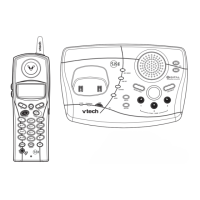
• While phone is not in use, press to display caller ID information.
• While entering names or numbers into memory, press then press CHAN/REMOVE to delete
last character entered.
/VOL+
• While on a call, press to increase the volume. A double beep will sound when you reach the highest
setting.
• While phone is not in use, press to display directory entries.
• While entering names, press twice to add a space.
SELECT
• Press to conrm an entry of operation, or to select highlighted item from menu.
OFF
• During a call, press to hang up. While using menu, press to cancel an operation or exit the menu
display
REDIAL/PAUSE
• Press to view redial number. Press it again to delete the redial number. Press to insert a dialing
pause while entering a number.
PROG
• With the handset in idle (on-hook), press to enter the program setting mode.
Volume
• During a call, press
or
to adjust the listening volume to a comfortable level.
Telephone operation



 To Next Page