EasyManua.ls Logo

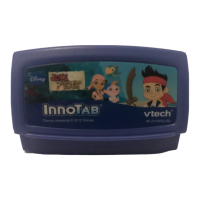
VTech InnoTab Software - Jake and the Never Land Pirates - User Manual

VTech InnoTab Software - Jake and the Never Land Pirates
10 pages
Print Icon
To Next Page IconTo Next Page
Loading...
T
H
E
L
E
A
R
N
I
N
G
A
P
P
T
A
B
L
E
T
Disney elements © Disney
Visit DisneyJunior.com
User’s ManualUser’s Manual

Questions and Answers

  • C
    coxpeterJul 29, 2025
    What to do if my VTech Toy malfunctions when inserting or removing an InnoTab cartridge?
    • S
      Stephanie CookJul 29, 2025
      If your VTech Toy malfunctions when inserting or removing an InnoTab cartridge, disconnect the AC adapter from the main unit or remove the batteries. Then, reconnect the adapter, or reinstall the batteries.

Summary

Introduction

Initial Cartridge Setup

Instructions on how to insert the InnoTab cartridge.

Setup Steps and Device Controls

Select Cartridge Icon on Desktop

Instructions on selecting the cartridge icon on the desktop.

Home Button Operation

Exits the current activity and returns to the InnoTab desktop.

Help Button Operation

Replays instructions or asks for a hint.

Settings and Activity Options

Game Play Descriptions

Game Modes and Creative Activities

Care and Maintenance Guidelines

Important Safety Warnings

Basic Troubleshooting Steps

Technical Support Information

VTech InnoTab Software - Jake and the Never Land Pirates Specifications

General IconGeneral
BrandVTech
ModelInnoTab Software - Jake and the Never Land Pirates
CategoryToy
LanguageEnglish

Related product manuals