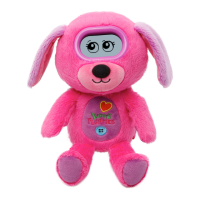
The VTech KidiFluffies Dog is a soft, interactive toy designed to entertain and educate children through various engaging activities. It responds to motion, sound, and touch, offering a personalized experience with fun responses and eye expressions. Children can record their name and birthday, making the toy feel more unique to them.
Function Description
The KidiFluffies Dog serves as a companion that encourages interaction and imaginative play. It features different modes and activities tailored to a child's developmental stage, from stimulating senses in babies to curriculum-related learning for older children. The toy aims to foster creativity, language development, and problem-solving skills through its interactive features.
Usage Features
The KidiFluffies Dog offers a wide range of interactive features and modes:
- Pet Mode: This is the primary mode where children can interact with their KidiFluffies. It responds to speaking and movement with various eye expressions and phrases.
- Trick Commands: In Pet Mode, the KidiFluffies Dog responds to 13 different actions, including:
- Silly Talk: Double-tapping the screen activates Silly Talk mode, where the KidiFluffies repeats what the child says in a silly voice.
- Air Play: Throwing the KidiFluffies into the air elicits fun responses.
- Shake-Shake: Shaking the KidiFluffies gets its attention, and too much shaking can make it dizzy.
- Rock-a-Bye: Rocking the KidiFluffies gently can help it take a nap.
- Give Me A High Five: Pressing the LEFT or RIGHT button prompts the KidiFluffies to ask for a high five.
- The KidiFluffies Song: Pressing the LEFT and RIGHT buttons together plays the KidiFluffies song.
- Tickle-Tickle: Pressing the OK button tickles its tummy, making it laugh.
- Soothe Me: Swiping the forehead shows affection and makes the KidiFluffies feel loved and happy.
- Secret Talk: This mode allows for secret conversations with the KidiFluffies.
- Noise Detector: The KidiFluffies reacts to loud noises it hears.
- Upside Down: Holding the KidiFluffies upside down elicits specific responses.
- Face Down/Face Up: Laying the KidiFluffies face down or on its back triggers different reactions.
- Pet Levels and Status: Children can monitor their KidiFluffies' health, hunger, thirst, and happiness using the Clipboard Item. The toy's eyes and status indicators provide visual cues about its needs.
- Normal: Keep playing games, feeding, and resting to maintain good health.
- Hungry: Give food until it refuses more.
- Thirsty: Give drinks until it refuses more.
- Unhappy: Play Exercise Games or Fun Games to cheer it up.
- Sick: Give medicine.
- Tired/Napping: Swing it gently to help it nap, or let it sleep if it's already napping.
- Sleep Time: During set sleep times, the KidiFluffies will not play games or activities, but the Music Player feature remains accessible.
- Main Menu: Accessible from Pet Mode, the main menu allows navigation to various submenus:
- Care & Items: Provides tools and items for the KidiFluffies, such as food, water, medicine, and a clipboard to check its condition. New items are unlocked as the KidiFluffies levels up.
- Exercise Games: Encourages physical activity and interaction:
- Jumping Fun: Move the KidiFluffies up and down as if jumping.
- Sit-up Mania: Move the KidiFluffies from lying to sitting position.
- Crazy Dance: Move the KidiFluffies in all directions as if dancing.
- Fun Games: Offers engaging mini-games:
- Leaf Catcher: Catch falling leaves by pressing the LEFT or RIGHT buttons.
- Odd One Out: Select the pattern that is different from others.
- Singing Fun: Press buttons in time with notes to make the KidiFluffies sing.
- Relaxing Music Mode: Listen to 10 calming melodies.
- Silly Talk Mode: (Also accessible from Pet Mode) Repeats what is said in a silly voice.
- Clock: Displays the time and allows for setting alarms, time, and date.
- Sound & Display: Adjusts sound volume and display contrast.
- Parent Settings: Customization options for parents:
- Seasonal Greetings: Pre-programmed greetings for holidays like Bonfire Night, Christmas, and Valentine's Day.
- Record Messages: Record personalized messages for the LEFT, RIGHT, and OK buttons.
- Record Child's Name: Record the child's name to be inserted into daily sentences.
- Birthday Setting: Set the child's birthday for a special greeting and kiss.
- Sleeptime Setting: Schedule specific times when the KidiFluffies will be asleep and unresponsive to input (except for Music Mode).
- System Reset: Resets all KidiFluffies data.
Maintenance Features
- Battery Installation: Requires 2 AA (UM-3/LR6) batteries. Instructions are provided for correct installation and replacement.
- Battery Notice: Emphasizes the use of new alkaline or fully charged Ni-MH rechargeable batteries, proper polarity, and safe handling (e.g., removing exhausted batteries, not mixing types, adult supervision for charging).
- Disposal of Batteries and Product: Clear instructions are given for environmentally responsible disposal of batteries and the electronic product, adhering to relevant regulations (e.g., WEEE directive).
- Standby Mode: The KidiFluffies automatically enters Standby Mode after 120 seconds of inactivity to conserve battery life. It can be woken by pressing the LEFT or RIGHT button.
- Troubleshooting Guide: A comprehensive section addresses common issues such as the LCD not displaying, unresponsiveness to sound, motion, or touch, and problems with specific modes like Silly Talk or rocking to sleep. It provides solutions like checking batteries, adjusting interaction methods, and ensuring the KidiFluffies is in the correct condition for certain actions.
- Customer Support: VTech provides contact information for their Consumer Services Department for further assistance with any problems or suggestions.
- Product Registration: Encourages users to register their product online for competitions, news, and expert advice.
- Product Warranty: Details the one-year warranty covering manufacturing defects and provides instructions for returning faulty products.

 Need help?
 General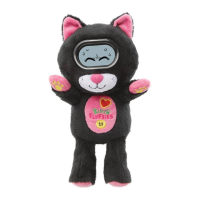



 To Next Page