EasyManua.ls Logo

VTech Peppa Pig Learn & Explore Tablet - User Manual

VTech Peppa Pig Learn & Explore Tablet
12 pages
Print Icon
To Next Page IconTo Next Page
Loading...
Parents' Guide
Peppa Pig Learn & Explore Tablet
©2021 ABD Ltd/Ent. One UK Ltd/Hasbro
IM-546600-004
Question and Answer IconNeed help?

Do you have a question about the VTech Peppa Pig Learn & Explore Tablet and is the answer not in the manual?

Summary

Included in Package and Safety

Package Contents and Safety Notes

Lists included items, warnings about packaging materials, and notes for parents.

Packaging Lock Removal Instructions

Step-by-step guide on how to unlock and remove packaging locks from the toy.

Device Instructions and Battery Management

Battery Removal and Installation

Detailed steps for safely removing old batteries and installing new ones, including safety warnings.

Important Battery Information

Guidelines on correct battery polarity, mixing, disposal, and rechargeable battery precautions.

Battery and Product Disposal

Information on environmentally responsible disposal of batteries and the product.

Product Features and Operation

Core Control Buttons

Explains the On/Off, Volume, Activity, Letter, and Number buttons on the tablet.

Navigation and Music Controls

Details Character, OK & Arrow, and Music On/Off buttons, plus automatic shut-off feature.

Learning Activities

Letter and Number Van Activity

Learn letters, phonics, and numbers with Freddy Fox and Mr. Fox.

Counting Stars Activity

Help Emily Elephant count stars.

Letter Painting Fun Activity

See objects Peppa Pig drew for each letter of the alphabet.

Music Time Activity

Add sound effects to melodies with Candy Cat.

Hide-and-Seek Activity

Find who is hiding with Peppa Pig and friends.

Picnic Time Activity

Guide Daddy Pig to the picnic spot.

Care, Maintenance, and Troubleshooting

Care and Maintenance Guidelines

Instructions for cleaning, storage, and protecting the unit from damage.

Troubleshooting Steps

Steps to resolve common issues like the unit not working or malfunctioning.

Consumer Services and Warranty

Contacting Consumer Services

Information on how to contact VTech for support, problems, or suggestions.

Product Warranty and Guarantees

Details on VTech's warranty policy and consumer guarantees in different regions.

Overview

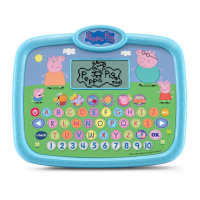
The VTech Peppa Pig Learn & Explore Tablet is an interactive educational toy designed to engage children in learning through fun activities with Peppa Pig and her family. This tablet offers six distinct activities that focus on language, mathematics, logic, and more, providing a comprehensive learning experience in an adventurous setting. The device is designed to be user-friendly for young children, featuring a variety of buttons and an LCD screen for interactive play.

Function Description

The tablet's core functionality revolves around its six educational activities, each accessible via dedicated Activity Buttons. These activities are:

  • Letter and Number Van: This activity helps children learn letters, phonics, and numbers. By pressing the Letter Buttons or Number Buttons, children can interact with Freddy Fox and Mr. Fox to explore foundational literacy and numeracy skills.
  • Counting Stars: In this game, children assist Emily Elephant in counting stars, reinforcing basic counting abilities.
  • Letter Painting Fun: This activity allows children to press a letter button to reveal an object drawn by Peppa Pig that corresponds to that letter of the alphabet, promoting letter recognition and association.
  • Music Time: Children can help Candy Cat host a music party. By pressing any number or character button, they can add fun sound effects to various melodies, fostering creativity and an appreciation for music.
  • Hide-and-Seek: This game encourages problem-solving as children help Peppa Pig find characters hidden behind bushes, engaging them in a classic hide-and-seek adventure with family and friends.
  • Picnic Time: In this activity, children guide Daddy Pig through muddy puddles using the left and right Arrow Buttons to reach the family's picnic spot, developing directional skills and coordination.

Beyond these activities, the tablet includes several key interactive elements:

  • On/Off Button: This button controls the power of the unit, allowing children to easily start and stop play.
  • Volume Button: Children can adjust the sound level to their preference, ensuring comfortable listening during play.
  • Character Buttons: Pressing these four buttons allows children to hear playful phrases from Peppa Pig and her family, adding an immersive and familiar element from the show.
  • OK & Arrow Buttons: The Arrow Buttons are used for navigation on the screen and selecting options, while the OK Button confirms choices, guiding children through the interactive menus.
  • Music On/Off Button: This button allows users to toggle the background music on or off, providing flexibility for different play environments or preferences.
  • LCD Screen: The central display where all activities and interactions are visually presented.
  • Letter Buttons: A set of buttons corresponding to letters of the alphabet, used for letter learning activities.
  • Number Buttons: A set of buttons corresponding to numbers, used for number learning and answering number-related questions.

The tablet also features an Automatic Shut-Off mechanism to conserve battery life. If left inactive for several minutes, the unit will automatically power down. It can be reactivated by pressing the On/Off Button.

Usage Features

The VTech Peppa Pig Learn & Explore Tablet is designed for intuitive use by young children. Its clearly labeled buttons and engaging activities make it easy for children to navigate and learn independently. The character voices and familiar Peppa Pig theme enhance the play experience, making learning enjoyable and relatable. The tablet's portable design allows children to take their learning adventures with them wherever they go.

Maintenance Features

Proper maintenance ensures the longevity and optimal performance of the Peppa Pig Learn & Explore Tablet.

  • Cleaning: The unit should be kept clean by wiping it with a slightly damp cloth. This helps remove dust and grime without damaging the electronics.
  • Environmental Care: It is important to keep the unit out of direct sunlight and away from any direct heat sources to prevent damage to internal components and the screen. The unit should also not be dropped on hard surfaces or exposed to moisture or water, as this can cause significant damage.
  • Battery Management:
    • Installation: Adult assembly is required for battery installation. The unit uses two 'AA' (AM-3/LR6) batteries. For best performance, alkaline batteries or fully charged Ni-MH rechargeable batteries are recommended. Batteries should be inserted with the correct polarity (+ and -).
    • Removal: When the unit will not be in use for an extended period, the batteries should be removed to prevent leakage and damage. Exhausted batteries should also be removed promptly.
    • Mixing Batteries: Do not mix old and new batteries, or different types of batteries (alkaline, standard carbon-zinc, or rechargeable).
    • Rechargeable Batteries: If using rechargeable batteries, they must be removed from the toy before charging and should only be charged under adult supervision. Non-rechargeable batteries should never be charged.
    • Disposal: Batteries should be disposed of safely and not in fire. The crossed-out wheelie bin symbol on products and batteries indicates they should not be disposed of with domestic waste, as they may contain substances harmful to the environment and human health. Chemical symbols (Hg, Cd, Pb) indicate the presence of mercury, cadmium, or lead above specified values. Consumers are encouraged to dispose of products and batteries responsibly at designated collection points or through local council kerbside collections.
  • Troubleshooting: If the unit malfunctions or stops working, a simple troubleshooting process is recommended:
    1. Turn the unit OFF.
    2. Interrupt the power supply by removing the batteries.
    3. Allow the unit to stand for a few minutes.
    4. Replace the batteries.
    5. Turn the unit ON. If the problem persists, installing a brand new set of batteries is advised. For continued issues, contacting VTech's Consumer Services Department is recommended.

By following these guidelines, users can ensure a safe, enjoyable, and long-lasting learning experience with the Peppa Pig Learn & Explore Tablet.

VTech Peppa Pig Learn & Explore Tablet Specifications

General IconGeneral
Age Range2-5 years
Character ThemesPeppa Pig
Item Weight1.2 pounds
Batteries IncludedYes
Screen TypeLCD
Voice OutputYes
Volume ControlYes
Auto Shut-OffYes
Battery TypeAA
Learning ModesMusic
Educational FocusMusic
PowerBattery
TypeEducational Tablet

Related product manuals