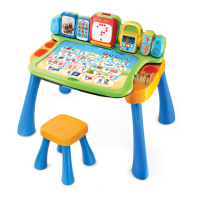
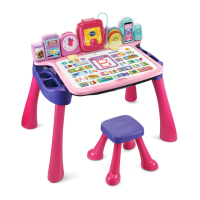
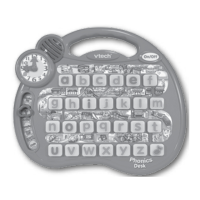
The VTech Phonics Desk is an interactive electronic learning toy designed to entertain and educate children in phonics, letters, numbers, time concepts, and basic vocabulary. It features a 3D light-up letter keyboard, a movable clock hand, and various activity modes to encourage exploration and learning.
Function Description:
The Phonics Desk offers eight distinct activity modes, each designed to engage children in different aspects of early learning:
-
Phonics Fun: In this mode, children can press any of the 26 light-up letter buttons to hear the letter's name, its phonetic sound, a related word, a fun phrase, and a corresponding sound effect. This helps children associate letters with their sounds and build foundational vocabulary.
-
Town Visit: This activity takes children on a virtual tour around a town. At the start of the tour, a light flashes to indicate the starting position. Children then follow flashing lights to discover the next stop and press the corresponding button to continue the tour. This mode encourages observation and listening skills.
-
Find It: In "Find It" mode, the Phonics Desk provides hints to help children locate a specific object or place within the town. Children must then press the correct light-up letter button to answer. This activity promotes problem-solving and listening comprehension.
-
Spelling: This mode focuses on spelling words. The device pronounces a word and then spells it out, with the lights on the letter buttons illuminating in sequence. Children are prompted to press the letter buttons in the correct order to spell the word. Flashing lights guide them to the next letter, reinforcing spelling and letter recognition.
-
Counting: In the "Counting" activity, a number of letter buttons light up. Children are instructed to press these lights one by one to count them until all the lights are off. This helps develop basic counting skills and one-to-one correspondence.
-
Clock Quiz: This mode introduces time-telling concepts. Children are asked to set the clock to a specific time by moving the movable clock hand. This interactive feature helps them learn to read a clock and understand time.
-
Light-Up The Town: This is a fast-paced game where children must press flashing lights as quickly as possible to "light up the town" before their time runs out. This activity enhances reaction time and visual tracking.
-
Music: In the "Music" mode, pressing any letter button plays a melody, and the lights dance along with the music. This provides an enjoyable way for children to interact with the toy and appreciate music. The device includes a "LIGHT-UP MUSIC BUTTON" which, when pressed, plays the sung song "The Wheels on the Bus."
Important Technical Specifications:
- Power Source: The VTech Phonics Desk requires 3 "AA" (UM3/LR6) alkaline batteries for operation. The battery compartment is located on the bottom of the unit.
- Automatic Shut-Off: To conserve battery life, the unit features an automatic shut-off function. If there is no input for several minutes, the Phonics Desk will automatically turn off. It can be turned back on by pressing the ON/OFF button.
- Volume Control: A volume control switch is located at the bottom of the unit, allowing users to adjust the sound level.
- Included in Package: One VTech Phonics Desk unit and one User's Manual.
Usage Features:
- ON/OFF Button: A dedicated button to turn the unit on and off.
- Activity Selector: A sliding switch that allows users to choose from the eight different learning activities.
- Light-Up Letter Buttons: 26 interactive buttons, each representing a letter of the alphabet, that light up and respond to presses. These buttons are central to most activities.
- Object Labels: The Phonics Desk features various object labels around the keyboard, which are likely integrated into the "Town Visit" and "Find It" activities.
- Movable Clock Hand: An interactive clock hand that can be moved to different times, used for learning time concepts and answering questions in "Clock Quiz."
- Light-Up Music Button: A specific button to play music, including the "The Wheels on the Bus" song.
- Melody List: The manual provides a comprehensive list of 26 melodies, each associated with a letter of the alphabet, played in the "Music" mode. Examples include "Animal Fair" for 'a', "Chopsticks" for 'b', "London Bridge" for 'k', and "Twinkle, Twinkle Little Star" for 'x'.
Maintenance Features:
- Cleaning: The unit can be cleaned by wiping it with a slightly damp cloth.
- Storage: It should be kept out of direct sunlight and away from direct heat sources.
- Battery Removal: Batteries should be removed if the unit will not be used for an extended period.
- Handling: The unit should not be dropped on hard surfaces or exposed to moisture or water.
- Battery Installation Guidelines:
- Ensure the unit is OFF before installing batteries.
- Use a coin or screwdriver to open the battery cover.
- Install 3 new "AA" (UM3/LR6) batteries, ensuring correct polarity.
- New alkaline batteries are recommended for optimal performance.
- Non-rechargeable batteries should not be recharged.
- Rechargeable batteries (if applicable) must be removed from the toy before charging and charged under adult supervision.
- Do not mix different types of batteries or new and used batteries.
- Only batteries of the same or equivalent type as recommended should be used.
- Exhausted batteries must be removed from the toy.
- Supply terminals should not be short-circuited.
- The toy should not be connected to more than the recommended number of power supplies.
- Do not dispose of batteries in fire.
- The use of rechargeable batteries is not recommended for this device.
Troubleshooting:
- If the program or activity stops working or malfunctions, users should:
- Turn the unit OFF.
- Remove and then replace the batteries to interrupt the power supply.
- Allow the unit to stand for a few minutes before turning it ON again.
- If the issue persists, replace with a new set of batteries.
- Demo Tag: If the product is still in demo mode after unpacking, the demo tag located at the bottom of the unit should be removed to activate normal play mode.
- For persistent problems, VTech Consumer Services Department can be contacted for assistance.
The VTech Phonics Desk is designed to be a durable and engaging educational tool, providing a multi-sensory learning experience through its interactive features, sounds, and lights.

 Need help?




 To Next Page
 General