EasyManua.ls Logo

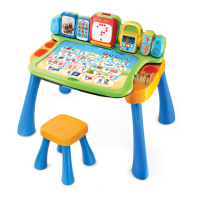
VTech Touch & Learn Activity Desk - User Manual

VTech Touch & Learn Activity Desk
14 pages
Print Icon
To Next Page IconTo Next Page
Loading...
© 2014 VTech
Printed in China
91-002914-000
US
User’s Manual
Touch & Learn
Activity Desk
TM

Other manuals for VTech Touch & Learn Activity Desk

Questions and Answers

  • J
    jacob22Jul 28, 2025
    What to do if VTech Touch & Learn Activity Desk gives an incorrect response?
    • W
      William ReedJul 28, 2025
      If your VTech Toy gives an incorrect response, try these steps: First, reload the batteries to reset the Touch & Learn Activity Desk. If that doesn't work, the batteries may be exhausted, so replace them with a new set. Also, humidity may cause interference, so ensure the desk is in a dry area.
  • R
    robert32Aug 6, 2025
    What to do if the VTech Toy Activity Card is not recognised?
    • C
      carrillochristopherAug 6, 2025
      If the VTech Toy Activity Card is not being recognized, ensure that only one Activity Card is inserted into the slot. Also, check that the Activity Card is the only object in the slot and that it is fully inserted.
  • D
    David BrownAug 17, 2025
    What to do if VTech Touch & Learn Activity Desk Activity Page Area has no response?
    • J
      Jason PerezAug 17, 2025
      If the main unit of your VTech Toy is on but the Activity Page Area has no response, first make sure the LED Display is securely attached to the main body. Also, ensure you are touching the Activity Page Area with your finger and are not using the Stylus or other objects.

Summary

Introduction and Package Contents

Assembly Instructions

Provides step-by-step guidance for adult assembly of the desk and stool, along with safety notes.

Product Features Overview

Interactive Page and Card Usage

Explains how to interact with the activity page area, modes, and insert activity cards for various learning games.

Getting Started Guide

Battery Installation and Notices

Instructions for properly installing batteries and important safety precautions for battery usage.

Activity Card Content

Troubleshooting and Support

Common Problems and Solutions

Addresses issues like the unit not turning on, card recognition errors, and incorrect responses with possible fixes.

Care and Maintenance

Guidelines for storing, cleaning, and maintaining the activity desk and its components.

Technical Support Contact

Information on how to get help, including online resources and customer service phone numbers.

VTech Touch & Learn Activity Desk Specifications

General IconGeneral
CategoryToy
ManufacturerVTech
Country of OriginChina
LanguageEnglish
Number of Activity Pages5
Recommended Age2-5 years
FeaturesInteractive desktop, LED display, music player
Power Source3 AA batteries
Educational FocusLetters, Numbers, Colors, Shapes, Music
TypeInteractive Learning Desk

Related product manuals