12
13
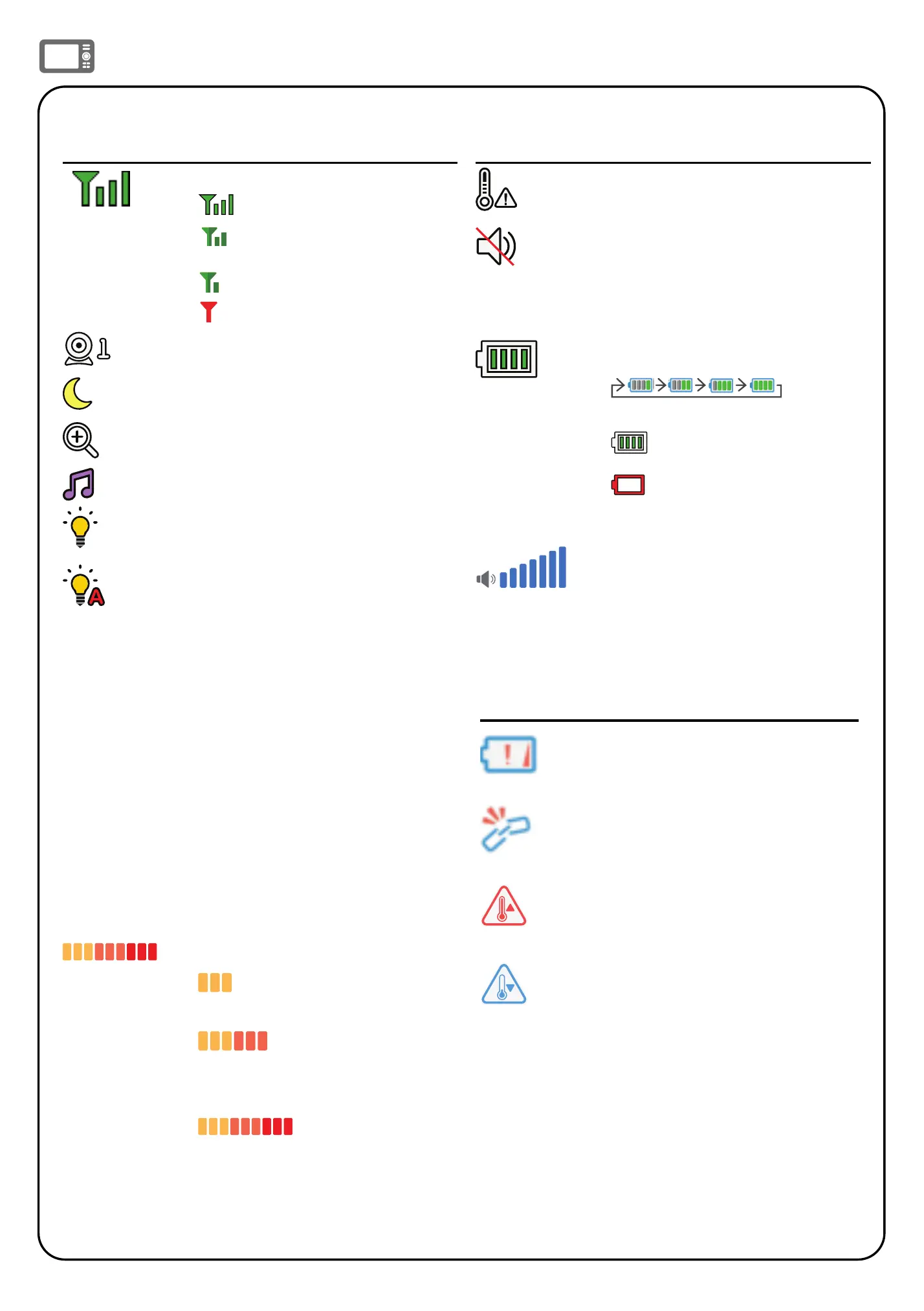
Parent unit icons (Cont’d)
Status icons
Connection status
•
- Strong signal strength.
• - Moderate signal
strength.
• - Low signal strength.
• - Weak signal strength.
Current view status
Night vision - On
Zoom - On
Lullaby - On
Night light - On
Night light - Auto-on
• Color icon indicates the night
light is set to auto-on, and is
currently turned on by sound
activation.
• Gray icon indicates the night
light is currently off but is set
to auto-on. Night light will turn
on when sound is detected by
the baby unit.
o
F or
o
C
Real-time temperature
• Real-time temperature
detected by the baby unit in
Fahrenheit (
o
F) or Celsius (
o
C)
(e.g. 57
o
F or 14
o
C).
9-level sound indicator
•
indicates low sound level
detected by the baby unit.
• indicates moderate
sound level detected by the
baby unit.
• indicates high
sound level detected by the
baby unit.
Status icons
Temperature alert tone - On
Mute alert
• Displays when the parent unit
speaker volume is set to off.
• Displays when the parent unit
is talking to the baby unit.
Battery status
•
animates
when the battery is charging.
• indicates battery is fully
charged.
•
indicates battery is low
and needs charging.
Speaker volume - displays the
parent unit speaker volume
level while adjusting.
Alert icons
• Displays when parent unit’s
battery is low and needs
charging.
• Displays when connection
between parent unit and
baby unit is lost.
• Baby unit detects
temperature reaches or
exceeds the set maximum.
• Baby unit detects
temperature is at or is lower
than the set minimum.
Sound sensitivity and sound activation
Sound activated screen and audio
Adjust sound detection sensitivity
The parent unit screen automatically
stays off to save power when the baby
unit does not detect any sounds. When
Sound activation is turned on, once the
baby unit detects sounds that are louder
than the chosen sound sensitivity level,
the parent unit screen and speaker turn
on automatically. The parent unit will then
turn off again after 50 seconds of no sound
detection.
Note
• If you have muted the parent unit speaker, only the parent unit screen will turn on when a sound is
detected.
When you turn on Sound activation, you can adjust the baby unit’s VOX Sensitivity to detect
sounds and turn on the parent unit when its screen is switched off or dimmed.
When the baby unit detects sounds that exceed certain levels, the parent unit screen will
automatically turn on and the baby unit will transmit the detected sounds to the parent unit.
You will then be able to see and hear your baby.
If you have turned on the Night light Auto-on feature, it will turn on automatically to sooth
your baby.
If you turn off Sound activation, you will hear sounds from the baby unit all the time,
even
when the parent unit screen is switched off.
VOX Sensi-
tivity level
Level 5
(Highest)
Level 4
(High)
Level 3
(Medium)
Level 2
(Low)
Level 1
(Lowest)
Description
(Default setting)
The parent unit
screen and
speaker turn on
for very quiet
sounds, includ-
ing background
noises from your
baby’s room.
The parent
unit screen
and speaker
turn on for soft
babbling and
louder sounds
from your baby.
The parent unit
remains quiet
when your
baby sleeps
soundly.
The parent unit
screen and
speaker only
turn on for loud
babbling and
louder sounds
from your baby.
The parent unit
remains quiet
when your baby
makes soft
sounds.
The parent unit
screen and
speaker only
turn on for cry-
ing and louder
sounds from
your baby. The
parent unit
remains quiet
when your
baby makes
soft sounds.
The parent
unit screen
and speaker
only turn on
for loud crying
or screeching
sounds from
your baby. The
parent unit
remains quiet
when your baby
makes soft
sounds.


 To Next Page
 Loading...