VXi V175 User Guide
PAGE 12
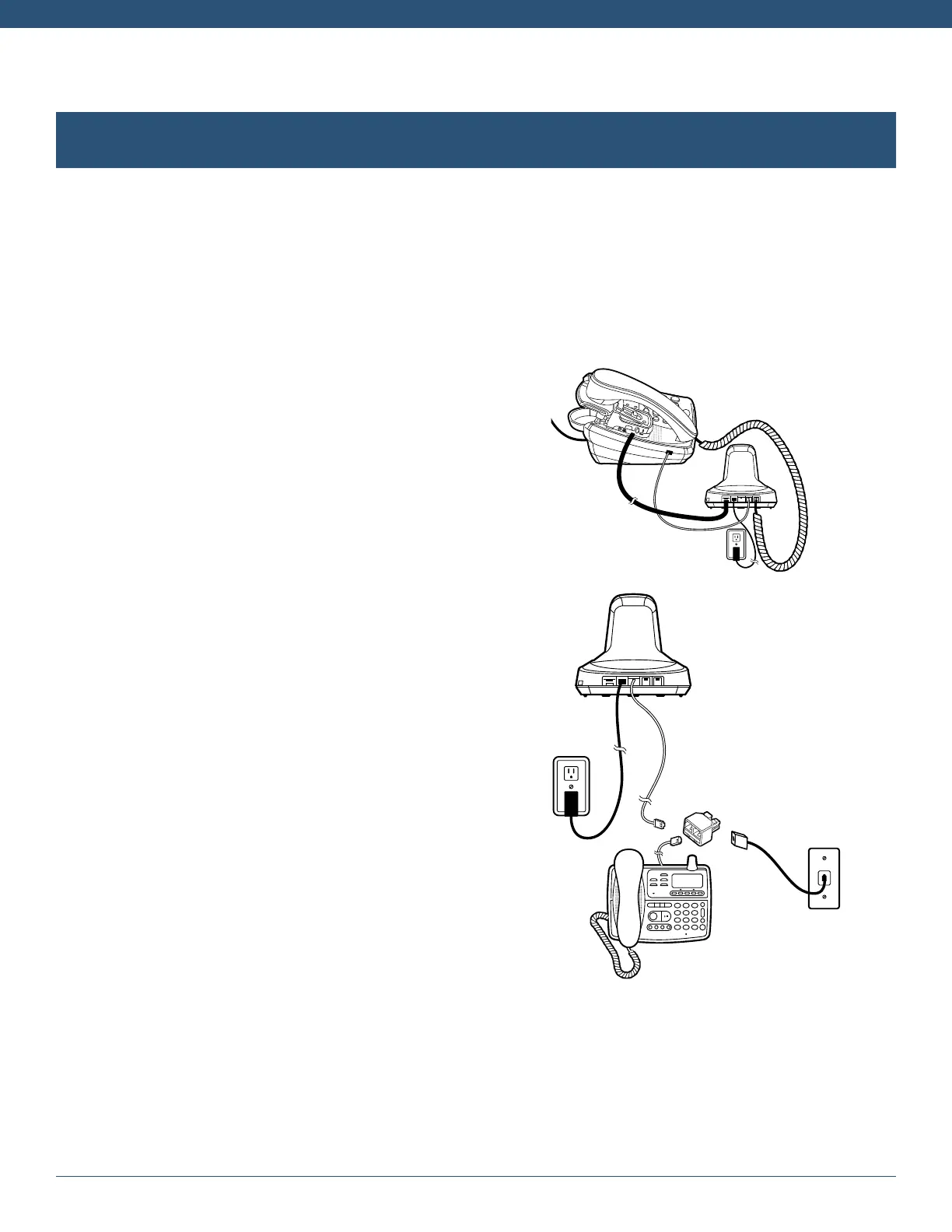
Office Phone with EHS (sold separately)
1. Remove the panel from the bottom of the base.
2. Connect the base jack cable to the headset port of the phone and configure as described above.
3. Snap the EHS onto the base unit.
4. Connect the EHS cable to the EHS/lifter port on the base station. Refer to the EHS setup instructions for
further installation details.
Office Phone with L50 Lifter (sold separately)
1. Connect the base jack cable to the handset port of the
phone.
2. Plug the phone handset into the handset port on the base.
3. Check “Configuration and Make a Test Call” (see above).
4. Attach the L50 Lifter to your phone. Refer to the L50
user’s guide for lifter setup and adjustment details.
Home (Analog) Phone
1. Remove the panel from the bottom of the base.
2. Connect the telephone line cord (red flag) to the “Tel
Wall Jack Port” (red dot) on the base. Plug the other
end of the cord into the line splitter.
3. Plug the line splitter into the telephone wall jack.
4. Connect the analog (home) phone to the other port of
the line splitter.
5. Replace the panel on the bottom of the base station.
6. Check “Configuration and Make a Test Call”:
• Make sure the red Mode 1 LED on the base station
is lit. If the green Mode 2 LED is lit, press the mode
button on the side of the base to change to the
correct mode.
• Lift the phone’s handset (if cordless, activate
handset).
• Press the call control button on the headset and
listen for a dial tone in the headset. If there is no dial
tone, or the call is unclear, slide the compatibility
switch from A-G, one setting at a time until the dial
tone/call is clear.
CONNECT TO YOUR PHONE (continued)



 To Next Page