35
35
Index
Contents
Index
Contents
CUSTOMIZING THE POP-UP MENU
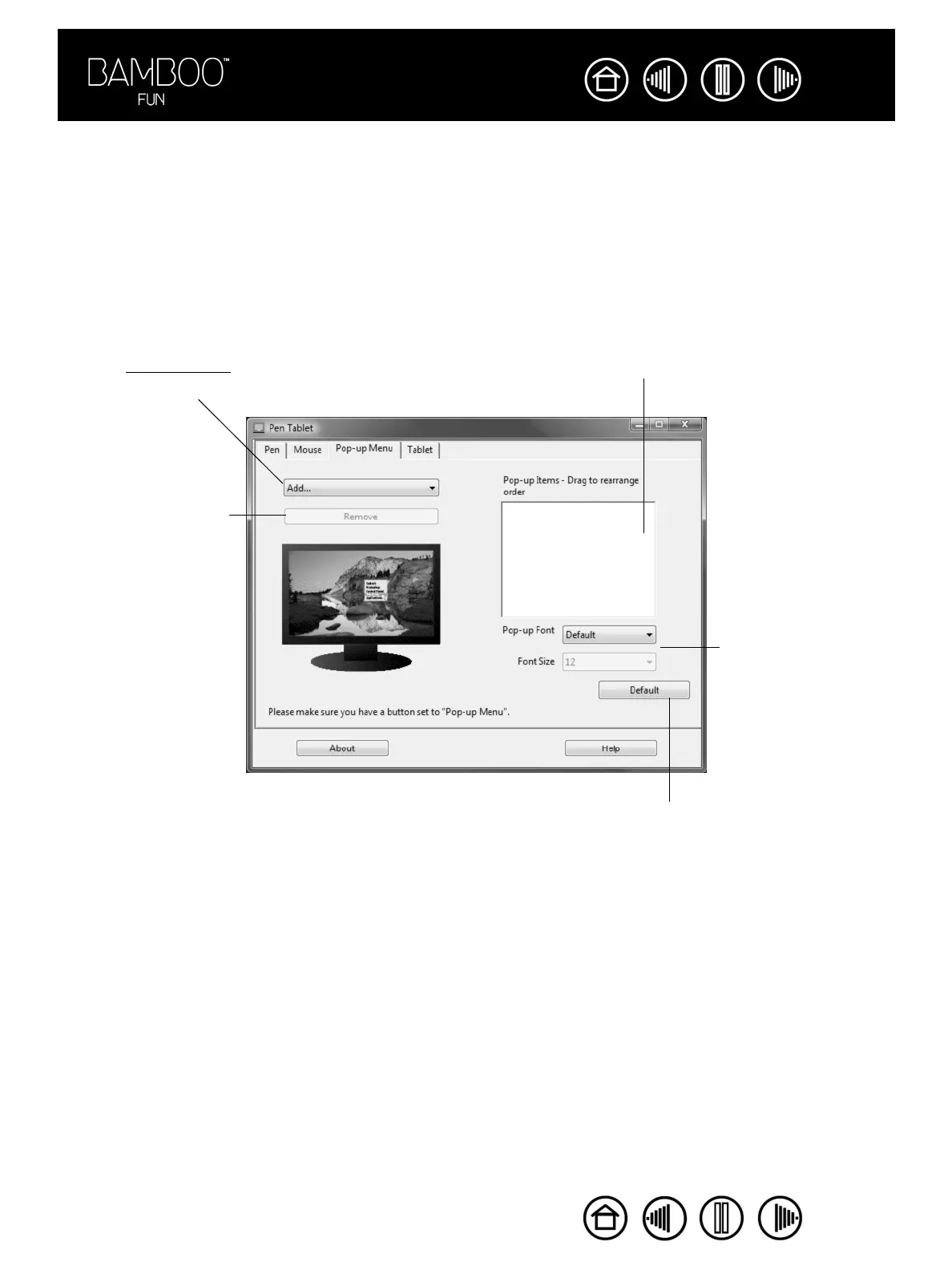
Use the POP-UP MENU tab to define the available functions on the Pop-up Menu list.
To display the Pop-up Menu, set a tool button to the POP-UP MENU function. Whenever you press that
button, the Pop-up Menu is displayed. Select from available items in the Pop-up Menu by clicking on them.
To close the Pop-up Menu without making a selection, click outside of the Pop-up Menu.
Displays a list of functions that
have been added to the Pop-up
Menu. To change the order of an
item, drag it to a new location.
Double-click on an item to make
edits.
Sets the FONT and
FONT SIZE of the Pop-
up Menu.
Returns all tab settings to their
default values.
Important: This action will
delete all Pop-up Menu
items that have been
defined.
Removes the selected
item from the list.
Select a button function
to add to the Pop-up
Menu list.











 To Next Page