Need help?
Do you have a question about the WACOM INTUOS 3 and is the answer not in the manual?
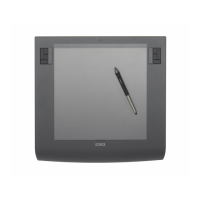
Explains the physical components, ExpressKeys, and Touch Strips of the Intuos3 tablet.
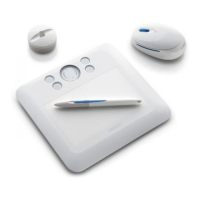
Introduces the Intuos3 Grip Pen, mouse, and optional accessories like Airbrush and Art Pen.
Offers guidance on arranging your computer setup for optimal comfort and productivity.
Covers fundamental pen techniques: holding, pointing, clicking, dragging, and using the side switch.
Details how to hold, point, click, drag with the pen, and use the side switch.
Explains how to leverage pressure-sensitivity and tilt for expressive digital drawing.
Provides an exercise to improve pen control and cursor alignment.
Details the functionality and customization options for the Intuos3 mouse.
Details the features and use of the Intuos3 Airbrush and Art Pen.
Describes how to interact with the tablet's active area using ExpressKeys and Touch Strips.
Guides on assigning custom functions to the tablet's ExpressKeys.
Details how to configure Touch Strips for zooming, scrolling, or custom actions.
Instructions on how to open the Wacom Tablet control panel for customization.
An overview of the Wacom Tablet control panel's layout and features.
Covers adjusting pen tip feel, double-click, eraser, pressure, tilt, and tool buttons.
Explains how to customize pen tip sensitivity, pressure, and double-click settings.
Details how to set the sensitivity and responsiveness of the pen's eraser.
Details how to assign various functions to the pen's side switch and tip.
Explains how to adjust the pen's tilt sensitivity for controlling brush characteristics.
Covers customizing mouse buttons, fingerwheel, and mouse mode settings.
Guides on assigning functions to the Intuos3 mouse buttons and fingerwheel.
Details how to configure the relationship between tablet movement and screen cursor.
Explains the differences between Pen mode and Mouse mode for cursor control.
Covers defining screen areas and tablet areas for mapping.
Describes how the tablet maps across multiple display setups.
Covers customization of ExpressKeys, Touch Strips, and the Pop-up Menu.
Guides on assigning custom functions to the tablet's ExpressKeys.
Details how to configure Touch Strips for zooming, scrolling, or custom actions.
Guides on adding and arranging functions for the Pop-up Menu.
Explains how to create and manage custom tool settings tailored for specific applications.
Provides steps to create custom tool settings for individual applications.
Details the process for removing custom application settings.
Outlines recommended steps for diagnosing and resolving tablet problems.
Provides procedures to verify the correct operation of the tablet and its accessories.
Explains how to verify the functionality of ExpressKeys and Touch Strips.
Guides on testing the Intuos3 pen's features and the mouse's buttons and wheel.
Lists common problems and provides solutions for general, Windows, and Macintosh systems.
Provides information on how to get help from Wacom support, including required details.
Guides users on downloading the latest Wacom tablet drivers for compatibility.
Offers instructions on cleaning and properly storing the Intuos3 tablet and input tools.
Details the steps for installing and uninstalling the Wacom tablet driver software.
Covers changing tablet mode and installing multiple tablets.
Explains the Intuos3 Lens Cursor, its customization, and testing procedures.
Guides on configuring Intuos3 for AutoCAD, including digitizer and menu setup.
Details steps for setting up AutoCAD with Intuos3 as a digitizer.
Explains how Intuos3 integrates with Windows Vista's pen input and digital ink capabilities.
Lists detailed technical specifications for all Intuos3 tablet models and input tools.
Provides resources for software compatibility information and ordering accessories.
Covers FCC, IC, CE notices and information on radio/television interference.
Details the software license agreement and the product's limited warranty terms.
Outlines the process for obtaining warranty service within the USA and Canada.
 General
| Model | Intuos 3 |
|---|---|
| Pressure Levels | 1024 |
| Resolution | 5080 lpi |
| Connection | USB |
| Compatibility | Windows, Mac |
| Technology | Electromagnetic Resonance |
| Touch Strip | Yes |
| Power | USB Powered |
| ExpressKeys | Yes |
| Tilt Sensitivity | 60 degrees |
| Report Rate | 200 pps |
| Dimensions | Varies by model |
| Weight | Varies by model |
| Active Area | 6" x 8" |








 To Next Page