8
WAFERLOCK CORPORATION
Step 1
Step 2
Step 3
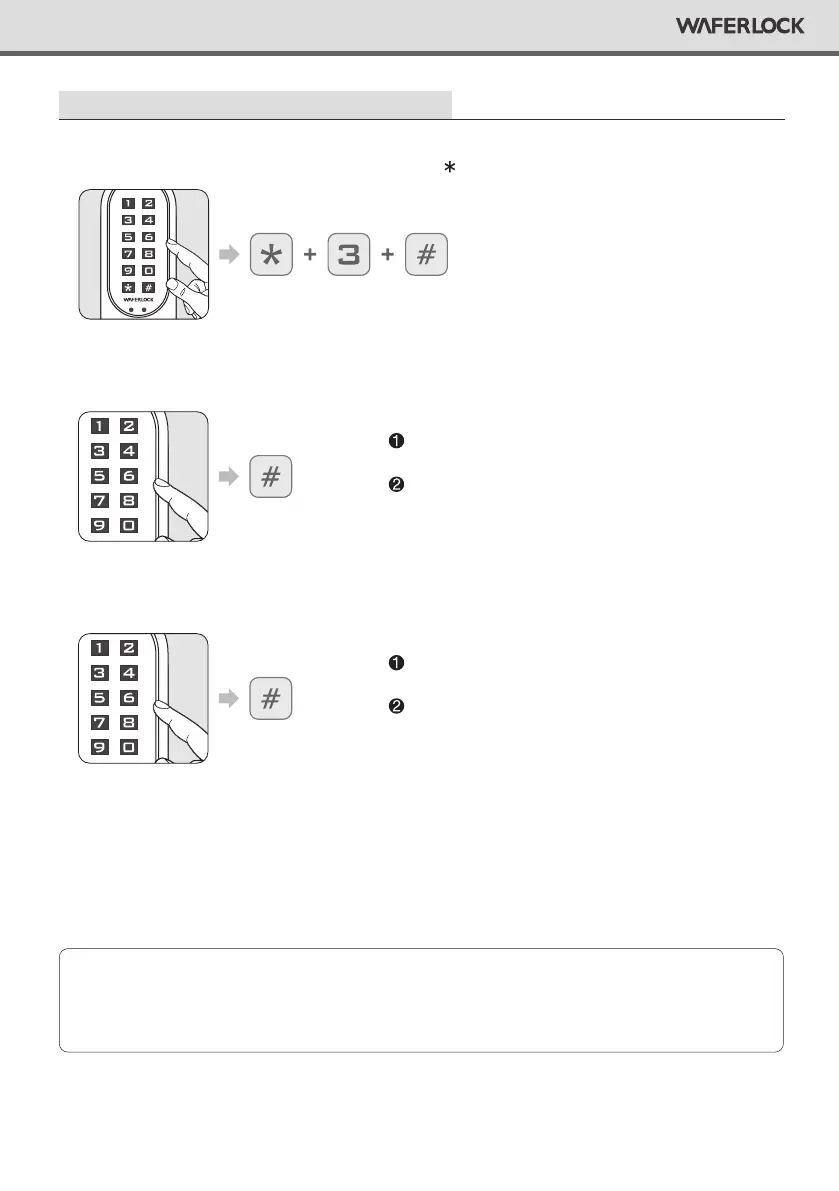
Press any button to activate the keypad, then press 3 #.
Enter current Master Pin Code, then press #.
Re-enter Master Pin Code, then press #.
Delete All User (Cards / Tags / Pin Codes) Reset the lock to default
Correct Master Pin Code: 1 beep followed by green
light ashing 1 time.
Incorrect Master Pin Code: 2 beeps followed by red
light ashing 2 times, then standby.
Correct Master Pin Code: 1 beep followed by green
light ashing 1 time.
Incorrect Master Pin Code: 2 beeps followed by red
light ashing 2 times, then standby.
• When all User Card and Pin Code are deleted, the lock will be reset to default setting.
Master Pin Code will be reset to 123456.
• If the lock was in Dual Mode or Toggle Mode, it will also be set back to Standard + Single Mode.
Note


 To Next Page