• Toggle Mode: the lock will switch between “Always Open” and “Always Close” when a valid PIN
Code is entered to the lock, or a valid user card is tapped to the reader.
Note
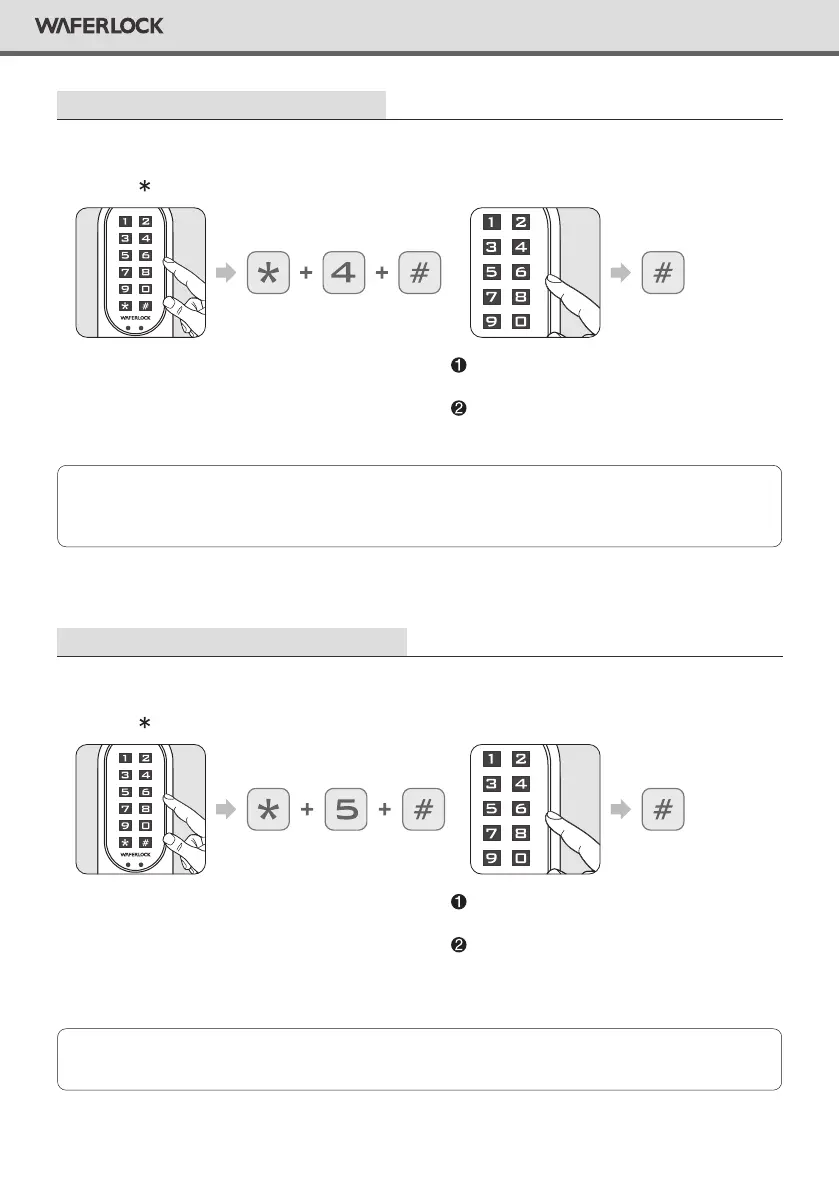
Set Up The Lock As Toggle Mode
Step 1
Press any button to activate the keypad,
then press 4 #.
Correct Master Pin Code: 1 beep followed
by green light ashing 1 time.
Incorrect Master Pin Code: 2 beeps followed
by red light ashing 2 times, then standby.
Step 2
Enter current Master Pin Code, then press #.
• After setting the door as Standard Mode, The lock will be set from manual locking to automatic.
Note
Set Up The Lock As Standard Mode
Step 1
Press any button to activate the keypad,
then press 5 #.
Correct Master PIN Code: 1 beep followed
by green light ashing 1 time..
Incorrect Master Pin Code: 2 beeps followed
by red light ashing 2 times, then standby.
Step 2
Enter current Master Pin Code, then press #.
9
WAFERLOCK CORPORATION


 To Next Page