5
WAFERLOCK CORPORATION
STANDALONE MODE PROGRAMMING INSTRUCTION
• When programming a new user card or new pin code, it will create a 3-digit (001, 002, 003...)
“Serial Number” inside lock's memory. Please write down this serial number.
• When performing deleting function, this serial number will be needed. Please use Serial No. /
Name List page in last pages as a note to copy down the serial number for the user.
Note
Program New Users Card / Tags
Step 1
Step 2
Step 3
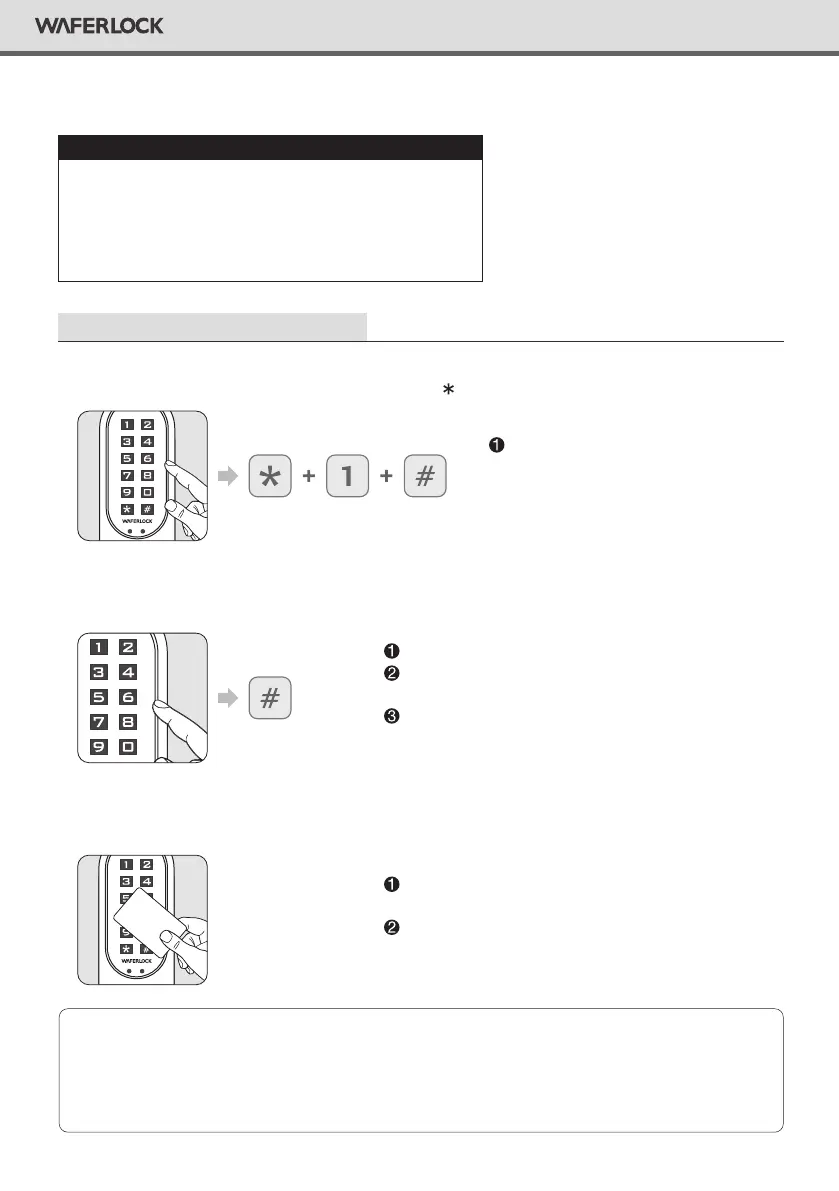
Press any button to activate the keypad, then press 1 # to program new users.
Enter Master Pin Code, then press #.
Tap new user card to the reader.
Default Master Pin Code is 123456.
Correct Master Pin Code: 1 beep followed by green
light ashing 1 time.
Incorrect Master Pin Code: 2 beeps followed by red
light ashing 2 times, then standby.
If the lock has been programmed
with 250 users already, 2 beeps
followed by red light ashing 2
times, then standby.
If user card/tag is programmed: 1 beep followed by
green light ashing 1 time, then standby.
If a user card/tag card already exists, 2 beeps followed
by red light ashing 2 times, then standby.
User
Standalone Mode programming functions
(Master Pin Code) are NOT available after
the lock is paired with mobile App!
If you would like to use Standalone Mode, please
unpair the lock via WAFERKEY App.
Please remember to change
Master Pin Code (Default is 123456),
referring to the instruction on P03.
WARNING


 To Next Page