6
WAFERLOCK CORPORATION
• When programming a new user card or new pin code, it will create a 3-digit (001, 002, 003...)
“Serial Number” inside lock's memory. Please write down this serial number.
• When performing deleting function, this serial number will be needed. Please use Serial No. /
Name List page in last pages as a note to copy down the number for the user.
Step 1
Step 2
Step 3
Step 4
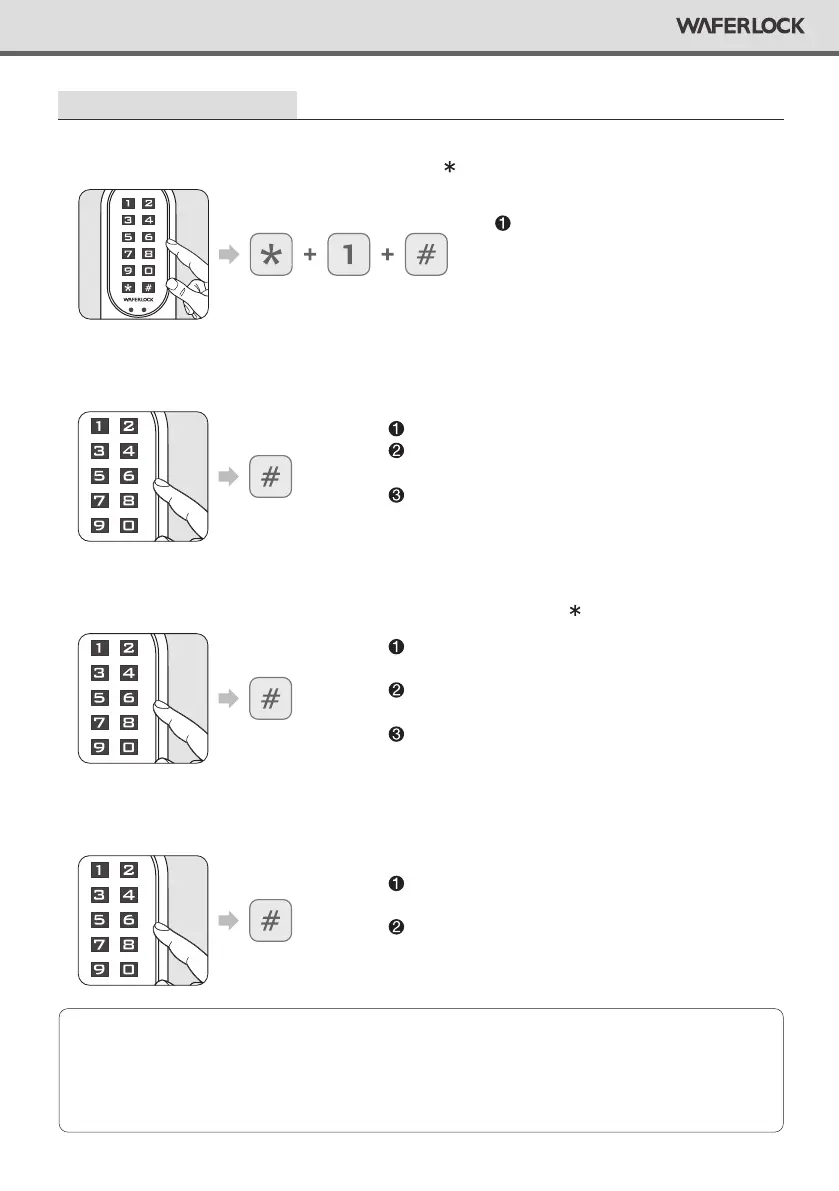
Press any button to activate the keypad, then press 1 #.
Enter Master Pin Code , then press #.
Enter 4~6 digits, then press # (0~9 only, it does not include Pin Code # sign).
Re-enter the new 4~6 digits again, then press #.
Program New Pin Code
Default Master Pin Code is 123456.
Correct Master Pin Code: 1 beep followed by green
light ashing 1 time.
Incorrect Master Pin Code: 2 beeps followed by red
light ashing 2 times, then standby.
If enter less than 4 digits or over 6 digits, 2 beeps
followed by red light ashing 2 times, then standby.
If code already exists, 2 beeps followed by red light
ashing 2 times, then standby.
If code is programmed, 1 beep followed by green light
ashing 1 time.
If the code does not match rst code you entered, 2
beeps followed by red light ashing 2 times, then standby.
If the code matches, 1 beep followed by green light
ashing 1 time.
Note
If the lock has been programmed
with 250 users already, 2 beeps
followed by red light ashing 2
times, then standby.


 To Next Page