44
Pro Dry Instruction Manual | Walker Filtration | www.walkerltration.com
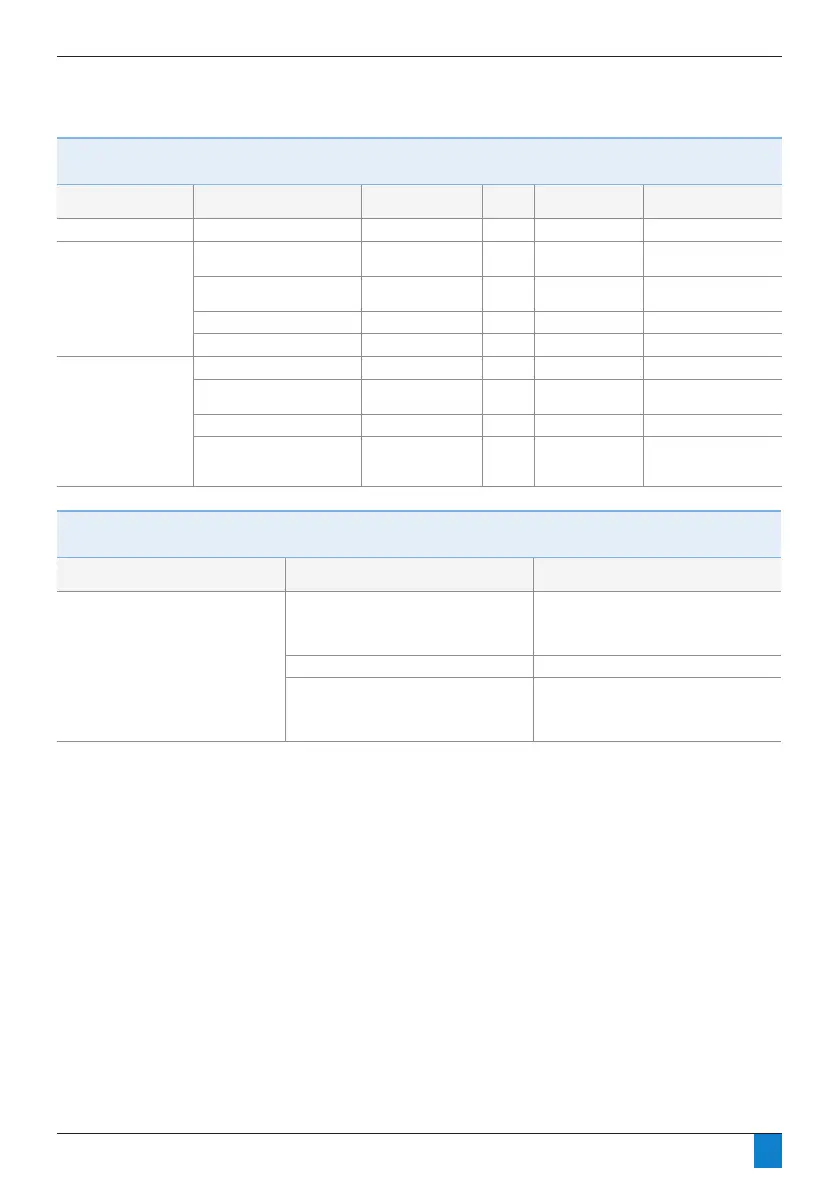
Section 8: Troubleshooting
Troubleshooting: Electrical
Problem
Possible Cause Display Priority Location Action
No dryer function No power supply None - - Check supply
Incorrect dryer
operation
Left solenoid open or short
circuit
Flashing red P1 X LED Replace solenoid valve
Right solenoid open or short
circuit
Flashing red P1 Y LED Replace solenoid valve
Controller fault Flashing red P2 POWER LED Replace controller
Low power fault Continuous red P1 POWER LED Check supply
Drain not operating Energy Management active None - - Check installation
Drain solenoid open or short
circuit
Flashing red P1 Z LED Replace solenoid valve
Controller fault Flashing red P2 POWER LED Replace controller
Tube connections from filter
into dryer and from filter to
drain reversed
None - - Reverse tubes
Troubleshooting: Energy Management
Problem
Possible Cause Action
Dryer does not enter Energy
Management when switching device is
activated and/or Dryer does not enter
Energy Management when EM contacts
are opened.
Shorted or incorrect device wiring Remove external wiring from the dryers EM
contacts and place jumper between pins 1
& 2. To test with Energy Mangement not
connected.
Faulty switching device Consult device manufacturer
Recent cartridge change, where the control
does not have a minimum of 6 hours on
the ‘Service hours from new’ found on the
dryer’s main software window
Allow dryer to be energised for 6 hours



 To Next Page