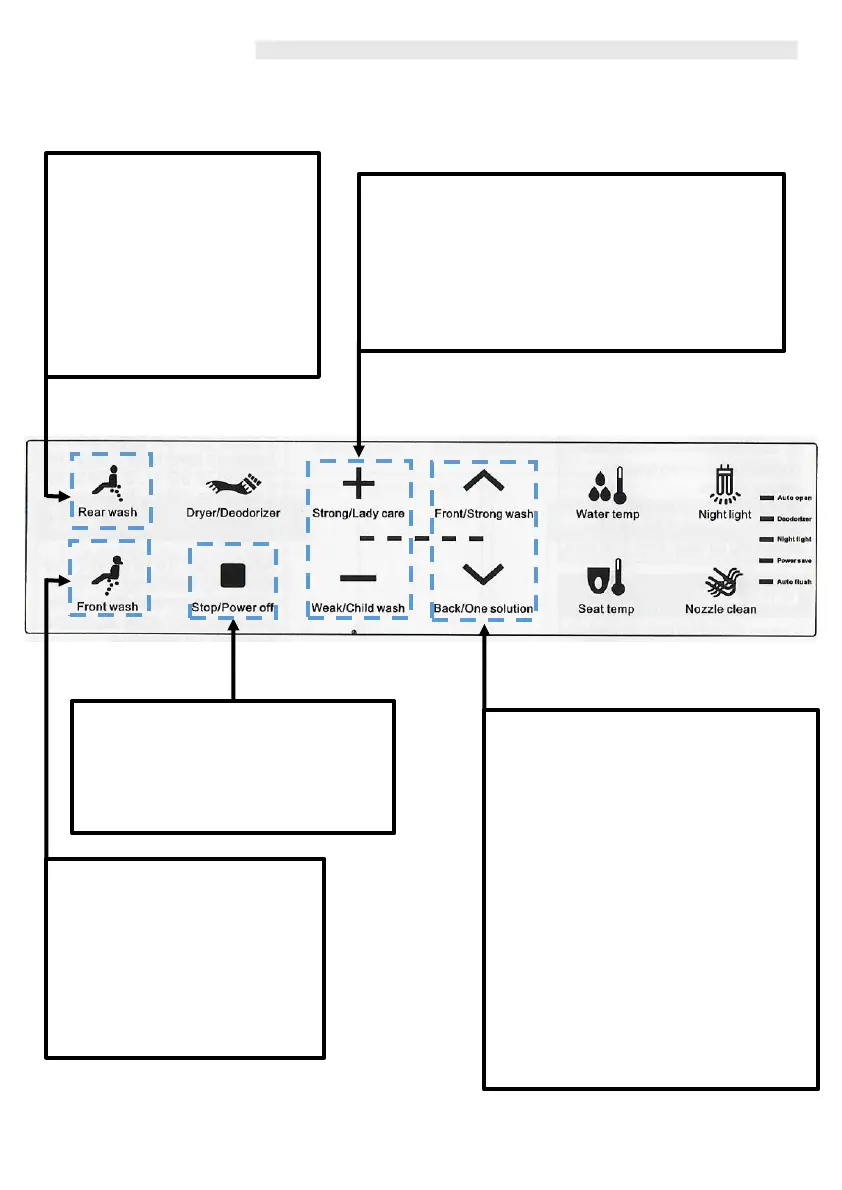
Operation
Front Wash / Oscillating
When you are seated and press
this button, this activates the
feminine wash. The nozzle
comes out and sprays water on
the feminine area. Press this
button again and the nozzle will
move forwards and backwards.
Rear Wash / Oscillating
When you are seated and press
this button, this activates the
posterior wash. The nozzle
comes out and sprays water on
the users posterior area. Press
this button again and the
nozzle will move forwards and
backwards.
Nozzle position
Adjust nozzle position using forward
or backwards button according to
your preference and convenience
during washing. Please note that
during the ‘oscillation motion’ the
adjustment of the nozzle will not be
possible.
Dryer Position
When the Dryer Function is in use,
this will also adjust the Dryer position
to the users preference. Please note
that under the ‘movable’ dryer
mode, the dryer adjustment can not
be operated manually.
7
Stop
All currently operating functions will
stop by pressing this button. Press
and hold this button for 3 seconds
and ‘Standby Mode’ will be activated.
Water Pressure
While cleansing function is operating, press the
`Strong/Lady Care‘ to increase pressure and
‘Weak/Child Wash’ to decrease pressure. There are
4 pressure levels from ‘LOW’ to ‘HIGH.’



 To Next Page