4
Start-Up Procedure
Placing unit into service
Normal
Operation
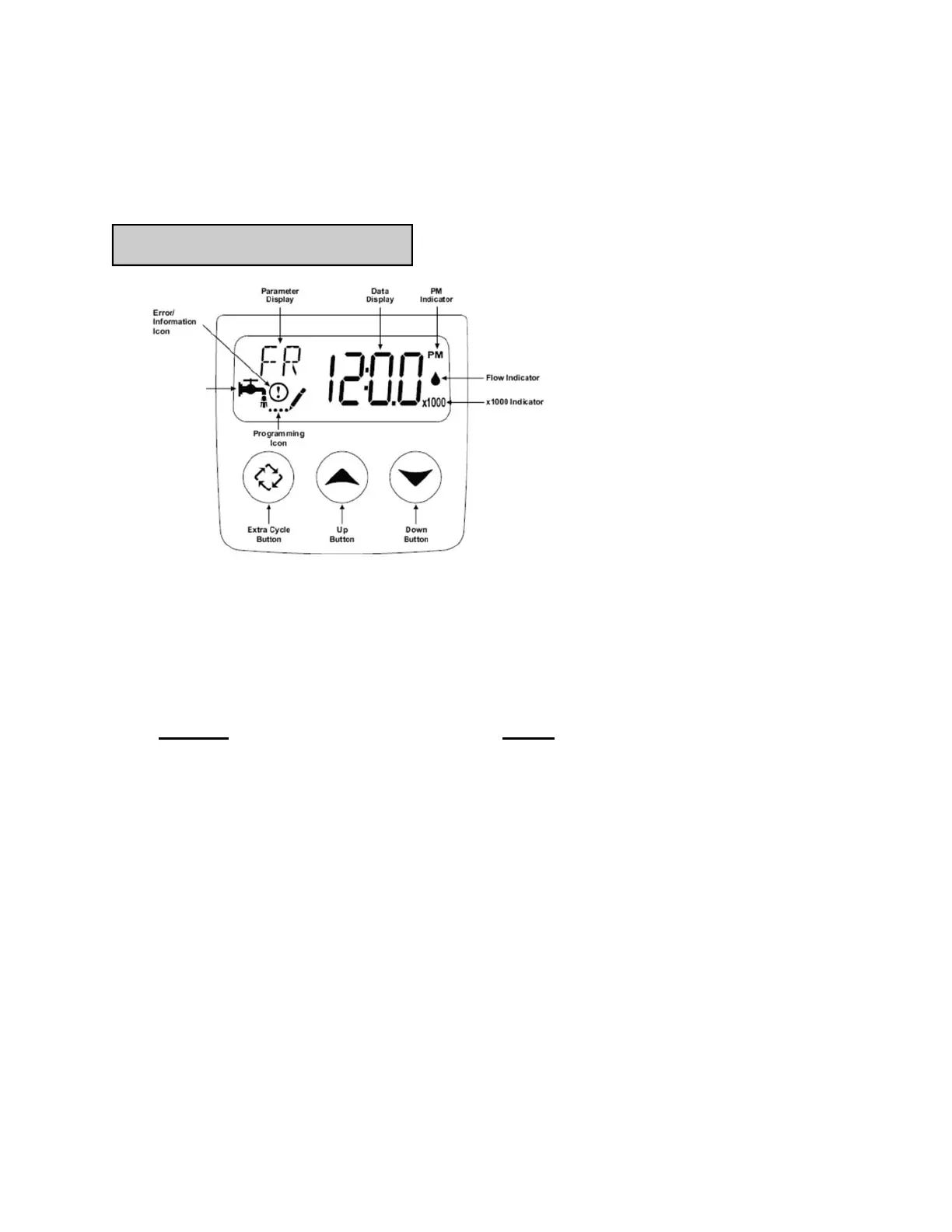
Mode Icon
While in service, the Data Display alternates between time of day,
volume remaining or days to regeneration.
The Flow Indicator flashes when outlet flow is detected.
The Faucet Icon flashes if a regeneration cycle has been queued.
1. Fill the mineral tank with water
Keep ELEMENT33 in BYPASS
Press and hold the extra cycle button for 5 seconds, display will indicate BW, Backwash
cycle.
Partially open the bypass valve so that water Slowly begins to enter the resin tank. Allow
water to flow for 5-10 minutes. This will allow the media in the tank to become saturated.
Fully Open bypass valve to the service position.
Push extra cycle button once and let go, display will indicate the normal operation mode
icon.
Push extra cycle button for 5 seconds, this will start a manual regeneration from start-to-
finish. This will take approximately 12 minutes.
Start-up procedure is now complete.
The unit is now pressurized with water and ready for service.
Proceed to setting current time of day.


 To Next Page