®
Installation Guide - NiMH to Lithium
Need Help? Contact Customer Care at (732) 967-9888
Upgrading the Pool Blaster® MAX Li/MAX Li CG Motor Box
4
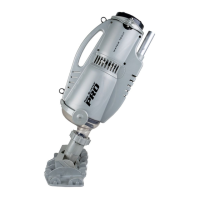
STEP 5: Remove the ve (5) screws that hold the
funnel to the motor box and separate the motor box
from the funnel. Place screws to side.
STEP 6: Place new motor box on table with impeller
side up. Place funnel on top of motor box (pole
should be facing you). Line up screw openings on
funnel with screw openings on motor box. Insert
ve (5) previously set aside screws into openings and
tighten with drill or screwdriver.











 To Next Page