Programming Instructions
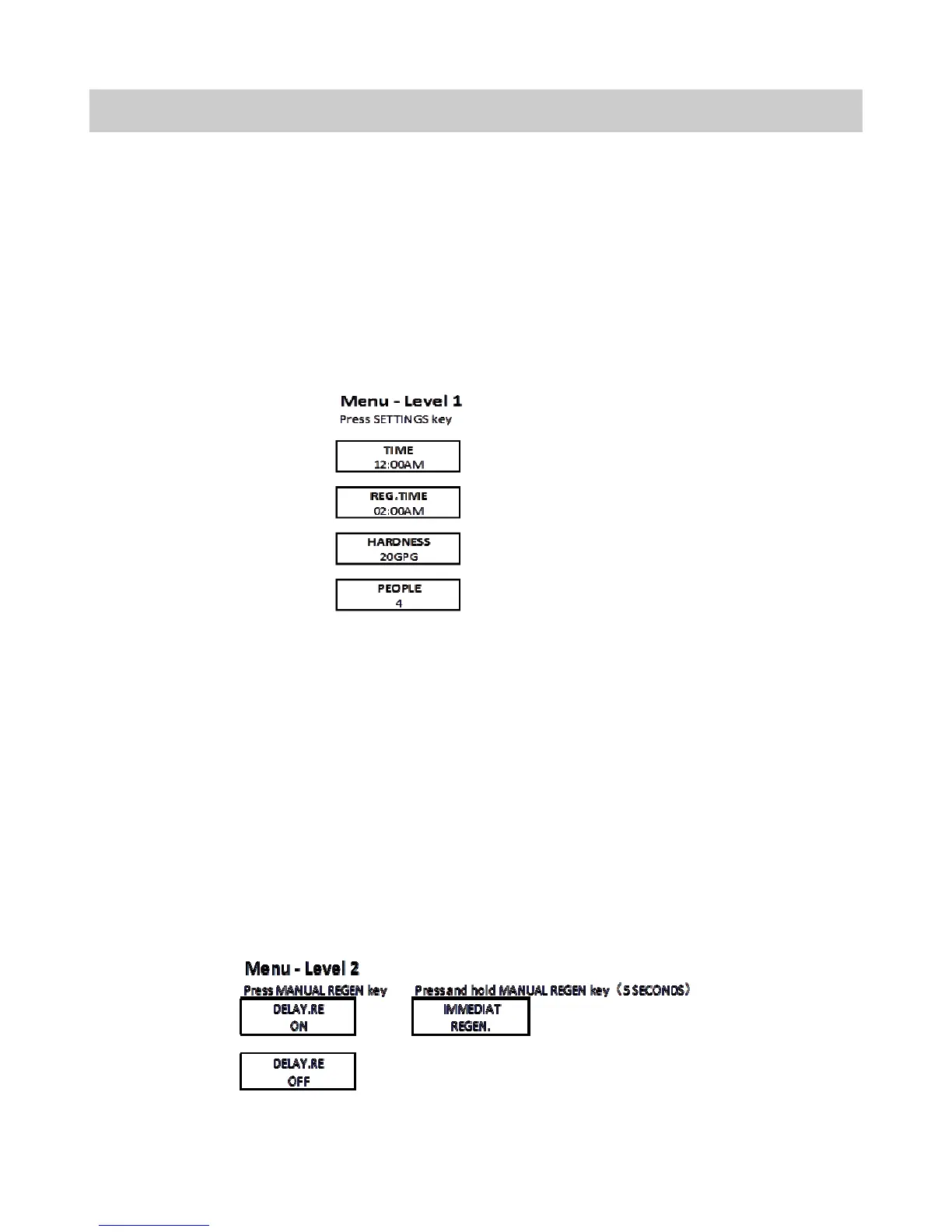
Manual Regeneration (Step / Cycle Valve)
If screen is locked, press and hold SETTINGS for 3 seconds to unlock. To initiate an imme-
diate regeneration, press and hold the MANUAL REGEN key for 5 seconds. The valve will
immediately start into manual regeneration.
To initiate a delayed regeneration, press the MANUAL REGEN key once to turn on and a re-
generation will be queued at the next pre-set regeneration time (i.e. 2:00 a.m.).. To cancel,
press the MANUAL REGEN key again.
1. Press SETTINGS to advance to the TIME of DAY. TIME of DAY will flash. Press Up and
Down key to adjust the TIME of DAY. Press and Hold UP or DOWN key to quickly ad-
vance the hours and minutes. When desired time is displayed, press SELECT to Ad-
vance to the HARDNESS setting.
2. HARDNESS will flash. Press the UP or DOWN key to adjust HARDNESS (Min 1/Max
199). When desired hardness (in grain per gallon) is displayed, press SELECT to ad-
vance to the PEOPLE setting (Min 1/Max 9).
3. PEOPLE will flash. When desired number of people is displayed press SELECT to com-
plete the programming.
4. At any time, press SETTINGS to return to previous home screen menu.
9



 To Next Page