3.
L
M
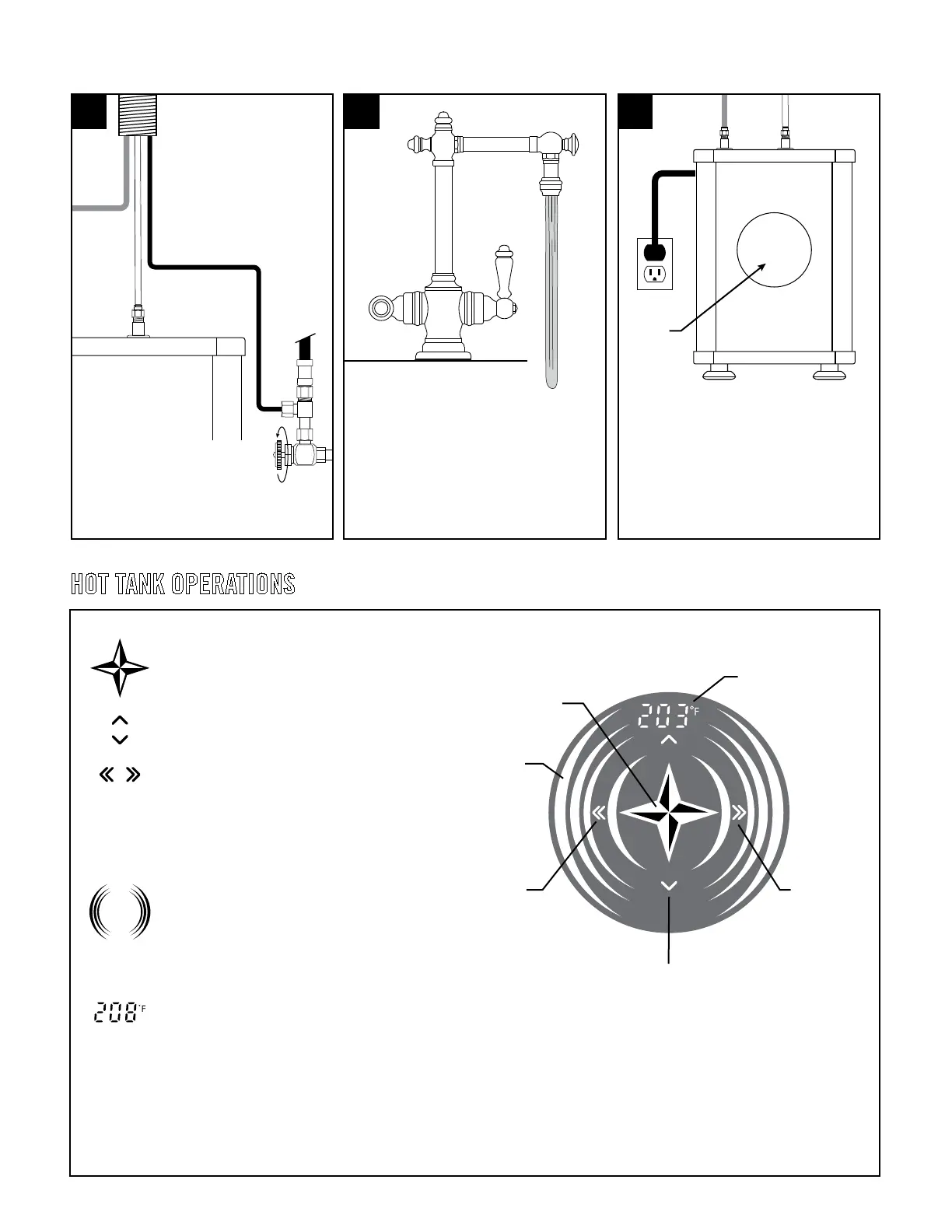
WATER TEMPERATURE
ON/OFF/SET BUTTON
CONTROL PANEL
N
INCREASES
TEMPERATURE
BY ONE DEGREE
DECREASES
TEMPERATURE
BY ONE DEGREE
RED RINGS
Push power button in center to enable unit. Water
temperature number will ash.
Set Hot Tank to desired temperature by pushing
arrow buttons around the center. Hot Tank comes
with six temperature presets: 167F, 176F, 194F,
203F, 206F, and 208F. The single arrows on the
top and bottom control the pre-set temperatures.
Use the double arrow buttons on the left and right
to adjust temperature up or down by one degree.
Once the desired temperature is chosen, push the
center button again to set. Hot Tank will then begin
to heat up and outer red rings will pulsate. Once
unit has reached set water temperature, pulse will
stop and red rings will remain lit.
If the Hot Tank ever becomes empty of water and is
turned ON, an automatic dry-burn protection
sensor will shut down the unit. The display panel will then ash 208°F to indicate lack of water. To ll again, turn power o and
repeat Step 4 in the installation section. Temperatures at or above 203F are the optimal settings for most installations. However,
there are factors which may inuence the performance of the unit such as incoming water temperature, atmospheric pressure and
altitude. Should any water discharge from the spout during heat up, reduce the setting by 1 preset to compensate.
SIX PRE-SET TEMPERATURE SETTINGS:
167F, 176F, 194F, 203F, 206F, and 208F.
4. 5.
HOT TANK OPERATIONS
DO NOT plug in unit until tank is full
of water. Turn on faucet hot water until
water ows freely from faucet. This means
Hot Tank is full. Tank will take about 90
seconds to ll. Turn o faucet and check all
connections for leaks or hose kinks.
Connect 1/4” blue tube (L) to
water supply (M). Turn water
supply back on.
Check that installation area is dry and no
water has spilled. Connect plug to the
power socket. The Hot Tank’s display panel
(N) will light up with the ON/OFF power
button illuminated.


 To Next Page